
Article Categories
- All Categories
-
 Data Structure
-
 Networking
-
 RDBMS
RDBMS
-
 Operating System
-
 Java
Java
-
 MS Excel
-
 iOS
iOS
-
 HTML
HTML
-
 CSS
CSS
-
 Android
-
 Python
-
 C Programming
-
 C++
C++
-
 C#
C#
-
 MongoDB
-
 MySQL
MySQL
-
 Javascript
-
 PHP
PHP
-
 Economics & Finance
Finding and modifying Service File for SAP system in root directory
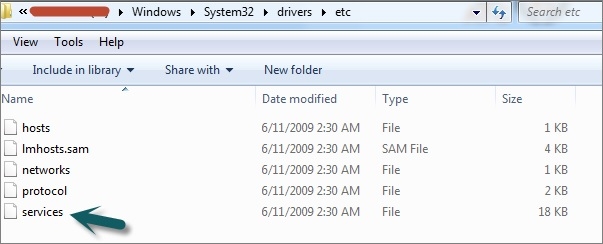
You can find the SAP system service file in %SystemRoot%\system32\drivers\etc where %SystemRoot% is generally your C:\ drive. This file is commonly known as the hosts file or services file, which contains network service definitions and host mappings for SAP system connections.
Modifying the Service File
To modify this file, you can right-click and open this file in Edit mode using Notepad. To perform this operation, you must have Administrator rights in the system, as this file is protected by Windows security settings.
Steps to Edit the File
Follow these steps to safely modify the service file ?
- Navigate to
C:\Windows\System32\drivers\etc - Right-click on the services or hosts file
- Select "Open with" and choose Notepad
- If prompted by User Account Control (UAC), click Yes to allow administrative access
- Make your required changes for SAP system configuration
- Save the file using Ctrl+S
Note: Always create a backup copy of the original file before making any modifications to ensure system recovery if needed.
Conclusion
The SAP service file located in the Windows system directory is essential for network connectivity and service definitions. Proper administrative access and careful editing ensure successful SAP system configuration without compromising system stability.

1K+ Views
