
- JSF Tutorial
- JSF - Home
- JSF - Overview
- JSF - Environment Setup
- JSF - Architecture
- JSF - Life Cycle
- JSF - First Application
- JSF - Managed Beans
- JSF - Page Navigation
- JSF - Basic Tags
- JSF - Facelet Tags
- JSF - Convertor Tags
- JSF - Validator Tags
- JSF - DataTable
- JSF - Composite Components
- JSF - Ajax
- JSF - Event Handling
- JSF - JDBC Integration
- JSF - Spring Integration
- JSF - Expression Language
- JSF - Internationalization
- JSF Useful Resources
- JSF - Quick Guide
- JSF - Useful Resources
- JSF - Discussion
JSF - Application Events
JSF provides system event listeners to perform application specific tasks during JSF application Life Cycle.
| S.No | System Event & Description |
|---|---|
| 1 | PostConstructApplicationEvent Fires when the application starts. Can be used to perform initialization tasks after the application has started. |
| 2 | PreDestroyApplicationEvent Fires when the application is about to shut down. Can be used to perform cleanup tasks before the application is about to shut down. |
| 3 | PreRenderViewEvent Fires before a JSF page is to be displayed. Can be used to authenticate the user and provide restricted access to JSF View. |
System Events can be handled in the following manner.
| S.No | Technique & Description |
|---|---|
| 1 | SystemEventListener Implement SystemEventListener interface and register the system-event-listener class in faces-config.xml |
| 2 | Method Binding Pass the name of the managed bean method in listener attribute of f:event. |
SystemEventListener
Implement SystemEventListener Interface.
public class CustomSystemEventListener implements SystemEventListener {

   @Override
   public void processEvent(SystemEvent event) throws
      AbortProcessingException {

      if(event instanceof PostConstructApplicationEvent) {
         System.out.println("Application Started.
            PostConstructApplicationEvent occurred!");
      }
   }
}
Register custom system event listener for system event in faces-config.xml.
<system-event-listener>
   <system-event-listener-class>
      com.tutorialspoint.test.CustomSystemEventListener
   </system-event-listener-class>

   <system-event-class>
      javax.faces.event.PostConstructApplicationEvent
   </system-event-class>
</system-event-listener>
Method Binding
Define a method
public void handleEvent(ComponentSystemEvent event) {
   data = "Hello World";
}
Use the above method.
<f:event listener = "#{user.handleEvent}" type = "preRenderView" />
Example Application
Let us create a test JSF application to test the system events in JSF.
| Step | Description |
|---|---|
| 1 | Create a project with a name helloworld under a package com.tutorialspoint.test as explained in the JSF - First Application chapter. |
| 2 | Modify UserData.java file as explained below. |
| 3 | Create CustomSystemEventListener.java file under a package com.tutorialspoint.test. Modify it as explained below |
| 4 | Modify home.xhtml as explained below. |
| 5 | Create faces-config.xml in WEB-INF folder.Modify it as explained below. Keep the rest of the files unchanged. |
| 6 | Compile and run the application to make sure the business logic is working as per the requirements. |
| 7 | Finally, build the application in the form of war file and deploy it in Apache Tomcat Webserver. |
| 8 | Launch your web application using appropriate URL as explained below in the last step. |
UserData.java
package com.tutorialspoint.test;

import java.io.Serializable;

import javax.faces.bean.ManagedBean;
import javax.faces.bean.SessionScoped;
import javax.faces.event.ComponentSystemEvent;

@ManagedBean(name = "userData", eager = true)
@SessionScoped
public class UserData implements Serializable {
   private static final long serialVersionUID = 1L;
   private String data = "sample data";

   public void handleEvent(ComponentSystemEvent event) {
      data = "Hello World";
   }

   public String getData() {
      return data;
   }

   public void setData(String data) {
      this.data = data;
   }
}
CustomSystemEventListener.java
package com.tutorialspoint.test;

import javax.faces.application.Application;
import javax.faces.event.AbortProcessingException;
import javax.faces.event.PostConstructApplicationEvent;
import javax.faces.event.PreDestroyApplicationEvent;
import javax.faces.event.SystemEvent;
import javax.faces.event.SystemEventListener;

public class CustomSystemEventListener implements SystemEventListener {

   @Override
   public boolean isListenerForSource(Object value) {

      //only for Application
      return (value instanceof Application);
   }

   @Override
   public void processEvent(SystemEvent event)
      throws AbortProcessingException {

      if(event instanceof PostConstructApplicationEvent) {
         System.out.println("Application Started.
            PostConstructApplicationEvent occurred!");
      }

      if(event instanceof PreDestroyApplicationEvent) {
         System.out.println("PreDestroyApplicationEvent occurred.
            Application is stopping.");
      }
   }
}
home.xhtml
<?xml version = "1.0" encoding = "UTF-8"?>
<!DOCTYPE html PUBLIC "-//W3C//DTD XHTML 1.0 Transitional//EN"
"http://www.w3.org/TR/xhtml1/DTD/xhtml1-transitional.dtd">

<html xmlns = "http://www.w3.org/1999/xhtml"
   xmlns:h = "http://java.sun.com/jsf/html"
   xmlns:f = "http://java.sun.com/jsf/core">

   <h:head>
      <title>JSF tutorial</title>
   </h:head>

   <h:body>
      <h2>Application Events Examples</h2>
      <f:event listener = "#{userData.handleEvent}" type = "preRenderView" />
      #{userData.data}
   </h:body>
</html>
faces-config.xhtml
<?xml version = "1.0" encoding = "UTF-8"?>
<faces-config
   xmlns = "http://java.sun.com/xml/ns/javaee"
   xmlns:xsi = "http://www.w3.org/2001/XMLSchema-instance"
   xsi:schemaLocation = "http://java.sun.com/xml/ns/javaee
   http://java.sun.com/xml/ns/javaee/web-facesconfig_2_0.xsd"
   version = "2.0">

   <application>
      <!-- Application Startup -->
      <system-event-listener>
         <system-event-listener-class>
            com.tutorialspoint.test.CustomSystemEventListener
         </system-event-listener-class>
         <system-event-class>
            javax.faces.event.PostConstructApplicationEvent
         </system-event-class>
      </system-event-listener>

      <!-- Before Application is to shut down -->
      <system-event-listener>
         <system-event-listener-class>
            com.tutorialspoint.test.CustomSystemEventListener
         </system-event-listener-class>
         <system-event-class>
            javax.faces.event.PreDestroyApplicationEvent
         </system-event-class>
      </system-event-listener>
   </application>
</faces-config>
Once you are ready with all the changes done, let us compile and run the application as we did in JSF - First Application chapter. If everything is fine with your application, this will produce the following result.
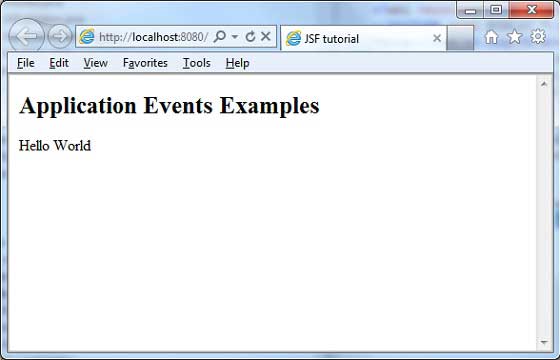
Look into your web-server console output. You will see the following result.
INFO: Deploying web application archive helloworld.war
Dec 6, 2012 8:21:44 AM com.sun.faces.config.ConfigureListener contextInitialized

INFO: Initializing Mojarra 2.1.7 (SNAPSHOT 20120206) for context '/helloworld'
Application Started. PostConstructApplicationEvent occurred!
Dec 6, 2012 8:21:46 AM com.sun.faces.config.ConfigureListener
$WebConfigResourceMonitor$Monitor <init>

INFO: Monitoring jndi:/localhost/helloworld/WEB-INF/faces-config.xml
for modifications
Dec 6, 2012 8:21:46 AM org.apache.coyote.http11.Http11Protocol start

INFO: Starting Coyote HTTP/1.1 on http-8080
Dec 6, 2012 8:21:46 AM org.apache.jk.common.ChannelSocket init
INFO: JK: ajp13 listening on /0.0.0.0:8009

Dec 6, 2012 8:21:46 AM org.apache.jk.server.JkMain start
INFO: Jk running ID = 0 time = 0/24  config = null
Dec 6, 2012 8:21:46 AM org.apache.catalina.startup.Catalina start
INFO: Server startup in 44272 ms
To Continue Learning Please Login