- Swift - Home
- Swift - Overview
- Swift - Environment
- Swift - Basic Syntax
- Swift - Variables
- Swift - Constants
- Swift - Literals
- Swift - Comments
- Swift Operators
- Swift - Operators
- Swift - Arithmetic Operators
- Swift - Comparison Operators
- Swift - Logical Operators
- Swift - Assignment Operators
- Swift - Bitwise Operators
- Swift - Misc Operators
- Swift Advanced Operators
- Swift - Operator Overloading
- Swift - Arithmetic Overflow Operators
- Swift - Identity Operators
- Swift - Range Operators
- Swift Data Types
- Swift - Data Types
- Swift - Integers
- Swift - Floating-Point Numbers
- Swift - Double
- Swift - Boolean
- Swift - Strings
- Swift - Characters
- Swift - Type Aliases
- Swift - Optionals
- Swift - Tuples
- Swift - Assertions and Precondition
- Swift Control Flow
- Swift - Decision Making
- Swift - if statement
- Swift - if...else if...else Statement
- Swift - if-else Statement
- Swift - nested if statements
- Swift - switch statement
- Swift - Loops
- Swift - for in loop
- Swift - While loop
- Swift - repeat...while loop
- Swift - continue statement
- Swift - break statement
- Swift - fall through statement
- Swift Collections
- Swift - Arrays
- Swift - Sets
- Swift - Dictionaries
- Swift Functions
- Swift - Functions
- Swift - Nested Functions
- Swift - Function Overloading
- Swift - Recursion
- Swift - Higher-Order Functions
- Swift Closures
- Swift - Closures
- Swift-Escaping and Non-escaping closure
- Swift - Auto Closures
- Swift OOps
- Swift - Enumerations
- Swift - Structures
- Swift - Classes
- Swift - Properties
- Swift - Methods
- Swift - Subscripts
- Swift - Inheritance
- Swift-Overriding
- Swift - Initialization
- Swift - Deinitialization
- Swift Advanced
- Swift - ARC Overview
- Swift - Optional Chaining
- Swift - Error handling
- Swift - Concurrency
- Swift - Type Casting
- Swift - Nested Types
- Swift - Extensions
- Swift - Protocols
- Swift - Generics
- Swift - Access Control
- Swift - Function vs Method
- Swift - SwiftyJSON
- Swift - Singleton class
- Swift Random Numbers
- Swift Opaque and Boxed Type
- Swift - Compile Online
- Swift - Quick Guide
- Swift - Cheatsheet
- Swift - Useful Resources
- Swift - Discussion
Swift - do...while Loop
Unlike for and while loops, which test the loop condition at the top of the loop, the do...while loop checks its condition at the bottom of the loop.
A do...while loop is similar to a while loop, except that a do...while loop is guaranteed to execute at least once.
Syntax
The syntax of a do...while loop in Swift is −
do {
   statement(s);
}while( condition );
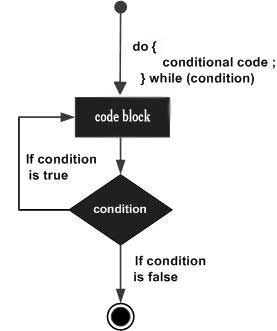
It should be noted that the conditional expression appears at the end of the loop, so the statement(s) in the loop execute once before the condition is tested. If the condition is true, the control flow jumps back up to do, and the statement(s) in the loop execute again. This process repeats until the given condition becomes false.
The number 0, the strings '0' and "", the empty list(), and undef are all false in a Boolean context and all other values are true. Negation of a true value by ! or not returns a special false value.
Flow Diagram
Example
import Cocoa

var index = 10

do {
   println( "Value of index is \(index)")
   index = index + 1
}while index < 20
When the above code is executed, it produces the following result −
Value of index is 10
Value of index is 11
Value of index is 12
Value of index is 13
Value of index is 14
Value of index is 15
Value of index is 16
Value of index is 17
Value of index is 18
Value of index is 19
