
- Python Design Patterns - Home
- Python Design Patterns - Introduction
- Python Design Patterns - Gist
- Model View Controller Pattern
- Python Design Patterns - Singleton
- Python Design Patterns - Factory
- Python Design Patterns - Builder
- Python Design Patterns - Prototype
- Python Design Patterns - Facade
- Python Design Patterns - Command
- Python Design Patterns - Adapter
- Python Design Patterns - Decorator
- Python Design Patterns - Proxy
- Chain of Responsibility Pattern
- Python Design Patterns - Observer
- Python Design Patterns - State
- Python Design Patterns - Strategy
- Python Design Patterns - Template
- Python Design Patterns - Flyweight
- Python Design Patterns - Abstract Factory
- Python Design Patterns - Object Oriented
- Object Oriented Concepts Implementation
- Python Design Patterns - Iterator
- Python Design Patterns - Dictionaries
- Python Design Patterns - Lists Data Structure
- Python Design Patterns - Sets
- Python Design Patterns - Queues
- Python Design Patterns - Strings & Serialization
- Python Design Patterns - Concurrency
- Python Design Patterns - Anti Pattern
- Python Design Patterns - Exception Handling
Python Design Patterns Resources
Selected Reading
Python Design Patterns - Proxy Pattern
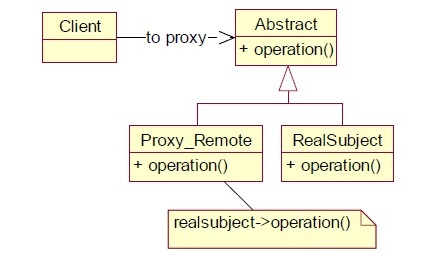
The proxy design pattern includes a new object, which is called Proxy in place of an existing object which is called the Real Subject. The proxy object created of the real subject must be on the same interface in such a way that the client should not get any idea that proxy is used in place of the real object. Requests generated by the client to the proxy are passed through the real subject.
The UML representation of proxy pattern is as follows −
Example - How to implement the proxy pattern?
Let us now see how to implement the proxy pattern.
main.py
class Image:
   def __init__( self, filename ):
      self._filename = filename

   def load_image_from_disk( self ):
      print("loading " + self._filename )

   def display_image( self ):
      print("display " + self._filename)

class Proxy:
   def __init__( self, subject ):
      self._subject = subject
      self._proxystate = None

class ProxyImage( Proxy ):
   def display_image( self ):
      if self._proxystate == None:
         self._subject.load_image_from_disk()
         self._proxystate = 1
      print("display " + self._subject._filename )

proxy_image1 = ProxyImage ( Image("HiRes_10Mb_Photo1") )
proxy_image2 = ProxyImage ( Image("HiRes_10Mb_Photo2") )

proxy_image1.display_image() # loading necessary
proxy_image1.display_image() # loading unnecessary
proxy_image2.display_image() # loading necessary
proxy_image2.display_image() # loading unnecessary
proxy_image1.display_image() # loading unnecessary
Output
The above program generates the following output −
loading HiRes_10Mb_Photo1
display HiRes_10Mb_Photo1
display HiRes_10Mb_Photo1
loading HiRes_10Mb_Photo2
display HiRes_10Mb_Photo2
display HiRes_10Mb_Photo2
display HiRes_10Mb_Photo1
The proxy pattern design helps in replicating the images that we created. The display_image() function helps to check if the values are getting printed in the command prompt.

Advertisements