
- Less - Nested Rules
- Less - Nested Directives and Bubbling
- Less - Operations
- Less - Escaping
- Less - Functions
- Less - Namespaces and Accessors
- Less - Scope
- Less - Comments
- Less - Importing
- Less - Variables
- Less - Extend
- Less - Mixins
- Less - Parametric Mixins
- Less - Mixins as Functions
- Less - Passing Rulesets to Mixins
- Less - Import Directives
- Less - Import Options
- Less - Mixin Guards
- Less - CSS Guards
- Less - Loops
- Less - Merge
- Less - Parent Selectors
- Functions
- Less - Misc Functions
- Less - String Functions
- Less - List Functions
- Less - Math Functions
- Less - Type Functions
- Less - Color Defination Functions
- Less - Color Channel Functions
- Less - Color Operation
- Less - Color Blending Functions
- Usage
- Less - Command Line Usage
- Using Less In The Browser
- Less - Browser support
- Less - Plugins
- Less - Programmatic Usage
- Less - Online Compilers
- Less - GUIs
- Less - Editors and Plugins
- Less - Third Party Compilers
- Less - Frameworks
- Less Useful Resources
- Less - Quick Guide
- Less - Cheatsheet
- Less - Useful Resources
- Less - Discussion
Selected Reading
LESS - Color Blending Average Function
Description
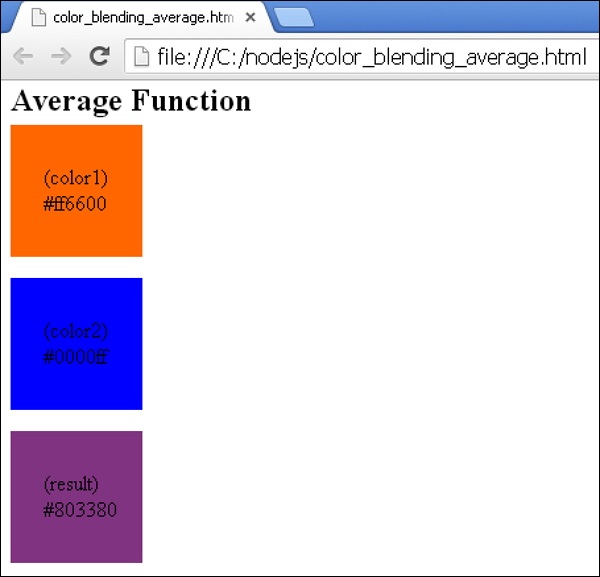
The average function computes the average of two input colors on a per-channel (RGB) basis.
Parameters
color1 − A color object.
color2 − A color object.
Returns
color
Example
The following example demonstrates the use of average function in the LESS file −
<html>
   <head>
      <link rel = "stylesheet" href = "style.css" type = "text/css" />
   </head>

   <body>
      <h2>Average Function</h2>
      <div class = "color1">
         <p>(color1) <br> #ff6600</p>
      </div><br>

      <div class = "color2">
         <p>(color2) <br> #0000ff</p>
      </div><br>

      <div class = "res">
         <p>(result) <br> #803380</p>
      </div>
   </body>
</html>
Next, create the style.less file.
style.less
.color1 {
   width: 100px;
   height: 100px;
   background-color: #ff6600;
}

.color2 {
   width: 100px;
   height: 100px;
   background-color: #0000ff;
}

.res {
   width: 100px;
   height: 100px;
   background-color: average(#ff6600, #0000ff);
}

p {
   padding: 30px 0px 0px 25px;
}
You can compile the style.less to style.css by using the following command −
lessc style.less style.css
Execute the above command; it will create the style.css file automatically with the following code −
style.css
.color1 {
   width: 100px;
   height: 100px;
   background-color: #ff6600;
}

.color2 {
   width: 100px;
   height: 100px;
   background-color: #0000ff;
}

.result {
   width: 100px;
   height: 100px;
   background-color: #803380;
}

p {
   padding: 30px 0px 0px 25px;
}
Output
Follow these steps to see how the above code works −
Save above code in color_blending_average.html file.
Open this HTML file in a browser, the following output will get displayed.
less_color_blending_functions.htm

Advertisements