
Article Categories
- All Categories
-
 Data Structure
-
 Networking
-
 RDBMS
RDBMS
-
 Operating System
-
 Java
Java
-
 MS Excel
-
 iOS
iOS
-
 HTML
HTML
-
 CSS
CSS
-
 Android
-
 Python
-
 C Programming
-
 C++
C++
-
 C#
C#
-
 MongoDB
-
 MySQL
MySQL
-
 Javascript
-
 PHP
PHP
-
 Economics & Finance
Selected Reading
How can I verify Error Message on a webpage using Selenium Webdriver?
We can verify error messages on a webpage using Selenium webdriver using the Assertion. In case, the actual and expected values do not match, an Assertion Error is thrown.
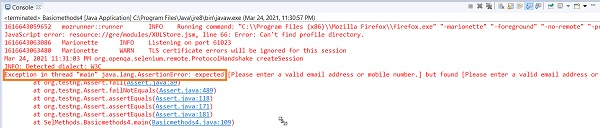
Let us try to verify the highlighted error message.
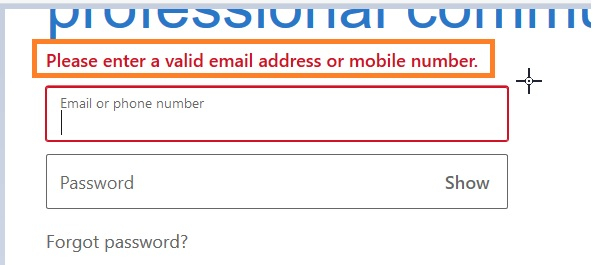
Example
import org.openqa.selenium.By;
import org.openqa.selenium.WebDriver;
import org.openqa.selenium.WebElement;
import org.openqa.selenium.firefox.FirefoxDriver;
import java.util.concurrent.TimeUnit;
import org.testng.Assert;
public class VerifyErrorMsg{
   public static void main(String[] args) {
      System.setProperty("webdriver.gecko.driver",
         "C:\Users\ghs6kor\Desktop\Java\geckodriver.exe");
      WebDriver driver = new FirefoxDriver();
      //implicit wait
      driver.manage().timeouts().implicitlyWait(5, TimeUnit.SECONDS);
      //URL launch
      driver.get("https://www.linkedin.com/");
      // identify element
      WebElement l = driver.findElement(By.id("session_key"));
      l.sendKeys("abc");
      WebElement t = driver.findElement(By.className("sign-in-form__submit-button"));
      t.click();
      //expected error text
      String exp = "Please enter a valid email address or mobile number.";
      //identify actual error message
      WebElement m = driver.findElement(By.className("alert-content"));
      String act = m.getText();
      System.out.println("Error message is: "+ act);
      //verify error message with Assertion
      Assert.assertEquals(exp, act);
      driver.quit();
   }
}
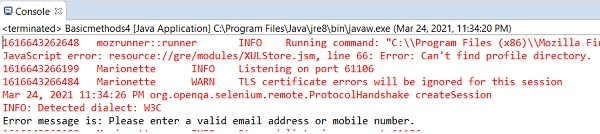
Output

Updated on: 2021-04-07T09:01:10+05:30
9K+ Views

Advertisements