
Article Categories
- All Categories
-
 Data Structure
-
 Networking
-
 RDBMS
RDBMS
-
 Operating System
-
 Java
Java
-
 MS Excel
-
 iOS
iOS
-
 HTML
HTML
-
 CSS
CSS
-
 Android
-
 Python
-
 C Programming
-
 C++
C++
-
 C#
C#
-
 MongoDB
-
 MySQL
MySQL
-
 Javascript
-
 PHP
PHP
-
 Economics & Finance
Selected Reading
What is Selenium Internet Explorer Driver or IE Driver?
Selenium Internet Explorer Driver is used to execute test cases in the Internet Explorer browser. It is a standalone server that establishes a link between our Selenium test and the Internet Explorer browser.
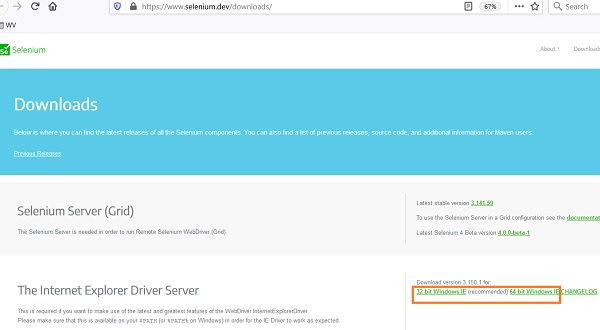
We can download the Internet Explorer Driver file from the below link − https://www.selenium.dev/downloads/
Select and click on the download link which is compatible with our local operating system. As the download is done successfully, a zip file gets created. We have to unzip it and save the executable file - IEDriverServer.exe in a location.
Next, we shall set the path of the IEDriverServer.exe file using the System.setProperty method. We have to create an object of the InternetExplorerDriver.
Syntax
System.setProperty("webdriver.ie.driver",
"C:\Users\ghs6kor\Desktop\Java\IEDriverServer.exe");
WebDriver driver = new InternetExplorerDriver();
Example
import org.openqa.selenium.WebDriver;
import org.openqa.selenium.ie.InternetExplorerDriver;
import org.openqa.selenium.Capabilities;
import org.openqa.selenium.remote.RemoteWebDriver;
public class BrwIEDriver{
   public static void main(String[] args) {
      //configure path of IEDriverServer.exe path
      System.setProperty("webdriver.ie.driver",
         "C:\Users\ghs6kor\Desktop\Java\ IEDriverServer.exe");
      //object of InternetExplorerDriver
      WebDriver driver = new InternetExplorerDriver();
      //URL launch
      driver.get("https://www.tutorialspoint.com/index.htm")
      Capabilities cap = ((RemoteWebDriver) driver).getCapabilities();
      System.out.println("Browser name is: " + cap.getBrowserName());
      System.out.println("Browser version is: " + cap.getVersion());
      //browser close
      driver.close();
   }
}
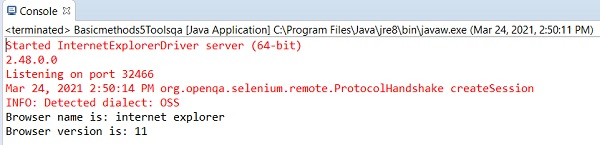
Output

Updated on: 2021-04-07T08:51:46+05:30
651 Views

Advertisements