- Vibe Coding - Home
- Vibe Coding - Overview
- Vibe Coding - Process
- Vibe Coding vs Traditional Programming
- Vibe Coding - Effective Prompts
- Vibe Coding - Product Requirement and Design
- Vibe Coding - Vibe Coding Tools
- Vibe Coding - Google AI Studio
- Vibe Coding - Firebase Studio
- Vibe Coding - Gemini Code Assist
- Vibe Coding - Claude AI
- Vibe Coding - Copilot
- Vibe Coding - Replit
- Vibe Coding - Pitfalls and Solutions
- Vibe Coding - Creating a Sample Project
Vibe Coding Useful Resources
Vibe Coding - Quick Guide
Vibe Coding - Overview
Vibe Coding is the latest and highly innovating practice in software development by leveraging the AI to generate functional code. Generative AI tools are Large Language Models trainned on vast amount of data and can understand and generate natural language as well as programming language constructs. Vibe Coding leverage Generative AI tools to create code. This term was originally coined by OpenAI co-founder Andrej Karpathy in Feb 2025 in his X post where he describes software development workflow to shift from line to line development to guiding a Generative AI to generate source code, refine it further and debug it using conversational process.
As per Andrej post −
There's a new kind of coding I call "vibe coding", where you fully give in to the vibes, embrace exponentials, and forget that the code even exists. It's possible because the LLMs (e.g. Cursor Composer w Sonnet) are getting too good... The code grows beyond my usual comprehension, I'd have to really read through it for a while. Sometimes the LLMs can't fix a bug so I just work around it or ask for random changes until it goes away... It's not too bad for throwaway weekend projects, but still quite amusing.
Even before Andrej coining this term, developers were using LLMs like ChatGPT, Copilot etc to assist in coding.
Primary goal of the vibe coding is to quickly spin up working code and to add new features. In traditional coding, developers are to write each code line by line; in vibe coding, developers provides instructions to LLM to produce a working code.
Types of Vibe Coding
Vibe coding can be classified broading into two types −
Pure Vibe Coding &minus In pure vibe coding, user trusts Generative AI completely to deliver the output. This is ideal for rapid prototyping where a developer can give demo of intented product to client or owners while generating the prototype within seconds. Other use case is of speed and turn around time.
AI Assisted Coding &minus This is more responsible and practical approact while using AI to assist in application development. In AI assisted coding, a developer uses a LLM as a pair programmer. A developers provides prompts to AI to generate code, and then take full responsibility of the generated code by testing, reviewing and understanding the code completely.
Advantages of Vibe Coding
Following are the advantages of following vibe coding −
Fully functional code can be developed using natural language prompts.
Accelerated development as most of boiler plate coding part is handled by LLM.
A very little or no coding experience required to follow vibe coding.
Developers can focus on bigger picture or on mail goal of the app or application.
App building becomes much easier and AI handles most of the intricacies.
Use Cases for Non-Programmers
Vibe coding allows non-programmers to create applications or apps without any prior knowledge of any programming language. They can quickly create a prototype of what they are thinking of by simply giving instruction to an LLM tool. This approach is very useful for project managers who wants to showcase a prototype, general public who want to automate their day to day activities or small scale business owners. Consider the following use cases −
Marketing/sales executives can create an app to demonstrate the vision of the product/service they are looking to promote. They can specify the features to generative AI in plain natural lanaguage and generative AI will create a working prototype for them to display to their customers. Once prototype is approved, same can be handed over the development team to own the code and prepare a production ready software.
A teacher can create a online tuition portal by mentioning the subjects and AI will create a portal for given subjects with progress tracking mechanism, AI powered chat options and many other features as mentioned to it in conversational feedbacks.
Data Scientists/Engineer can envision their data analysis by asking LLM tools to create a prototype and then test using given data sets.
Use Cases for Programmers
For programmers, vibe coding can prove to be a blessing as they need not to focus on boilerplate codes or to write code functionality line by line. They can focus on main functionalities instead of low level implementations. Consider the following use cases for more clarifications −
Rapid Prototyping − Developers can use vibe coding to create prototypes or POCs (Proof of Concepts) quickly to demonstrate feasibility of the required functionalities. The initial code generated by AI tool once approved can be refined further by AI itself or by developers, reviewers. This approach speeds up development process especially in complex scenarios.
Integrate New Features Quickly − Using vibe coding, new features can be quickly by asking AI to add a feature in plain natural language. This features enhances productivity to next levels as developers are not required to write much of boilerplate code and many business scenarios are already implemented by AI.
Refactoring Code − Vibe Coding can refactor existing codebases as well. AI tools can analyze the code and suggests code improvements which reduces the efforts of developers to review and rewrite large portions of the code.
Vibe Coding - Process
Vibe coding can be used to refine code at low level defined as Code Level Workflow. Or it can be used to build and deploy a fully functional application as High level Life Cycle workflow.
Code Level Workflow
Code level refining is a conversational loop where a developer discusses with LLM to create and get a specific code or functionality.
Define Goal − Give a prompt in natural language. For example - "Create a Python Function to read a CSV file".
AI Generates the code − The Generative AI will interpret the prompt, and produces an initial code.
Test the code − Developer tests and verify the code to working as expected for required scenarios.
Give Feedback to refine code − If output is not as expected or error occured during execution, ask AI to refine code further by stating "Code works but add error handling code when file is not found".
Repeat − Repeat above steps of defining, generating, testing and then refining until all required scenarios are covered.
Application Level Workflow
Code level refining is a conversational loop where a developer discusses with LLM to create and get a specific code or functionality.
Idea − Give a prompt to describe an entire application in a single statement. For example - "Create an online store for agricultural products".
AI Generates the code − The Generative AI will interpret the prompt, and produce an initial version of the complete application which includes UI, backend logic, files etc.
Testing and Refinement − Developer tests the application and using follow up prompts to add new features, or update the existing features.
Validation − Once an initial draft version is ready, business expert like tester or product owner reviews the application for quality, security and correctness of the application.
Deployment − Once changes are finalized, most tools using LLM provides a single click deploment on cloud platform to deploy the code.
Vibe Coding for Business Driven Scenarios
Apart from application development, Vibe coding can be used in specialized business scenarios.
Migration − Applications can be converted from one programming to another programming language. For example, migrate code written in react to vue.js without impacting functionalities.
Cross Platform Support − Existing codebase can be analyzed by AI to get the areas which are to be improved to work across multiple platforms seemlessly.
Automated Documentation − AI can generate functions descriptions, API Docs and usage examples extensively.
Comments − AI can add meaningful inline comments to the code to increase maintainability.
Wikis − AI can be asked to create knowlegde bases, wikis, environment setup instructions and resourcs for troubleshooting.
Vibe Coding for Quality Assurance
Quality Assurance and continous improvement of code are critical part of any software developmet process. Vibe Coding can assists in multiple ways as shown below −
Automated Reviews − AI can analyze and debugs issues in code quickly, check security vulnerabilities and figure out performance bottlenecks.
Follow Best Practices − AI can ensure that the code is following the best coding standards, design patterns and any architectural concerned mentioned.
Refactoring Code − AI can refactor code without impact the functionality.
Traditional Programming vs Vibe Coding
In traditional coding/programming a developers focus on language requirements like keywords, punctuations, writing special constructs where as in Vibe coding, a developer is to use a natural language prompt like "Create a login Form" and AI automatically generates all the required code.
Difference between Traditional Coding and Vibe Coding
Following are some of the notable differences between Traditional Coding and Vibe Coding−
| Sr.No. | Feature | Traditional Coding | Vibe Coding |
|---|---|---|---|
| 1 | Code Generation | Manual process, developer to write line by line in programming language. | AI generates code based on prompts provided in natural language. |
| 2 | Roles | Developer, Architect, Debugger | Prompter, Tester, Refiner, Guide |
| 3 | Coding Expertise | Very High, knowledge of programming language and its syntax is must. | Optional, Nice to have knowledge of underlying programing language generated by AI to increase maintainablity. |
| 4 | Input | Code in particular programming language. | Prompts in natural language and feedback prompts. |
| 5 | Time taken in Development | Being manual and methodical, traditional programming is slow. | Vibe Coding uses AI making it very fast, especially for prototyping tasks. |
| 6 | Error Handling/ Debugging | Manual debugging is tedious and time consuming. Code needs to be understood comprehensively. | In Vibe Coding, code can be refined using a conversational feedback to AI. |
| 7 | Learning Curve | Learning a new programming language is often steep and time consuming. | In Vibe Coding, no such barrier to learn a new language. Working with LLM tools is very easy for beginners as well. |
| 8 | Maintainablity | Code is maintainable if designed and developed carefully by skilled developer and using set processes. | Maintainablity depends upon AI output and review feedbacks. |
Vibe Coding - Effective Prompts
A prompt is an instruction to LLM or Generative AI in natural language. A prompt can be used to ask a question to the AI, or place a request to do some task.
Example of Prompts
Following are few examples of prompts
Prompt as a Question
How to create a submit button on a form?
Prompt as a Request
Create a blue button that opens a dialog box when clicked.
Prompt as a Task
Create a Product Page showing details of Shoes with option to add item to the cart. Product title, image, description and price should come from a json file.
Creating Effective Prompts
Set Context
For a prompt to work perfectly, we should create a broad context first and then give specific instructions to the AI. Consider the following case.
Write a function to compute prime numbers.
Input should be integer and function should return true or false if input is prime or not.
In case input is not integer, throw an error.
Break bigger complex tasks to simpler tasks.
This way we can manage a large task and maintain as development progresses. Consider the following case of creating a search word puzzle.
Create a function which can generate a grid of 10 by 10 letters.
Create a function to search words in grid of letter using a work list given in json file.
Write the function to use above functions to generate grid of 10 by 10 words with 10 random words to search.
Avoid Ambigous statements
Ambigous and vague terms are poor prompts as they can lead to multiple responses. It is always better to refer what we want AI to. For example instead of saying −
Fix the error.
We can say
Fix the email validation error in email input field.
Maintain Conversational History
Generative AI maintains a conversational history to maintain the context of the development. So it is always best to utilize this feature.
Create a fresh thread for new functionality or project.
Remove any irreleveant request or discared response to avoid confusion in next responses.
Conversation should be focused on one functionality at a time instead of mixing all functionalities in a single conversation.
Strategies to improve AI responses
If AI responses are not aligned then we can deploy following strategies to improve AI suggestions.
Refine the Search
Add specific requirements.
Examples of sample input and output can be added in the prompt.
Specify the programming language or framework the code is to be produced in.
Ask for modifications
Ask AI to modify previous response. For example −
Improve previous function with error handling.
Simplify the code generated.
Add type checks to the code.
Build in Incremental Order
Ask AI to start with basic version and then
Ask for enhancements.
Add features one by one instead of specifying all features in single prompt.
Test each feature added in iterative way and then proceed further to next feature.
Vibe Coding - Product Requirement and Design
Proper product design or product planning is a key to build a successful software. In traditional programming, a careful planning is done by business analysts in conjunction with business owners resulting in formal requirements and wireframes. Having a well define product requirements ensures a smooth development process. In vibe coding, we can even define product requirements and product design with the help of AI.
We give instructions to generative AI in plain natural language and AI generates the document with product requirements and wireframes.
Creating a Product Vision
In order to make an effective use of AI in Vibe Coding, we should first create a product vision using AI collaboration. We can ask AI, series of related questions to define our application's purpose and use cases.
Example - Agricultural Parts Store
We can begin the conversation with the generative AI by describing the idea and series of questions as shown below −
Problem Identification − Ask AI the requirement in plain language. Describe the end purpose and target users. For example - "To create a online store for spare parts used in agricultural field."
Target Users − Mention the end user needs, and their technical abilities. It helps to decide the scope of the product. For example - "Application should work in low network bandwidth areas as farmers works in fields. User interface should have images of the spare parts."
Platforms − Mention the target platforms for the application. For example - "Code should work on mobile devices as well on laptops web browsers."
Scope of Features − Ask AI for core features to be included in initial product offering. Ask features which can be added later. For example - "A prototype with parts search. Payments module can be added later."
Technology Stack − Mention the programming language, frameworks and any tools. For example - "Application should be developed using Node and React".
Data Requirements − Decide what data to persist, process and to be displayed. For example - "Parts name, title, description and image should be displayed."
Security Constraints − Ensure that privacy, security concerns are addressed. Compliance issues to be checked. For example - "Prototype is not required to handle sensitive information, so minimal security constraints are fine.".
Creating a Product Requirement Document
Product Requirement Document, PRD is a very important artifact in a software development life cycle. It acts as a blue prints for both developers and as well AI tool. PRD is also shared with share holders to validate the requirements.
Next goal in Vibe coding is to transform our Product Vision into a Product Requirement Document with the help of AI. We can ask AI to create a PRD after sharing the product vision and ask following sections to be prepared −
Product summary − Summarize the App and target goal of the App.
Target audience − In this section, mention the end users.
Core features − List core functionalities to be developed as part of MVP, Minimum Viable Product.
UI descriptions − Describe Layout and design fields for each navigable screen.
Navigation − Describe navigation ways, like breadcrumb, top menus or side menus.
Sample data − A sample data to mention the format and target products to be shown.
Technical requirements − Mention frameworks, programming languages to be used. For example - Node, react etc.
Styling − Look and Feel of the application, Responsive layout etc.
Use cases −User work flows, interactions.
Out-of-scope − Excluded features
Once PRD is created, we can organize features in following three categories.
Must-have − Core features to be developed as part of initial product offering.
Should-have − Features which enhances user experience but can be added later.
Could-have − Optional features which can be added as product matures.
Example User flow
Entry → List Products → Show Product Details → Add to Cart → Review Cart → Checkout → Confirmation
A PRD should have wireframes and user flow diagrams which makes it easier to comprehend and communicate the requirements. We can ask AI tools to create wireframes, user flow diagrams and interface specifications.
Define Coding Standards and Guidelines
We can ask AI Tools to define coding standards to ensure quality and consistency in code generated by AI.
Code style − Naming conventions, code formatting styles, documentation, comments style.
Security − Validations, authorization, authentication, and data protection.
Testing − Unit testing, integration testing, test coverage etc..
Performance − Option to do Load handling,to test response times for peak loads
Accessibility − Inclusive design.
Example Prompt
Suggest coding standards for a responsive web app built with React. Include Formatting, testing, load and performance guidelines.
Vibe Coding - Tools
Various companies provides tools for vibe coding. Most popular one are by Google, Microsoft, OpenAI and many more. In this section, we're discussing the tools provided by Google under its Cloud Offering.
Google AI Studio − Ideal for creating a prototype. For example, Open Google AI studio and mention in prompt to create an online tuition classes for mathematics for class 12th for CBSE students. Google AI Studio will process the request and create a prototype website. Being prototype, backend is generally not available. Support is available to deploy the website over cloud and share with stakeholders. You can even download the source code and run locally.
Firebase Studio − Ideal for creating a full stack application having firebase as backend. For example, Open Firebase Studio and mention in prompt to create an online store for agricultural spare parts.
Gemini Code Assist − Ideal for developers/ data scientist who want to write a script or particular code snippet.
Difference between Various Tools
Following are some of the notable differences between above tools−
| Sr.No. | Tool | Start | Skill(s) Required | Feature |
|---|---|---|---|---|
| 1 | Google AI Studio | Any idea which you need to showcase | No coding experience needed. | Generates prototype for a single prompt. Provides option to deploy in one click. One of the fastest tool to bring an idea to sharable prototype application. |
| 2 | Firebase Studio | To Create a Full Stack Application | Some coding experience especially to customize the application code generated. | Generates full stack application with firebase as backend. Database, user authentication, networking can be added easily. |
| 3 | Gemini Code Assist | To Update an existing project or file | Proficient, professional coding experts | Provides in-editor assistance. Integrates well with existing IDEs. Generates code, provides explanation and even can test the code within the IDE. |
Vibe Coding - Using Google AI Studio
Using Google AI studio is very easy. It is ideal for prototyping where we want to visualize our creative idea quickly and share it with stakeholders in a visually appealing manner. Google AI studio starts with a single prompt and creates a live app within seconds.
Step 1: Describe what you want in the application
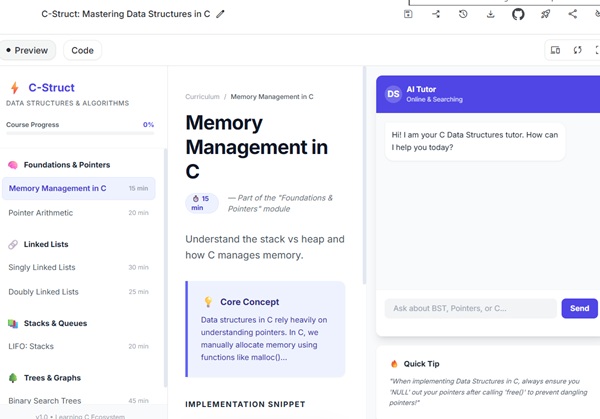
Open Google AI studio and in main text field, enter the idea and click on build button. Once you run the prompt, Gemini, the generative AI of Googles starts working, showing you the progress of the application code being generated. Once code is generated, it shows the preview of the application in the right side.
For example, set following prompt −
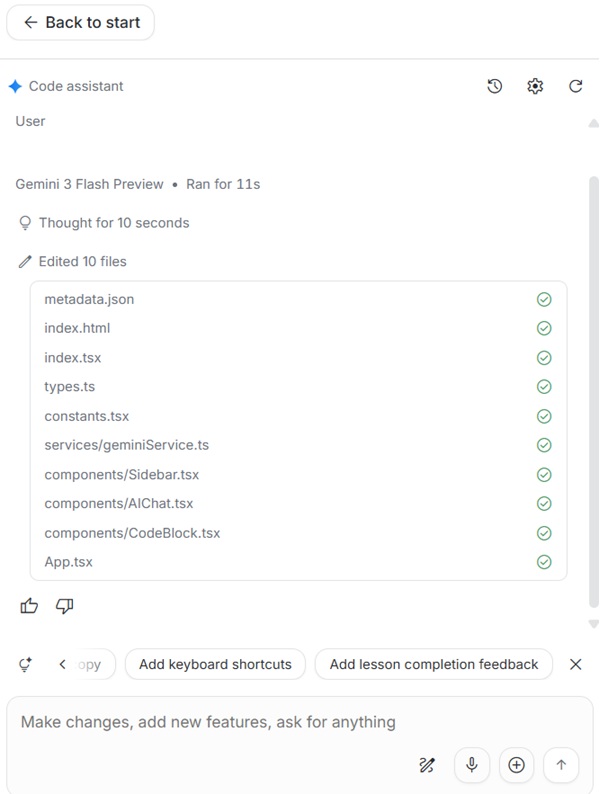
Create an online class website for data structures in C.
Step 2: Refine App
Once app is available for live preview, use the chat interface to improve further. Gemini suggests many quick enhancements as well under chat interface. You can add features, new visuals and much more.
For example, set following prompt −
Use a light green background and titles should be black.
In our case, Gemini provided many useful suggestions like - Add interactive visualizations, add quizes per lesson, improve code copy block, add keyboard shortcut, add lesson completion feedback.
Step 3: Deploy App
Once prototype is ready, you can deploy app over cloud in single click. You can even share the source code link with other developers. Code can be downloaded and run locally as well.
Vibe Coding - Using Firebase Studio
Firebase Studio is a very useful where we want a full fledged production ready application. We can use Firebase as backend, database as well as user authentication modules.
Step 1: Describe complete application in prompt
Open Firebase studio, enter a prompt describing the application. You can mention multiple pages in the beginning itself.
For example, set following prompt −
Create a simple online idea sharing portal. It should authenticate user so that employees can register and login. Once logged-in, employees will log their idea with title, detailed description and benefits of the idea. All submitted ideas should be available on the home page of the portal.
Step 2: Refine App blueprint
Once we submits the prompt, firebase studio generates the app blueprint for review purpose with details of the feature outlines, styles and technology stack to be used by AI. At this moment, we can refine the blueprint by providing feedback to ensure that end product meets our requirement.
For example, set following prompt −
Add review and rating options to the idea section.
Step 3:Generate prototype
Once prototype is ready, you can click "Prototype this App" Button. Now Firebase Studio starts processing and a working prototype is generated. Once processing is complete, you can see the interactive preview of your app.
Step 4: Editing live prototype
In Conversation Panel, we can ask AI to make changes to interactive prototype. For example, ask for visual updates, add new feature, remove a feature etc.
For example, set following prompt −
Make rating button functional. Add a favourite icon to the idea. Creates a new page -'My Favorites' to show selected ideas.
Step 5: Deploy the App
Firebase Studio utilize Cloud Run to deploy the prototype over cloud in a single click flow. As application is built targeting the production, it is scalable and can handle traffic from day one.
Vibe Coding - Using Gemini Code Assist
Gemini Code Assist is a very useful tool for developers. It can be directly integrated with existing IDEs like VS Code, JetBrains etc. Once installed, developer can use Gemini Code Assist as a pair programmer. Gemini Code Assist helps developers to work faster in their existing project within same IDE.
Step 1: Generating Code within Existing File
Open an existing project. Open a file and in Gemini Chat Window, mention the function or code you want to write. Gemini AI will create the required code and insert the same in the existing code.
For example, set following prompt −
Write a Java function to read a CSV file and get a list of values from email column.
Step 2: Refine Existing Code
Gemini Code Assist can improve existing code to great extent. Just highlight the code you want to improve and use follow-up prompts to improve the code. For example, add error handling, improve performance, or refactor the code.
For example, set following prompt −
Add an optional parameter filter, to get filtered values of particular domain from email column . Add error handling code if file is not readable.
Step 3:Generate Unit Tests
Writing unit test cases is often the most time consuming activity of developers. Gemini Code Assist can create unit test cases as well within seconds after analyzing the code. It ensures that code is production ready.
Write Unit test cases of above function using JUnit. One test for successfully read of all emails, one which filters the emails of particular domain and one for file permission not present.
Vibe Coding - Using Claude AI
Claude AI is an intelligent tool for developers. It is built on advanced models like sonnet 3.5/4.5 and is ideal for complex, multi-file projects. It can read, write or edit code directly within the IDE or terminal. It supports Python and JavaScript editing. It can execute bash commands, can handle git workflows, and have a 'Plan Mode' for complex tasks.
Options in Using Claude AI
Claude AI comes in various forms to help developers. Following is the list of options −
Claude Code
Claude Code is a terminal based or CLI based tool. It can acts as an autonomous AI agent which can be used to read project file to understand requirements, code, run the terminal commands and it can be used to make edit in real time just by asking.
Visual Studio Code Extension
Claude AI is available as VS Code extn, once installed, it can be used within code editor for differnces, chatting, file navigation.
Web Interface
Claude AI web interface, provides an excellent interface with preview capabilities, code navigation using side panel and testing capabilities.
Desktop App
Claude AI is available as a dedicated GUI based desktop application for all major operating systems.
@ Mentions
We can use @ mentions to refer to particular file or folder which gives Claude a better context to generate code or debug the code.
Best Practices while working with Claude AI
In order to make best use of Claude AI, use following best practices −
Use 'Plan Mode' − In Plan Mode, Claude AI creates a blueprint for complex tasks and improves generated code and makes debugging easier.
Use Incremental Steps − Ask for smaller tasks implementations instead of big task to get a maintainable code.
Commit Code − Claude AI can commit and push code in GIT. So commit code often once a feature is ready or fixed.
Start Fresh Conversation for new feature − Once a feature is done, clear the chat to clean the context and start a fresh context for new feature.
Debugging − You can paste error message directly into chat window and let Claude AI fix and debug the issue for you.
Vibe Coding - Using Copilot
Copilot is a genearative AI agent developed and maintained by Microsoft actively. It is very useful im vibe coding as it acts as pair programmer. It can provide code suggestions in realtime, can genearate code snippet based on natural language conversations. It can even write documentation and unit test cases. Copilot can be directly integrated with Visual Studio Code as well as in Visual Studio IDE. Copilot is also known Github Copilot.
Key Featues of Copilot
Code Generation − Copilot can genearate code based on natural language conversations. It can even complete the code, provide suggestions, can generate multi-file featuers based on existing code features.
Debugging − You can paste error blocks directly in Copilot chat window to ask for fix for logical errors. You can ask for security issues or performance improvements in the code.
Code Comments, Documentation − Copilot can analyze existing code and generate corresponding explanations which helps greatly in understanding new code bases. Copilot can generate documentations automatically.
Unit Testing − Copilot can genearate unit test cases and can conduct tests for developers improving test coverage and overall code quality.
Code Review − Copilot agent can be trained easily with custom code standard and practices and then it can review the code bases so that code adheres to project standards. It can provide suggestions/ feedbacks on the code without modifying it after code review.
Installing Copilot
GitHub Copilot is to be enabled as an extension in the IDE.
Take a Subscription − Copilot comes in various subscriptions ranging from free to pro+ versions. Visit https://github.com/features/copilot/plans for more details.
Install Compatible IDE − Download and Install Visual Studio Code or Visual Studio or any other IDE supporting Github Copilot.
Install and Enable Extension − Search, install and enable the copilot as extension.
Sign-in and Start Vibe Coding − Sign-in to the copilot and start vibe coding having Copilot as your pair programmer.
Best Practices
GitHub Copilot should be used as Code Assist AI. Following are the best practices to be used while using Github Copilot.
Always review generated code − Never promote the geneated code to the production before reviewing and understanding code. As a developer, you should own the code and understand it fully so that later if changes are to be made, you can maintain it easily. Have an eye for security issues as well.
Avoid ambigous prompt − Prompts should be clear and specific to generate a clean code. The more specific the prompt, better the generated code will be. Always state the goal clearly to set the context.
Use AI as a tool, not as replacement − Copilot should be treated as a learning partner instead of a programmer. It is always preferred to understand the AI generated code oneself.
Custom Instructions − Create copilot-instructions.md file to configure project specific coding standards, practices to get more aligned, relevant code suggestions. This way we can train copilot as per custom needs.
Vibe Coding - Using Replit
Replit is one of the prominent Vibe Coding Advocate thanks to its Replit Agent. Replit is famous for creating the Apps on the go with just one prompt. Replit Agent handles all the environment setup details, packaging and deployment of the app.
Think → Prompt → Test
Replit believes in iterative development process.
Scaffhold Prompt − Start with a high level vision. For example
Prepare a workout training routine. Use light theme with gray accents. You SQL database for persistence.
Refining − Replit Agent will ask relative question to refine the prompt. For example - can a user upload a photo of progress? Answering such questions will set up the vibe.
Run and Test App − Now Replit Agent will create the App which you can test and run immidiately. In case some thing is not correct, ask the agent to update the code. For example −
Save button is too small. Please fix.
Key Features of Replit
Replit provides free to enterprise versions. Available feature varies as per the pricings. Replit Agent include various tools like −
Checkpoints − Replit allows to revert back changes using the concept of checkpoints. It is a feature, where we can save progress and rollback to checkpoint to earlier development if something is not correct or not as per expectation.
Replit Database, Authentication Replit provides inbuilt database and authentication modules. We are not required to configure database like PostgreSql or OAuth. Simply asking that 'Add a login page' is sufficient to add authentication module to the app.
No DevOps Replit provides deploy button for single click deployment. Replit provides Cloud hosting, SSL and domains all at one place.
Vibe Coding - Pitfalls and Solutions
Vibe Coding makes development extremely fast as AI is doing most of the coding and other activities. But this speed also introduces many challenges. As AI is coding, there are silent failure which may prove catastropic failure in longer and difficult to debug due to some small unverified component. Developers often lose understanding of code and this leads to unmaintainable code later.
In following section, we are discussing pitfalls and solutions to them.
Hallucination Loop
Pitfall
Consider a case, where you ask AI to fix a code. AI fixes the same but a other code breaks. It can happen when AI's context window is full and AI is guessing non-existing library functions. This way developer ends up in circular arguments with AI agent.
Solution
Use The 3-Strike Rule. If AI agent fails to fix in 3 attempts, restart the conversation. Instead of passing the complete file, pass the few lines block and ask AI to check 3 ways of the failure of the code before fixing it.
Increasing Technical Debt
Pitfall
Consider "It works for now" trap. AI agent often takes a fix of least resistance like hardcoding values, skipping error handling and gives a successful results quickly. But over time, it makes code less managable and difficult to scale.
Solution
Create a project specific coding standard file using agent.md or vibe.md instruction file so that AI read the file and stays consistent while generating code. Example instruction could be like - 'UI should not have logic', 'error handling is must'.
Security Vulnerablities
Pitfall
AI generated code can contain security vulnerablities like SQL Injection or hardcoded API keys which can cause security issues. If code is not understood properly, this issues can slip to production.
Solution
Instead of asking -'Add a login system', you can mention to implement OAuth using official SDK. Ask to scan code for OWASP Vulnerablities and fix them.
Ask to use Secrets manager instead of hard coded API keys from any .py or .js file.
Growing Context Window
Pitfall
As project grows, AI context also grows, it may create confusion to AI to address new featuers as AI keeps history of context and can cause issues in code due to irrelevant logics or intermixing of features.
Solution
It is advisable to breaks bigger project requirement to smaller problems which are independent and easy to test and track.
In case of working on frontend, it is better to keep backend away so that AI focuses on frontend only.
Vibe Coding - Creating a Sample Project
In this section, we're exploring how to create and test a sample project using Vibe Coding. We're using Google AI Studio. Open Google AI Studio and it will show up a text box to start chat or to vibe code an app as shown below.

Enter a Prompt with initial requirement
We've enter folliowing prompt to create an shopping app for algriculture spare parts for farmers of North India.
a shopping app for spare parts for agriculture in North India
AI studio starts processing using its Gemini 3 Flash Agent for 10 seconds and generates sources files. In right panel, application preview is avaiable as well.
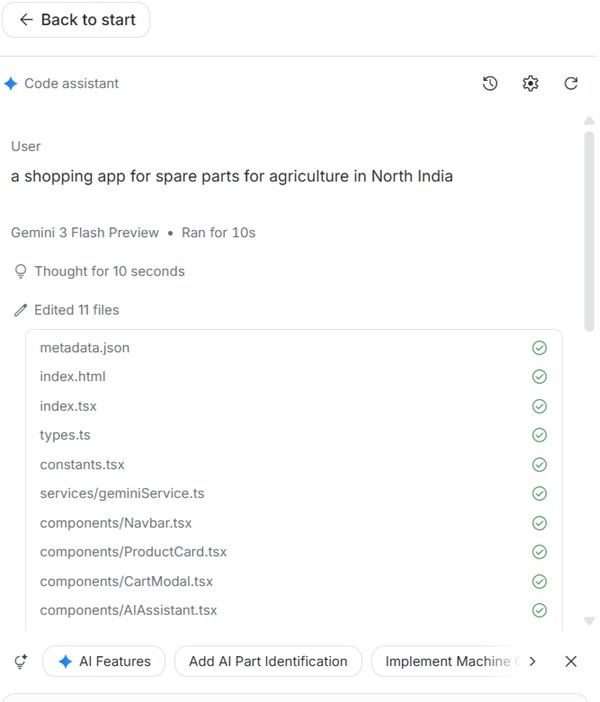
By default, AI studio generates code in React.
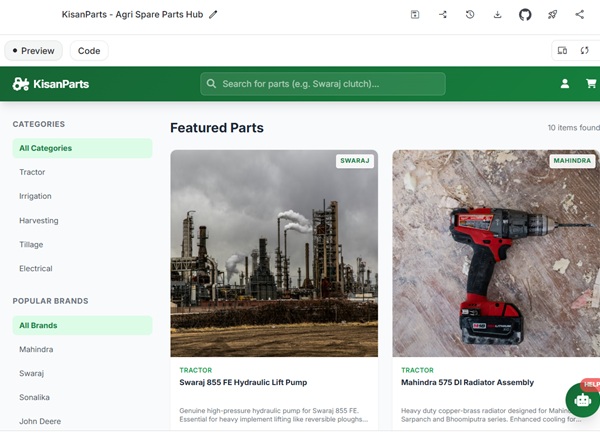
Preview the Application
In right panel, we've preview and code buttons. Under Preview section, live application preview is available.
Edit the code
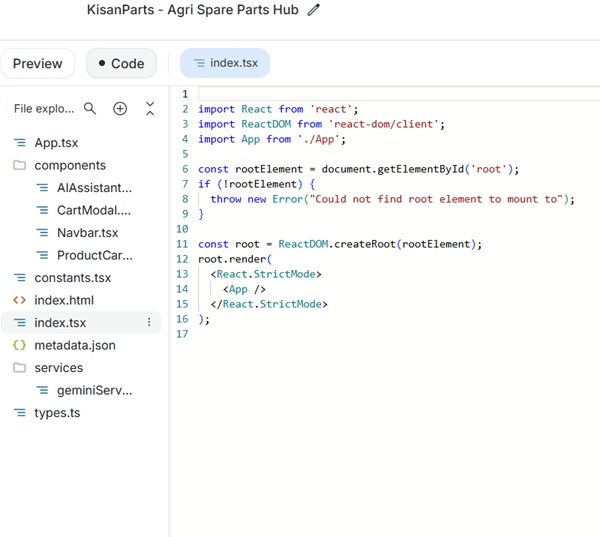
AI studio allows to edit code using an online IDE built within the studio. Click on the "Code" button and check the source code. You can edit any file as required to customize the app.
Provide feedback to improve application.
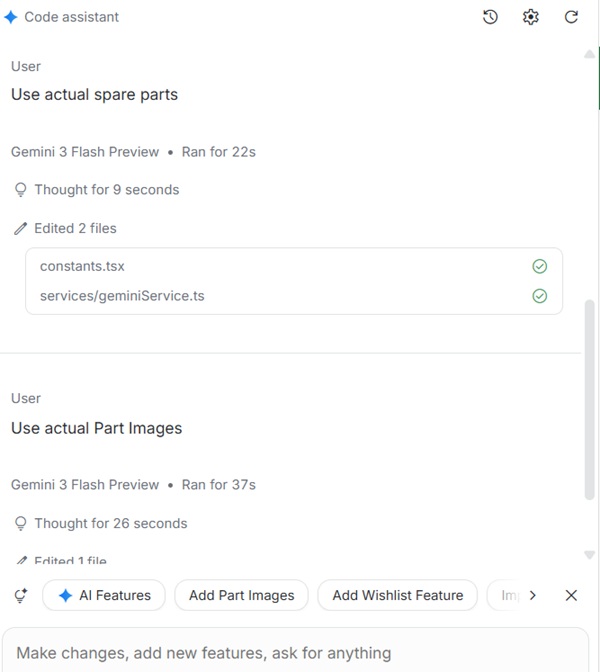
You can provide feedback in chat window as well. AI studio automatically provides many useful suggestions as per domain as well.
Deploy App
On right top, AI studio have panel with useful buttons to download app to run locally, commit code to github, deploy app on cloud run, share app link and lots more.
