

- VBA - Home
- VBA - Overview
- VBA - Excel Macros
- VBA - Excel Terms
- VBA - Macro Comments
- VBA - Message Box
- VBA - Input Box
- VBA - Variables
- VBA - Constants
- VBA - Operators
- VBA - Decisions
- VBA - Loops
- VBA - Strings
- VBA - Date and Time
- VBA - Arrays
- VBA - Functions
- VBA - Sub Procedure
- VBA - Events
- VBA - Error Handling
- VBA - Excel Objects
- VBA - Text Files
- VBA - Programming Charts
- VBA - Userforms
VB.Net - Select Case Statement
A Select Case statement allows a variable to be tested for equality against a list of values. Each value is called a case, and the variable being switched on is checked for each select case.
Syntax:
The syntax for a Select Case statement in VB.Net is as follows:
Select [ Case ] expression
    [ Case expressionlist
        [ statements ] ]
    [ Case Else
        [ elsestatements ] ]
End Select
Where,
expression: is an expression that must evaluate to any of the elementary data type in VB.Net, i.e., Boolean, Byte, Char, Date, Double, Decimal, Integer, Long, Object, SByte, Short, Single, String, UInteger, ULong, and UShort.
expressionlist: List of expression clauses representing match values for expression. Multiple expression clauses are separated by commas.
statements: statements following Case that run if the select expression matches any clause in expressionlist.
elsestatements: statements following Case Else that run if the select expression does not match any clause in the expressionlist of any of the Case statements.
Flow Diagram:
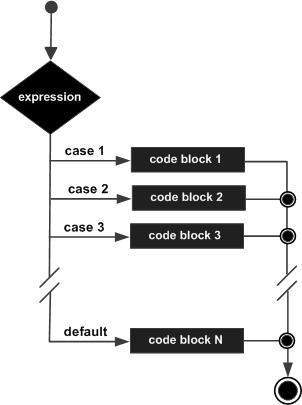
Example:
Module decisions
   Sub Main()
      'local variable definition
      Dim grade As Char
      grade = "B"
      Select grade
          Case "A"
              Console.WriteLine("Excellent!")
          Case "B", "C"
              Console.WriteLine("Well done")
          Case "D"
              Console.WriteLine("You passed")
          Case "F"
              Console.WriteLine("Better try again")
          Case Else
              Console.WriteLine("Invalid grade")
      End Select
      Console.WriteLine("Your grade is  {0}", grade)
      Console.ReadLine()
   End Sub
End Module
When the above code is compiled and executed, it produces the following result:
Well done
Your grade is B