

- VBA - Home
- VBA - Overview
- VBA - Excel Macros
- VBA - Excel Terms
- VBA - Macro Comments
- VBA - Message Box
- VBA - Input Box
- VBA - Variables
- VBA - Constants
- VBA - Operators
- VBA - Decisions
- VBA - Loops
- VBA - Strings
- VBA - Date and Time
- VBA - Arrays
- VBA - Functions
- VBA - Sub Procedure
- VBA - Events
- VBA - Error Handling
- VBA - Excel Objects
- VBA - Text Files
- VBA - Programming Charts
- VBA - Userforms
Selected Reading
VB.Net - GoTo Statement
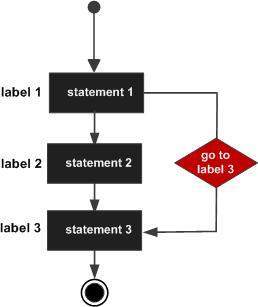
The GoTo statement transfers control unconditionally to a specified line in a procedure.
The syntax for the GoTo statement is:
GoTo label
Flow Diagram:
Example:
Module loops
   Sub Main()
      ' local variable definition
      Dim a As Integer = 10
Line1:
      Do
          If (a = 15) Then
              ' skip the iteration '
              a = a + 1
              GoTo Line1
          End If
          Console.WriteLine("value of a: {0}", a)
          a = a + 1
      Loop While (a < 20)
      Console.ReadLine()
   End Sub
End Module
When the above code is compiled and executed, it produces the following result:
value of a: 10
value of a: 11
value of a: 12
value of a: 13
value of a: 14
value of a: 16
value of a: 17
value of a: 18
value of a: 19
vb.net_loops.htm

Advertisements