

- VBA - Home
- VBA - Overview
- VBA - Excel Macros
- VBA - Excel Terms
- VBA - Macro Comments
- VBA - Message Box
- VBA - Input Box
- VBA - Variables
- VBA - Constants
- VBA - Operators
- VBA - Decisions
- VBA - Loops
- VBA - Strings
- VBA - Date and Time
- VBA - Arrays
- VBA - Functions
- VBA - Sub Procedure
- VBA - Events
- VBA - Error Handling
- VBA - Excel Objects
- VBA - Text Files
- VBA - Programming Charts
- VBA - Userforms
Selected Reading
VB.Net - Exit Statement
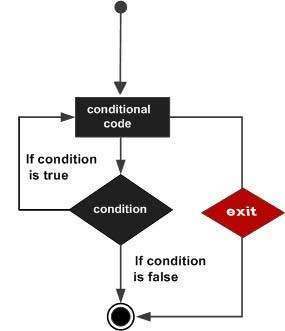
The Exit statement transfers the control from a procedure or block immediately to the statement following the procedure call or the block definition. It terminates the loop, procedure, try block or the select block from where it is called.
If you are using nested loops (i.e., one loop inside another loop), the Exit statement will stop the execution of the innermost loop and start executing the next line of code after the block.
Syntax:
The syntax for the Exit statement is:
Exit { Do | For | Function | Property | Select | Sub | Try | While }
Flow Diagram:
Example:
Module loops
   Sub Main()
      ' local variable definition
      Dim a As Integer = 10
      ' while loop execution '
      While (a < 20)
          Console.WriteLine("value of a: {0}", a)
          a = a + 1
          If (a > 15) Then
              'terminate the loop using exit statement
              Exit While
          End If
      End While
      Console.ReadLine()
   End Sub
End Module
When the above code is compiled and executed, it produces the following result:
value of a: 10
value of a: 11
value of a: 12
value of a: 13
value of a: 14
value of a: 15
vb.net_loops.htm

Advertisements