- SciPy - Home
- SciPy - Introduction
- SciPy - Environment Setup
- SciPy - Basic Functionality
- SciPy - Relationship with NumPy
- SciPy Clusters
- SciPy - Clusters
- SciPy - Hierarchical Clustering
- SciPy - K-means Clustering
- SciPy - Distance Metrics
- SciPy Constants
- SciPy - Constants
- SciPy - Mathematical Constants
- SciPy - Physical Constants
- SciPy - Unit Conversion
- SciPy - Astronomical Constants
- SciPy - Fourier Transforms
- SciPy - FFTpack
- SciPy - Discrete Fourier Transform (DFT)
- SciPy - Fast Fourier Transform (FFT)
- SciPy Integration Equations
- SciPy - Integrate Module
- SciPy - Single Integration
- SciPy - Double Integration
- SciPy - Triple Integration
- SciPy - Multiple Integration
- SciPy Differential Equations
- SciPy - Differential Equations
- SciPy - Integration of Stochastic Differential Equations
- SciPy - Integration of Ordinary Differential Equations
- SciPy - Discontinuous Functions
- SciPy - Oscillatory Functions
- SciPy - Partial Differential Equations
- SciPy Interpolation
- SciPy - Interpolate
- SciPy - Linear 1-D Interpolation
- SciPy - Polynomial 1-D Interpolation
- SciPy - Spline 1-D Interpolation
- SciPy - Grid Data Multi-Dimensional Interpolation
- SciPy - RBF Multi-Dimensional Interpolation
- SciPy - Polynomial & Spline Interpolation
- SciPy Curve Fitting
- SciPy - Curve Fitting
- SciPy - Linear Curve Fitting
- SciPy - Non-Linear Curve Fitting
- SciPy - Input & Output
- SciPy - Input & Output
- SciPy - Reading & Writing Files
- SciPy - Working with Different File Formats
- SciPy - Efficient Data Storage with HDF5
- SciPy - Data Serialization
- SciPy Linear Algebra
- SciPy - Linalg
- SciPy - Matrix Creation & Basic Operations
- SciPy - Matrix LU Decomposition
- SciPy - Matrix QU Decomposition
- SciPy - Singular Value Decomposition
- SciPy - Cholesky Decomposition
- SciPy - Solving Linear Systems
- SciPy - Eigenvalues & Eigenvectors
- SciPy Image Processing
- SciPy - Ndimage
- SciPy - Reading & Writing Images
- SciPy - Image Transformation
- SciPy - Filtering & Edge Detection
- SciPy - Top Hat Filters
- SciPy - Morphological Filters
- SciPy - Low Pass Filters
- SciPy - High Pass Filters
- SciPy - Bilateral Filter
- SciPy - Median Filter
- SciPy - Non - Linear Filters in Image Processing
- SciPy - High Boost Filter
- SciPy - Laplacian Filter
- SciPy - Morphological Operations
- SciPy - Image Segmentation
- SciPy - Thresholding in Image Segmentation
- SciPy - Region-Based Segmentation
- SciPy - Connected Component Labeling
- SciPy Optimize
- SciPy - Optimize
- SciPy - Special Matrices & Functions
- SciPy - Unconstrained Optimization
- SciPy - Constrained Optimization
- SciPy - Matrix Norms
- SciPy - Sparse Matrix
- SciPy - Frobenius Norm
- SciPy - Spectral Norm
- SciPy Condition Numbers
- SciPy - Condition Numbers
- SciPy - Linear Least Squares
- SciPy - Non-Linear Least Squares
- SciPy - Finding Roots of Scalar Functions
- SciPy - Finding Roots of Multivariate Functions
- SciPy - Signal Processing
- SciPy - Signal Filtering & Smoothing
- SciPy - Short-Time Fourier Transform
- SciPy - Wavelet Transform
- SciPy - Continuous Wavelet Transform
- SciPy - Discrete Wavelet Transform
- SciPy - Wavelet Packet Transform
- SciPy - Multi-Resolution Analysis
- SciPy - Stationary Wavelet Transform
- SciPy - Statistical Functions
- SciPy - Stats
- SciPy - Descriptive Statistics
- SciPy - Continuous Probability Distributions
- SciPy - Discrete Probability Distributions
- SciPy - Statistical Tests & Inference
- SciPy - Generating Random Samples
- SciPy - Kaplan-Meier Estimator Survival Analysis
- SciPy - Cox Proportional Hazards Model Survival Analysis
- SciPy Spatial Data
- SciPy - Spatial
- SciPy - Special Functions
- SciPy - Special Package
- SciPy Advanced Topics
- SciPy - CSGraph
- SciPy - ODR
- SciPy Useful Resources
- SciPy - Reference
- SciPy - Quick Guide
- SciPy - Cheatsheet
- SciPy - Useful Resources
- SciPy - Discussion
SciPy - ndimage.median_filter() Function
The scipy.ndimage.median_filter() is a function in the SciPy library which is used to apply a median filter to an image or array. It replaces each pixel in the input with the median value of the pixels within a specified neighborhood which is typically defined by a square or rectangular region.
The size of this neighborhood is controlled by the size parameter. This filter is particularly effective at removing salt-and-pepper noise while preserving edges in an image. It supports various boundary handling modes like 'reflect', 'constant' and 'nearest' and can work with multi-dimensional arrays
Syntax
Following is the syntax of the function scipy.ndimage.median_filter() to perform LU Decomposition −
scipy.ndimage.median_filter(a, permute_l=False, overwrite_a=False, check_finite=True, p_indices=False)
Parameters
Below are the parameters of the scipy.ndimage.median_filter() function −
- input (array_like): The input image or array on which the median filter will be applied. This is usually a 2D image or a multi-dimensional array.
- size (int or tuple of ints, optional): This parameter specifies the size of the neighborhood used to compute the median. It can be a single integer i.e., for a square neighborhood or a tuple such as (3, 3) for a 3x3 neighborhood. The default value is 3.
- footprint (array_like, optional): A boolean array that defines the shape of the neighborhood. This can be used instead of size. The default value is None.
- output (array, optional): The array where the result will be stored. If None (default) then a new array is created to store the output.
- mode (str, optional): This parameter defines how the input array is extended beyond its boundaries. The available modes are as follows −
- reflect: This is the default value where the array is reflected at the boundaries.
- constant: Pads with a constant value (specified by cval).
- nearest: Pads with the nearest boundary value.
- mirror: Similar to reflect but without copying the boundary values.
- wrap: Wraps the array from the opposite side.
- cval (scalar, optional): The constant value used for padding when mode='constant'. The default value is 0.0.
- origin (int or tuple of ints, optional): This specifies the position of the filter kernel relative to the input array. The default value is 0 which means the kernel is centered on the pixel.
Return Value
The scipy.ndimage.median_filter() function returns a new array with the same shape as the input where each element has been replaced by the median of its neighborhood.
Basic Example
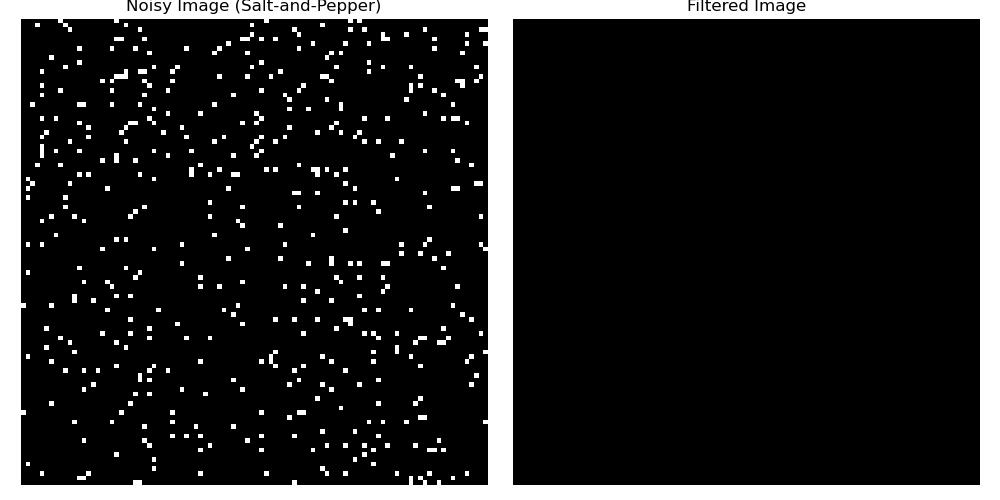
Following is the basic example which uses scipy.ndimage.median_filter() function to remove the salt-and-pepper noise from the given input image −
import numpy as np
from scipy.ndimage import median_filter
import matplotlib.pyplot as plt

# Create an image with salt-and-pepper noise
np.random.seed(0)
image = np.ones((100, 100)) * 128  # Base grayscale image
noise = np.random.choice([0, 255], (100, 100), p=[0.95, 0.05])  # Salt-and-pepper noise
noisy_image = np.clip(image + noise, 0, 255).astype(np.uint8)

# Apply median filter with a 3x3 kernel
filtered_image = median_filter(noisy_image, size=3)

# Display the results
plt.figure(figsize=(10, 5))
plt.subplot(1, 2, 1)
plt.title("Noisy Image (Salt-and-Pepper)")
plt.imshow(noisy_image, cmap='gray')
plt.axis('off')

plt.subplot(1, 2, 2)
plt.title("Filtered Image")
plt.imshow(filtered_image, cmap='gray')
plt.axis('off')

plt.tight_layout()
plt.show()
Here is the output of the scipy.ndimage.median_filter() function used to remove salt-and-pepper noise −
Smoothing a Grayscale Image
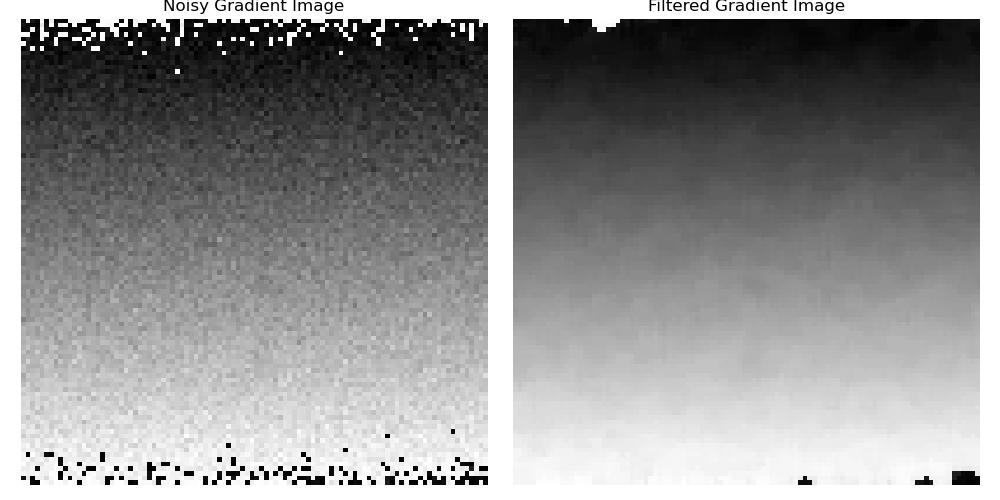
This example applies the median filter to a smooth grayscale gradient image to reduce noise while preserving edges −
import numpy as np
from scipy.ndimage import median_filter
import matplotlib.pyplot as plt

# Create a smooth grayscale gradient image
gradient_image = np.linspace(0, 255, 100*100).reshape(100, 100).astype(np.uint8)
gradient_image_with_noise = gradient_image + np.random.normal(0, 10, gradient_image.shape).astype(np.uint8)

# Apply median filter with a 5x5 kernel
filtered_gradient = median_filter(gradient_image_with_noise, size=5)

# Display the results
plt.figure(figsize=(10, 5))
plt.subplot(1, 2, 1)
plt.title("Noisy Gradient Image")
plt.imshow(gradient_image_with_noise, cmap='gray')
plt.axis('off')

plt.subplot(1, 2, 2)
plt.title("Filtered Gradient Image")
plt.imshow(filtered_gradient, cmap='gray')
plt.axis('off')

plt.tight_layout()
plt.show()
Here is the output of the scipy.ndimage.median_filter() function used to smooth the grayscale Image −
Filtering a Binary Image
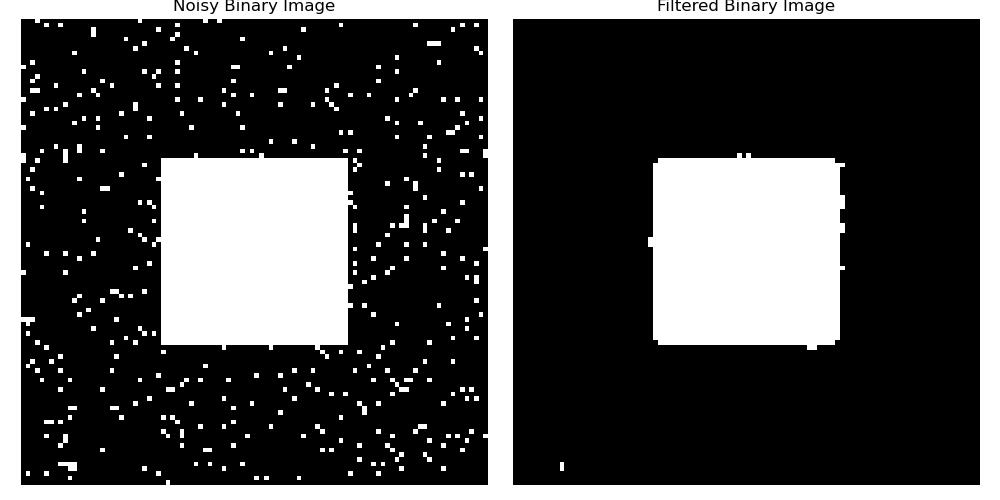
Here is the example which shows how the median filter can remove noise from binary images by using the function scipy.ndimage.median_filter()−
import numpy as np
from scipy.ndimage import median_filter
import matplotlib.pyplot as plt

# Create a binary image with noise
binary_image = np.zeros((100, 100), dtype=np.uint8)
binary_image[30:70, 30:70] = 1
noise = np.random.choice([0, 1], size=(100, 100), p=[0.95, 0.05])
noisy_binary_image = np.clip(binary_image + noise, 0, 1)

# Apply median filter with a 3x3 kernel
filtered_binary = median_filter(noisy_binary_image, size=3)

# Display the results
plt.figure(figsize=(10, 5))
plt.subplot(1, 2, 1)
plt.title("Noisy Binary Image")
plt.imshow(noisy_binary_image, cmap='gray')
plt.axis('off')

plt.subplot(1, 2, 2)
plt.title("Filtered Binary Image")
plt.imshow(filtered_binary, cmap='gray')
plt.axis('off')

plt.tight_layout()
plt.show()
Here is the output of the scipy.ndimage.median_filter() function used to filter the binary Image −