
Article Categories
- All Categories
-
 Data Structure
-
 Networking
-
 RDBMS
RDBMS
-
 Operating System
-
 Java
Java
-
 MS Excel
-
 iOS
iOS
-
 HTML
HTML
-
 CSS
CSS
-
 Android
-
 Python
-
 C Programming
-
 C++
C++
-
 C#
C#
-
 MongoDB
-
 MySQL
MySQL
-
 Javascript
-
 PHP
PHP
-
 Economics & Finance
Microsoft, Device Health for Windows 8.1
Microsoft Device Health for Windows 8.1 is a security service designed to enhance online banking and financial transaction safety. This Windows-based service monitors PC security status and provides device health information to certified e-commerce and online banking partners, enabling them to assess device security before allowing sensitive transactions.
Device Health acts as a protective layer between users and their financial accounts by evaluating system security and alerting both users and banking websites about potential security risks on the device.
How Device Health Works
When you attempt to access banking websites, Device Health communicates with the financial institution's security systems. If your device is deemed secure, transactions proceed normally. However, if security risks are detected, both you and the banking website receive warnings before any sensitive operations can occur.
Installation Process
To install Device Health on Windows 8.1, follow these steps −
Control Panel ? Windows Update ? Install optional updates
Navigate to Control Panel and select Windows Update
Click on "Install optional updates" link
Select "Check online for updates from Microsoft Update"
After the check completes, click the link showing available optional updates
Select Device Health from the list and click "OK"
Click "Install updates" to begin installation
Security Features
| Feature | Description | Benefit |
|---|---|---|
| Real-time Monitoring | Continuously checks PC security status | Proactive threat detection |
| Banking Integration | Communicates with certified financial partners | Enhanced transaction security |
| User Alerts | Warns users about device vulnerabilities | Informed decision making |
| Security Tips | Provides guidance for device protection | Improved security practices |
Example − Banking Website Integration
When accessing your banking website with Device Health installed, the service evaluates your system's security. Here's what happens −
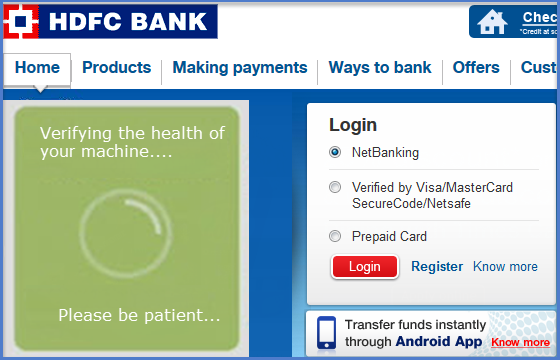
If your computer is compromised or has security vulnerabilities, you'll see a warning message with recommendations to resolve the issues before proceeding −

Conclusion
Microsoft Device Health for Windows 8.1 provides an essential security layer for online banking and financial transactions. By monitoring device health and coordinating with banking partners, it helps prevent fraudulent activities and guides users toward better security practices for safer online banking experiences.

372 Views
