
Article Categories
- All Categories
-
 Data Structure
-
 Networking
-
 RDBMS
RDBMS
-
 Operating System
-
 Java
Java
-
 MS Excel
-
 iOS
iOS
-
 HTML
HTML
-
 CSS
CSS
-
 Android
-
 Python
-
 C Programming
-
 C++
C++
-
 C#
C#
-
 MongoDB
-
 MySQL
MySQL
-
 Javascript
-
 PHP
PHP
-
 Economics & Finance
How to place UI5 code in SAP NetWeaver Server?
It is possible to deploy UI5 code from Eclipse or Web IDE to SAP backend server using ABAP Developer Tools (ADT). This deployment process creates a BSP (Business Server Page) application that can be accessed and managed through transaction code SE80 in the SAP system.
Deployment Process
The deployment involves transferring your UI5 application files from the development environment to the SAP NetWeaver server, where they are stored as BSP resources. This allows the application to run directly on the SAP server infrastructure.
Prerequisites
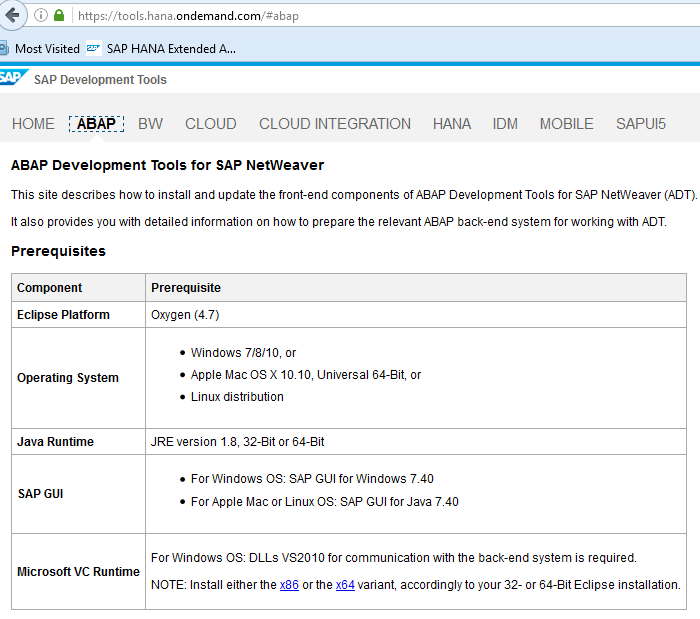
Before deploying UI5 code to SAP NetWeaver Server, ensure you have ?
- SAP Development Tools installed and configured
- Proper authorization to create BSP applications in the target system
- Connection established between your IDE and SAP system
You can download the required tools from the SAP Development Tools official page.
Verification Steps
After successful deployment, you can verify the BSP application using the following steps ?
- Login to your SAP system
- Execute transaction code
SE80 - Navigate to the BSP application repository
- Locate your deployed UI5 application
Conclusion
Deploying UI5 applications to SAP NetWeaver Server through ABAP Developer Tools creates BSP applications that can be managed and maintained directly within the SAP ecosystem using standard SAP tools like SE80.

250 Views
