
- C# - Home
- C# - Overview
- C# - Environment
- C# - Program Structure
- C# - Basic Syntax
- C# - Data Types
- C# - Type Conversion
- C# - Variables
- C# - Constants
- C# - Operators
- C# - Arithmetic Operators
- C# - Assignment Operators
- C# - Relational Operators
- C# - Logical Operators
- C# - Bitwise Operators
- C# - Miscellaneous Operators
- C# - Operators Precedence
- C# Conditional Statements
- C# - Decision Making
- C# - If
- C# - If Else
- C# - Nested If
- C# - Switch
- C# - Nested Switch
- C# - Switch Expressions
- C# Control Statements
- C# - Loops
- C# - For Loop
- C# - While Loop
- C# - Do While Loop
- C# - Nested Loops
- C# - Break
- C# - Continue
- C# - Foreach Loop
- C# - Goto Statement
- C# OOP & Data Handling
- C# - Encapsulation
- C# - Methods
- C# - Nullables
- C# - Arrays
- C# - Strings
- C# - Structure
- C# - Enums
- C# - Classes
- C# - Inheritance
- C# - Polymorphism
- C# - Operator Overloading
- C# - Interfaces
- C# - Namespaces
- C# - Preprocessor Directives
- C# - Regular Expressions
- C# - Custom Exceptions
- C# - Exception Handling
- C# - File I/O
- C# Advanced Tutorial
- C# - Attributes
- C# - Reflection
- C# - Properties
- C# - Indexers
- C# - Delegates
- C# - Events
- C# - Collections
- C# - Generics
- C# - LINQ
- C# - IEnumerable vs IEnumerator
- C# - Anonymous Methods
- C# - Unsafe Codes
- C# - Tasks and Parallel Programming
- C# - Multithreading
- C# - Extension Methods
- C# - Lambda Expressions
- C# - Async and Await
- C# Modern Features
- C# - Tuples
- C# - Records
- C# - Pattern Matching Enhancements
- C# - Top-level Statements
- C# - Nullable Reference Types
- C# - What's New in C# 11 / 12 / 13
- C# - Global Usings
- C# - File-Scoped Namespaces
- C# Practical & Advanced Usage
- C# - JSON & XML Handling
- C# - Data Serialization & Deserialization
- C# - REST API Calls with Httpclient
- C# - Dependency Injection
- C# - Unit Testing with NUnit, xUnit & MSTest
- C# - Package Management with NuGet
- C# Useful Resources
- C# - Developer's AI Tools
- C# - Questions and Answers
- C# - Cheatsheet
- C# - Quick Guide
- C# - Useful Resources
- C# - Discussion
- C# - Online Compiler
C# - Switch Statement
C# switch case statement is a control flow structure that allows us to execute distinct blocks of code depending on the value of a variable by comparing it against numerous possible case values.
We can say that it allows a variable to be tested for equality against a list of values. Each value is called a case, and the variable being switched on is checked for each switch case.
Syntax
Following is the syntax of the c# switch statement −
switch(expression) {
   case constant-expression1  :
      statement(s);
      break;
   case constant-expression2  :
   case constant-expression3  :
      statement(s);
      break;

   /* you can have any number of case statements */
   default : /* Optional */
   statement(s);
}
Rules for Using switch Statement
The following rules apply to a switch statement −
The expression used in a switch statement must have an integral or enumerated type, or be of a class type in which the class has a single conversion function to an integral or enumerated type.
You can have any number of case statements within a switch. Each case is followed by the value to be compared to and a colon.
The constant-expression for a case must be the same data type as the variable in the switch, and it must be a constant or a literal.
When the variable being switched on is equal to a case, the statements following that case will execute until a break statement is reached.
When a break statement is reached, the switch terminates, and the flow of control jumps to the next line following the switch statement.
Not every case needs to contain a break. If no break appears, then it will raise a compile time error.
A switch statement can have an optional default case, which must appear at the end of the switch. The default case can be used for performing a task when none of the cases is true.
Flow Diagram
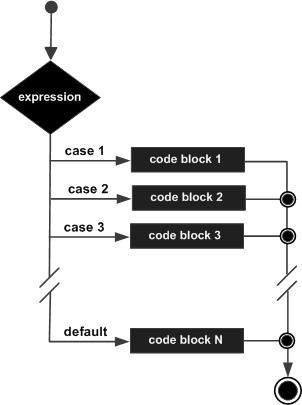
Example: Understanding Switch Statement
Here, in this c# program, we construct a code that demonstrates the use of a switch statement −
using System;
namespace DecisionMaking {
   class Program {
      static void Main(string[] args) {
         /* local variable definition */
         char grade = 'B';

         switch (grade) {
            case 'A':
               Console.WriteLine("Excellent!");
               break;
            case 'B':
            case 'C':
               Console.WriteLine("Well done");
               break;
            case 'D':
               Console.WriteLine("You passed");
               break;
            case 'F':
               Console.WriteLine("Better try again");
               break;
               default:
            Console.WriteLine("Invalid grade");
               break;
         }
         Console.WriteLine("Your grade is  {0}", grade);
         Console.ReadLine();
      }
   }
}
Output
When the above code is compiled and executed, it produces the following result −
Well done
Your grade is B
Example: Display Week Day
In this example, we use the switch case statement to display the weekday if the integer value is given −
using System;
public class Example {
   public static void Main() {
      int day = 5;
      switch (day)
      {
         case 1:
            Console.WriteLine("Sunday");
            break;
         case 2:
            Console.WriteLine("Monday");
            break;
         case 3:
            Console.WriteLine("Tuesday");
            break;
         case 4:
            Console.WriteLine("Wednesday");
            break;
         case 5:
             Console.WriteLine("Thursday");
             break;
         case 6:
            Console.WriteLine("Friday");
            break;
         case 7:
            Console.WriteLine("Saturday");
            break;
         default:
            Console.WriteLine("Invalid input! Please enter a number between 1 and 7.");
            break;
      }
   }
}
Output
Following is the output −
Thursday
