
Article Categories
- All Categories
-
 Data Structure
-
 Networking
-
 RDBMS
RDBMS
-
 Operating System
-
 Java
Java
-
 MS Excel
-
 iOS
iOS
-
 HTML
HTML
-
 CSS
CSS
-
 Android
-
 Python
-
 C Programming
-
 C++
C++
-
 C#
C#
-
 MongoDB
-
 MySQL
MySQL
-
 Javascript
-
 PHP
PHP
-
 Economics & Finance
Connecting system with SAP system using a Web Service
The best solution for connecting your system with an SAP system using a web service is to regenerate the web service code in the client system. This approach ensures that your client application has the most up-to-date interface definitions and can properly communicate with the SAP system's web services.
Regenerating Web Service Code in Visual Studio
To regenerate the WSDL code in Visual Studio, follow these steps ?
Navigate to Add Service Reference in Visual Studio and regenerate the WSDL code. This process will update your service reference with the latest web service definitions from the SAP system.
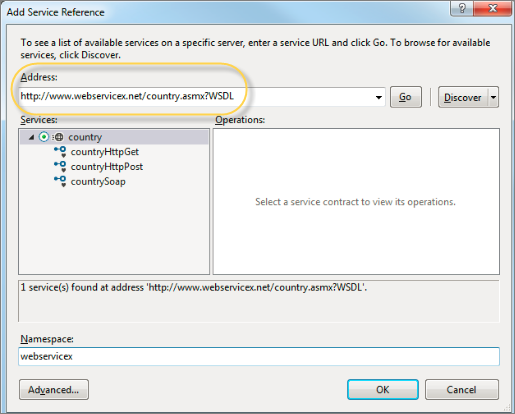
Steps to Add Service Reference
The Add Service Reference dialog allows you to ?
- Enter the SAP web service URL or browse for the WSDL file
- Specify a namespace for the generated proxy classes
- Configure advanced settings for the service reference
- Generate client-side proxy classes automatically
When you regenerate the service reference, Visual Studio will create new proxy classes based on the current WSDL definition. This ensures compatibility between your client application and the SAP system's web service interface.
Benefits of Regenerating Web Service Code
Regenerating the web service code provides several advantages ?
- Updated Interface ? Ensures your client code matches the latest SAP service definitions
- Error Resolution ? Fixes compatibility issues that may arise from outdated service references
- New Functionality ? Incorporates any new methods or parameters added to the SAP web service
Conclusion
Regenerating web service code through Visual Studio's Add Service Reference feature is the most reliable method to maintain proper connectivity between your system and SAP web services, ensuring seamless integration and up-to-date functionality.

769 Views
