
Article Categories
- All Categories
-
 Data Structure
-
 Networking
-
 RDBMS
RDBMS
-
 Operating System
-
 Java
Java
-
 MS Excel
-
 iOS
iOS
-
 HTML
HTML
-
 CSS
CSS
-
 Android
-
 Python
-
 C Programming
-
 C++
C++
-
 C#
C#
-
 MongoDB
-
 MySQL
MySQL
-
 Javascript
-
 PHP
PHP
-
 Economics & Finance
PHP Soap Client is not supporting WSDL extension while connecting to SAP system
When integrating PHP SOAP Client with SAP systems, you may encounter issues with WSDL extensions due to WS-Policy requirements. SAP's policy framework can prevent PHP SOAP clients from properly consuming web services. Here are two solutions to resolve this.
Solution 1: Modify Policy Requirements
Update the policy tag in your WSDL to make it optional instead of required. Find this line ?
<wsp:UsingPolicy wsdl:required="true"/>
Change it to ?
<wsp:UsingPolicy wsdl:required="false"/>
Test your PHP SOAP client connection after making this change to verify the service works correctly.
Solution 2: Change URL Endpoint to Standard
A more practical solution is to modify the WSDL URL to use the standard endpoint instead of ws_policy. This generates a WSDL without policy constraints that PHP can handle.
Step-by-step Process
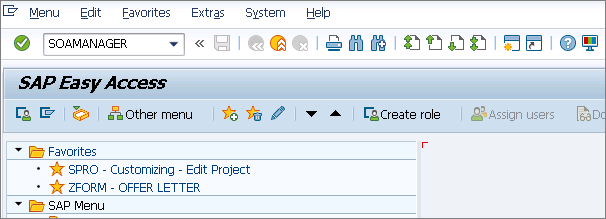
Navigate to SOAMANAGER → SOA-Management in your SAP ECC system ?
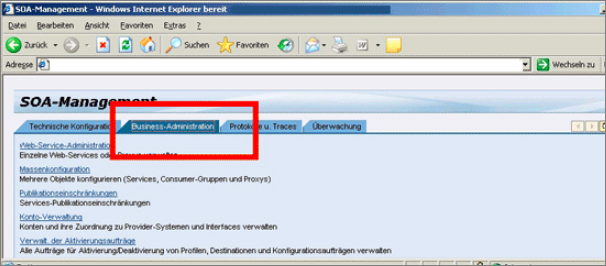
Access your web service configuration ?
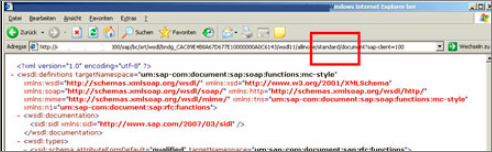
In the browser URL, replace ws_policy with standard ?
// Before
http://saphost:port/sap/bc/srt/wsdl/...?sap-client=100&wsdl_type=ws_policy

// After
http://saphost:port/sap/bc/srt/wsdl/...?sap-client=100&wsdl_type=standard
PHP SOAP Client Example
Once you have the standard WSDL URL, connect using PHP ?
$wsdl = 'http://saphost:port/sap/bc/srt/wsdl/...?sap-client=100&wsdl_type=standard';

$client = new SoapClient($wsdl, [
    'login'    => 'SAP_USERNAME',
    'password' => 'SAP_PASSWORD',
    'trace'    => 1,
]);

$result = $client->YourServiceMethod(['param' => 'value']);
Conclusion
Both solutions resolve PHP SOAP Client compatibility issues with SAP WSDL extensions. Changing ws_policy to standard in the WSDL URL is the most practical approach for production, as it generates a clean WSDL without policy restrictions that PHP can consume directly.

730 Views
