
Article Categories
- All Categories
-
 Data Structure
-
 Networking
-
 RDBMS
RDBMS
-
 Operating System
-
 Java
Java
-
 MS Excel
-
 iOS
iOS
-
 HTML
HTML
-
 CSS
CSS
-
 Android
-
 Python
-
 C Programming
-
 C++
C++
-
 C#
C#
-
 MongoDB
-
 MySQL
MySQL
-
 Javascript
-
 PHP
PHP
-
 Economics & Finance
In SAP Crystal Reports XI, return records that match multiple conditions
It is advisable to use functions to pass such filter conditions in SAP Crystal Reports XI. When dealing with multiple conditions, you can try changing the order of your condition like ?
({PR.cov} = "A" and {PR.cov}="B") or {PR.cov} = "A"
Using Custom Functions
You can create custom functions to handle complex conditions more efficiently. Try using a function like this ?
{@A}: if {PR.cov} = "A" then 1 else 0
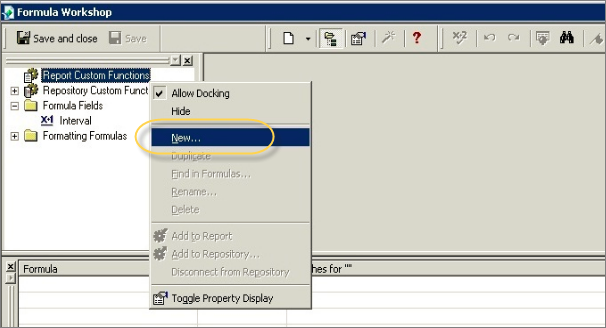
To create custom functions in Crystal Reports XI, navigate to Report Menu ? Formula Expert ? Right Click on Custom Functions ? New
Multiple Parameter Conditions
It is advisable to use custom functions when you have multiple parameters to pass in the condition. You can also use the following approach when you have two string parameters ?
( 'A' IN {?cov} OR {PR.cov} IN {?cov} )
AND
( 'B' IN {?cov} OR {PR.cov} IN {?cov} )
This method allows you to pass parameter arrays and check if specific values exist within those parameters, making your report filtering more flexible and maintainable.
Conclusion
Using custom functions and proper parameter handling in SAP Crystal Reports XI enables efficient filtering of records that match multiple conditions. This approach provides better maintainability and flexibility when working with complex reporting requirements.

421 Views
