
Article Categories
- All Categories
-
 Data Structure
-
 Networking
-
 RDBMS
RDBMS
-
 Operating System
-
 Java
Java
-
 MS Excel
-
 iOS
iOS
-
 HTML
HTML
-
 CSS
CSS
-
 Android
-
 Python
-
 C Programming
-
 C++
C++
-
 C#
C#
-
 MongoDB
-
 MySQL
MySQL
-
 Javascript
-
 PHP
PHP
-
 Economics & Finance
Selected Reading
Configuring SAP HANA Perspective shortcuts
This can be done using the Shortcuts tab of the Customize Perspective dialog. To configure shortcuts: Switch to the perspective that you want to configure.
Select Window → Perspective → Customize Perspective →Open the Shortcuts tab and choose the sub menu whose shortcuts you want to edit.
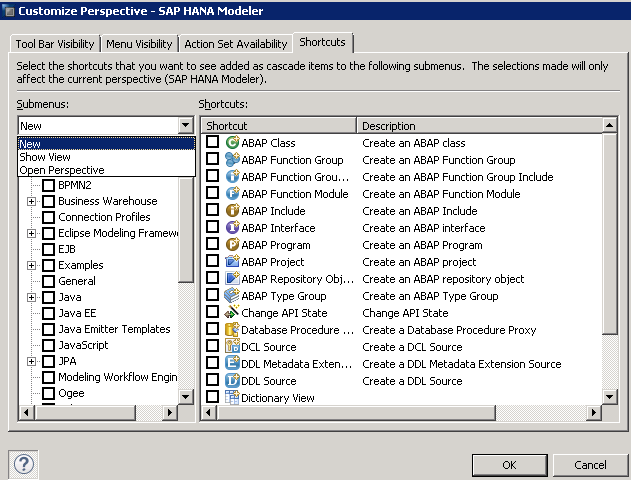
Use the Categories tree to turn groups of related shortcuts on or off, or select categories to work with individual menu items in the Shortcuts list.
Click OK to cause the changes to take effect.

Updated on: 2020-02-24T07:49:35+05:30
296 Views

Advertisements