
Article Categories
- All Categories
-
 Data Structure
-
 Networking
-
 RDBMS
RDBMS
-
 Operating System
-
 Java
Java
-
 MS Excel
-
 iOS
iOS
-
 HTML
HTML
-
 CSS
CSS
-
 Android
-
 Python
-
 C Programming
-
 C++
C++
-
 C#
C#
-
 MongoDB
-
 MySQL
MySQL
-
 Javascript
-
 PHP
PHP
-
 Economics & Finance
Selected Reading
RFC or BAPI for displaying change documents in SAP
You need to set up a workflow engine and then customize event generation. Next is to write down a Java service to connect to SAP system using Java Connector and then register a RFC server. For this, you have to follow steps:
Navigate to Transaction SM59 -> Expand TCP/IP connections directory and click on Create (F8).
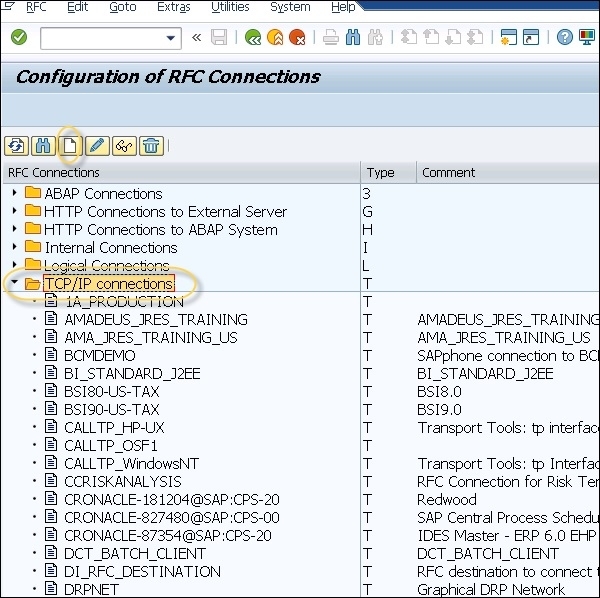
In the RFC destination field, enter the name of the RFC destination system. Next is to set the connection type to T (Start an external program through TCP/IP).
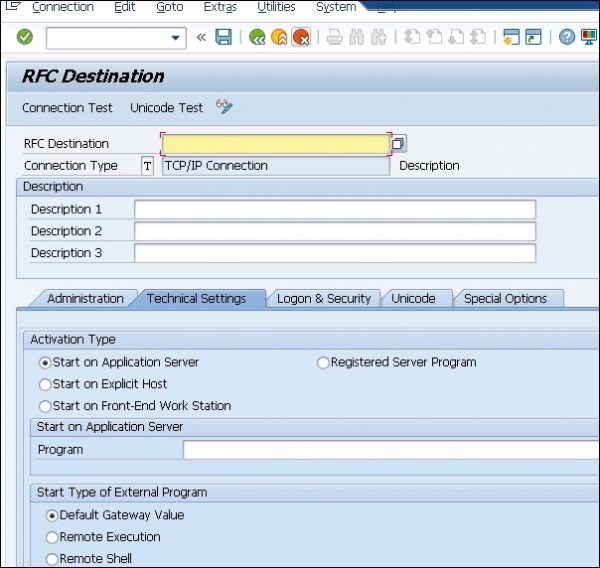
Next is to provide a Function Module handler that can be called using tRFC from SAP system -> Next is to add linkage entry to tell workflow engine to call Java program when a change document is written in SAP system.

Updated on: 2019-07-30T22:30:20+05:30
805 Views

Advertisements