
Article Categories
- All Categories
-
 Data Structure
-
 Networking
-
 RDBMS
RDBMS
-
 Operating System
-
 Java
Java
-
 MS Excel
-
 iOS
iOS
-
 HTML
HTML
-
 CSS
CSS
-
 Android
-
 Python
-
 C Programming
-
 C++
C++
-
 C#
C#
-
 MongoDB
-
 MySQL
MySQL
-
 Javascript
-
 PHP
PHP
-
 Economics & Finance
Remove grey color from legend display using ggplot2 in R.
To remove grey color from legend display using ggplot2, we can use theme function where we can fill legend.key argument to white with element_rect.
For Example, if we have a data frame called df that contains three columns say X and Y and F where X and Y are numerical and F is categorical then we can create scatterplot between X and Y without grey color in legend display by using the command given below −
ggplot(df,aes(X,Y))+geom_point(aes(colour=factor(F)))+theme(legend.key=element_rect(fill="white"))
Example
Following snippet creates a sample data frame −
x<-round(rnorm(20),2)
y<-round(rnorm(20),2)
Category<-sample(LETTERS[1:3],20,replace=TRUE)
df<-data.frame(x,y,Category)
df
The following dataframe is created
      x     y  Category
 1 -0.22 -0.31  B
 2  0.81  0.09  A
 3  0.81 -0.17  C
 4 -0.09 -0.09  A
 5  0.70  0.57  B
 6 -0.48 -0.93  B
 7  1.46  0.14  B
 8  0.07 -0.12  A
 9 -0.32  0.40  C
10  0.95 -0.96  C
11 -0.32  0.33  B
12 -0.84 -0.25  A
13  0.07 -0.10  B
14 -0.48  0.58  A
15 -0.51 -0.60  C
16  1.48 -0.41  A
17 -0.66 -1.17  A
18 -0.31 -0.49  B
19  0.77  0.30  A
20  0.09  0.55  A
To load ggplot2 package and create scatterplot between x and y with color of points based on Category column on the above created data frame, add the following code to the above snippet −
x<-round(rnorm(20),2)
y<-round(rnorm(20),2)
Category<-sample(LETTERS[1:3],20,replace=TRUE)
df<-data.frame(x,y,Category)
library(ggplot2)
ggplot(df,aes(x,y))+geom_point(aes(colour=factor(Category)))
Output
If you execute all the above given snippets as a single program, it generates the following Output −
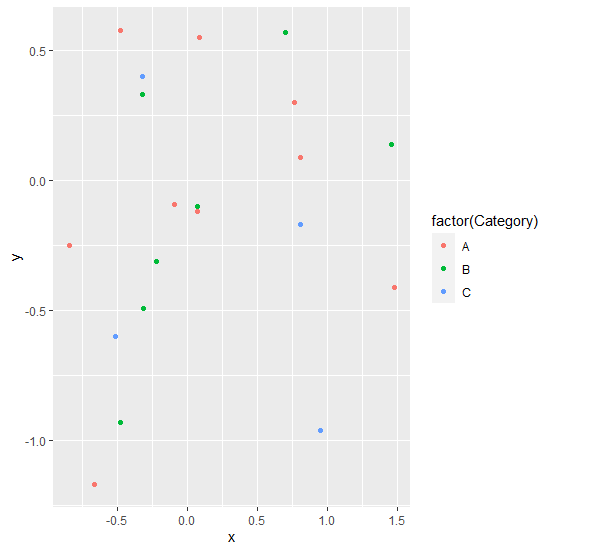
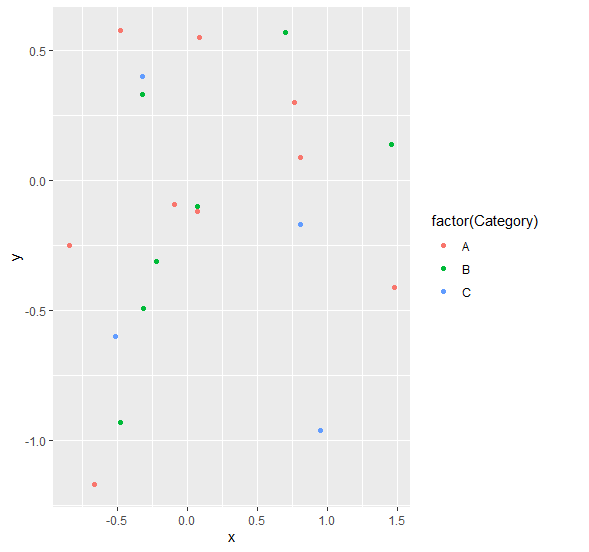
To create scatterplot between x and y with color of points based on Category column without grey color in legend display on the above created data frame, add the following code to the above snippet −
x<-round(rnorm(20),2)
y<-round(rnorm(20),2)
Category<-sample(LETTERS[1:3],20,replace=TRUE)
df<-data.frame(x,y,Category)
library(ggplot2)
ggplot(df,aes(x,y))+geom_point(aes(colour=factor(Category)))+theme(legend.key=element_rect(fill="white"))
Output
If you execute all the above given snippets as a single program, it generates the following Output −

4K+ Views
