
Article Categories
- All Categories
-
 Data Structure
-
 Networking
-
 RDBMS
RDBMS
-
 Operating System
-
 Java
Java
-
 MS Excel
-
 iOS
iOS
-
 HTML
HTML
-
 CSS
CSS
-
 Android
-
 Python
-
 C Programming
-
 C++
C++
-
 C#
C#
-
 MongoDB
-
 MySQL
MySQL
-
 Javascript
-
 PHP
PHP
-
 Economics & Finance
Moving SAP client from one system to other
You can also create a copy of the existing clients between local and remote system IDs.
Follow the below steps to create a copy of existing clients −
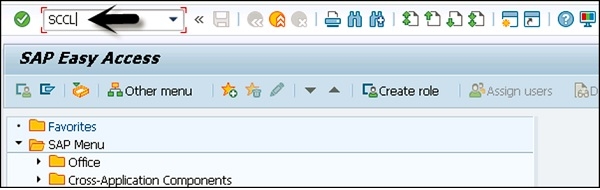
Step 1 − To create a copy of a client in local SID, the transaction code is SCCL.
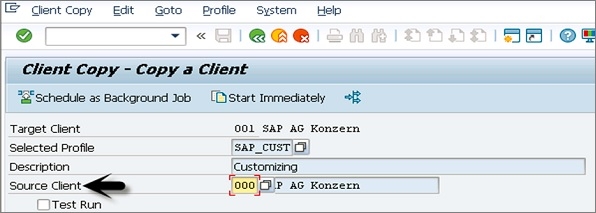
Step 2 − Enter the following details −
Select your desired profile, enter source client, and enter description.
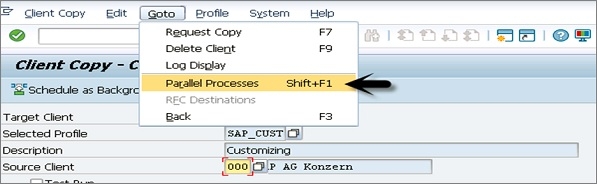
Step 3 − By default, the client copy is executed in a single process and you can distribute the workload on multiple processes to reduce time for copying.
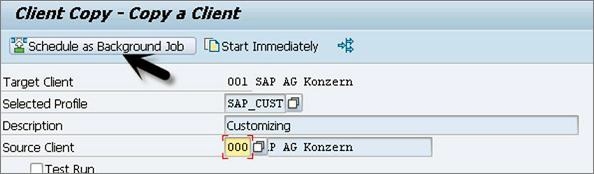
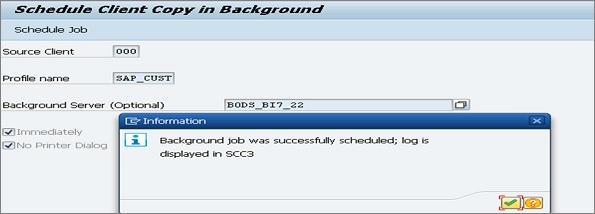
Step 4 − Copying a client can take longer. Therefore, this process can be run as background job.
Step 5 − To check the logs, transaction code — SCC3 can be used.
It is always recommended to use import/export option for client copy when database size is large. For more details you can navigate to the following link:
https://www.tutorialspoint.com/sap_basis/sap_basis_sap_client_administration.htm

1K+ Views
