
Article Categories
- All Categories
-
 Data Structure
-
 Networking
-
 RDBMS
RDBMS
-
 Operating System
-
 Java
Java
-
 MS Excel
-
 iOS
iOS
-
 HTML
HTML
-
 CSS
CSS
-
 Android
-
 Python
-
 C Programming
-
 C++
C++
-
 C#
C#
-
 MongoDB
-
 MySQL
MySQL
-
 Javascript
-
 PHP
PHP
-
 Economics & Finance
Selected Reading
How to create colored barplot using ggplot2 without legend entries in R?
When we create a colored barplot using ggplot2 the legend entries are automatically created. If we want to create the plot without those legend entries then theme function can be used. For example, if we have a data frame df that contains x as categorical variable and y as count variable then barplot without legend entries can be created as:
ggplot(df,aes(x,y,fill=x))+geom_bar(stat="identity")+theme(legend.position="none")
Example
Consider the below data frame:
> x<-c("A","B","C","D","E")
> y<-c(24,28,25,27,26)
> df<-data.frame(x,y)
> df
Output
x y
1 A 24
2 B 28
3 C 25
4 D 27
5 E 26
Loading ggplot2 package and creating the barplot:
> library(ggplot2)
> ggplot(df,aes(x,y,fill=x))+geom_bar(stat="identity")
Output:
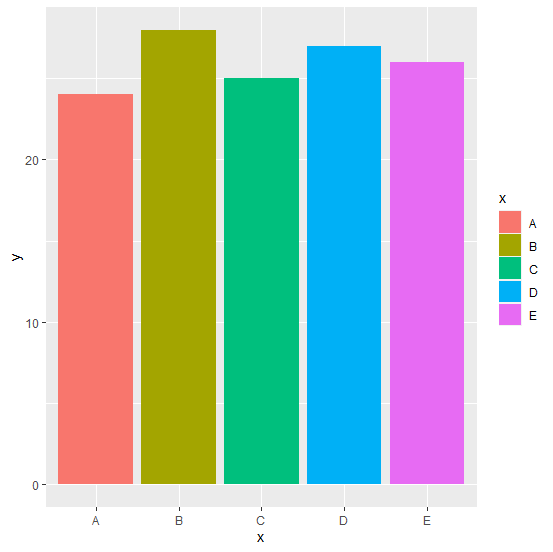
Creating the barplot without legend entries:
> ggplot(df,aes(x,y,fill=x))+geom_bar(stat="identity")+theme(legend.position="none")
Output:
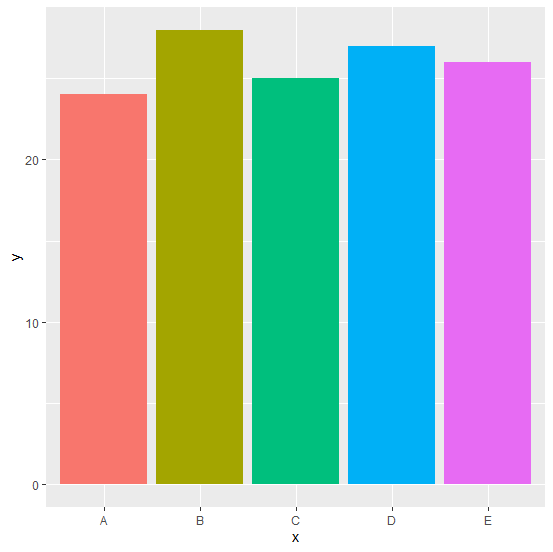

Updated on: 2026-03-11T22:50:53+05:30
250 Views

Advertisements