
Article Categories
- All Categories
-
 Data Structure
-
 Networking
-
 RDBMS
RDBMS
-
 Operating System
-
 Java
Java
-
 MS Excel
-
 iOS
iOS
-
 HTML
HTML
-
 CSS
CSS
-
 Android
-
 Python
-
 C Programming
-
 C++
C++
-
 C#
C#
-
 MongoDB
-
 MySQL
MySQL
-
 Javascript
-
 PHP
PHP
-
 Economics & Finance
Selected Reading
How do you use Selenium to execute javascript within a frame?
We can use Javascript within a frame with Selenium. It can run Javascript commands by the executeScript method. The command to be executed is passed as an argument to the method.
Next, we have to return the values from the Javascript command with the return keyword. We have to take the help of the window.length command in Javascript to count the number of frames in a page.
Syntax
JavascriptExecutor j = (JavascriptExecutor) driver;
int i = Integer.parseInt(j.executeScript("return window.length").toString());
Example
import org.openqa.selenium.By;
import org.openqa.selenium.WebDriver;
import org.openqa.selenium.WebElement;
import org.openqa.selenium.chrome.ChromeDriver;
import java.util.concurrent.TimeUnit;
import org.openqa.selenium.JavascriptExecutor;
public class FramesJS{
   public static void main(String[] args) {
         System.setProperty("webdriver.chrome.driver","C:\Users\ghs6kor\Desktop\Java\chromedriver.exe");
      WebDriver driver = new ChromeDriver();
      driver.get("http://www.uitestpractice.com/Students/Switchto");
      driver.manage().timeouts().implicitlyWait(4, TimeUnit.SECONDS);
      // Javascript executor to return value frame count
      JavascriptExecutor j = (JavascriptExecutor) driver;
      int i = Integer.parseInt
      (j.executeScript("return window.length").toString());
      System.out.print("Frame count is: " +i);
      // switching to the frame and get text within frame
      driver.switchTo().frame("iframe_a");
      WebElement l = driver.findElement(By.cssSelector("h1"));
      System.out.print("Text within frame: " + l.getText());
      driver.quit();
   }
}
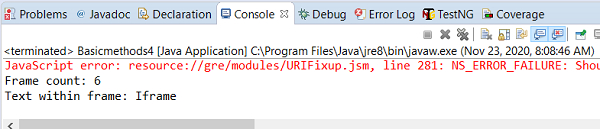
Output

Updated on: 2020-11-28T13:55:57+05:30
872 Views

Advertisements