
Article Categories
- All Categories
-
 Data Structure
-
 Networking
-
 RDBMS
RDBMS
-
 Operating System
-
 Java
Java
-
 MS Excel
-
 iOS
iOS
-
 HTML
HTML
-
 CSS
CSS
-
 Android
-
 Python
-
 C Programming
-
 C++
C++
-
 C#
C#
-
 MongoDB
-
 MySQL
MySQL
-
 Javascript
-
 PHP
PHP
-
 Economics & Finance
How do I select elements inside an iframe with Xpath?
We can select elements inside an iframe with xpath in Selenium webdriver. A frame is defined with

Selenium by default has access to the parent browser driver. In order to access inside a frame, the driver focus has to shift from the main browser window to the frame. There are more than one methods to shift focus to frames −
-
switchTo().frame(id) - The id or name of frame is passed as an argument.
Syntax − driver.switchTo().frame("id"), switching to the frame with id.
-
switchTo().frame(m) - The index of frame is passed as an argument. The index begins from zero.
Syntax − driver.switchTo().frame(0), switching to the first frame in the page.
-
switchTo().frame(webelement n) - The webelement of frame is passed as an argument.
Syntax − driver.switchTo().frame(l), switching to the frame with l webelement.
Once we move the driver focus inside the frame, we can access the elements inside the frame by the xpath locator with the help of the driver.findElement(By.xpath(
Example
Code Implementation.
import org.openqa.selenium.By;
import org.openqa.selenium.WebDriver;
import org.openqa.selenium.WebElement;
import org.openqa.selenium.chrome.ChromeDriver;
import java.util.concurrent.TimeUnit;
public class iFrameXpath{
   public static void main(String[] args) {
      System.setProperty("webdriver.chrome.driver", "C:\Users\ghs6kor\Desktop\Java\chromedriver.exe");
      WebDriver driver = new ChromeDriver();
      driver.get("https://the-internet.herokuapp.com/frames");
      driver.manage().timeouts().implicitlyWait(8, TimeUnit.SECONDS);
      // identify element and click
      driver.findElement(By.partialLinkText("Nested")).click();
      // switching to frame with frame name
      driver.switchTo().frame("frame-bottom");
      WebElement m = driver.findElement(By.xpath("//body"));
      System.out.println("Element identified with xpath: " +m.getText());
      driver.close();
   }
}
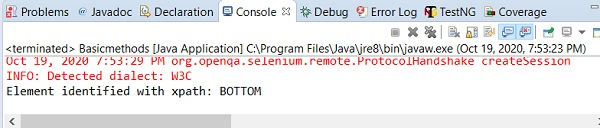
Output

12K+ Views
