
Article Categories
- All Categories
-
 Data Structure
-
 Networking
-
 RDBMS
RDBMS
-
 Operating System
-
 Java
Java
-
 MS Excel
-
 iOS
iOS
-
 HTML
HTML
-
 CSS
CSS
-
 Android
-
 Python
-
 C Programming
-
 C++
C++
-
 C#
C#
-
 MongoDB
-
 MySQL
MySQL
-
 Javascript
-
 PHP
PHP
-
 Economics & Finance
How can Tensorflow be used to decode the predictions using Python?
TensorFlow can be used to decode predictions by converting the predicted class indices to human-readable labels using ImageNet class names. This process is essential when working with pre-trained models for image classification.
Read More: What is TensorFlow and how Keras work with TensorFlow to create Neural Networks?
A neural network that contains at least one convolutional layer is known as a Convolutional Neural Network (CNN). We can use the Convolutional Neural Network to build learning model.
We are using Google Colaboratory to run the below code. Google Colab helps run Python code over the browser and requires zero configuration with free access to GPUs (Graphical Processing Units).
The intuition behind transfer learning for image classification is that if a model is trained on a large and general dataset, this model can effectively serve as a generic model for the visual world. It learns feature maps, so users don't have to start from scratch by training a large model on a large dataset.
TensorFlow Hub is a repository containing pre-trained TensorFlow models. TensorFlow can be used to fine-tune learning models.
Setting Up the Environment
Before decoding predictions, we need to import necessary libraries and load a pre-trained model ?
import tensorflow as tf
import numpy as np
import matplotlib.pyplot as plt
from PIL import Image
Decoding Predictions
Once we have predictions from a pre-trained model, we need to map the predicted class indices to human-readable labels ?
print("Decoding the predictions")
labels_path = tf.keras.utils.get_file('ImageNetLabels.txt','https://storage.googleapis.com/download.tensorflow.org/data/ImageNetLabels.txt')
imagenet_labels = np.array(open(labels_path).read().splitlines())

# Display the image with prediction
plt.imshow(grace_hopper)
plt.axis('off')
predicted_class_name = imagenet_labels[predicted_class]
_ = plt.title("Prediction is: " + predicted_class_name.title())
Code credit − https://www.tensorflow.org/tutorials/images/transfer_learning_with_hub
Output
Decoding the predictions
Downloading data from https://storage.googleapis.com/download.tensorflow.org/data/ImageNetLabels.txt
16384/10484 [==============================================] - 0s 0us/step
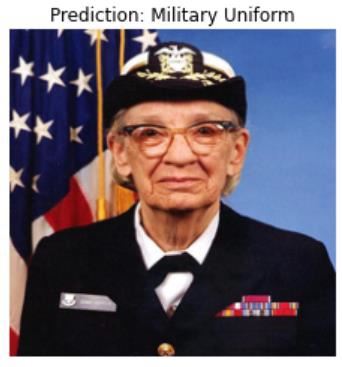
How It Works
The
tf.keras.utils.get_file()function downloads the ImageNet labels file containing 1000 class namesThe predicted class ID (numerical index) is used to fetch the corresponding human-readable label from the ImageNet labels array
The image is displayed with matplotlib along with the predicted class name as the title
The
.title()method formats the class name with proper capitalization
Alternative Approach
TensorFlow also provides a built-in function for decoding ImageNet predictions ?
# Using TensorFlow's built-in decode_predictions
from tensorflow.keras.applications.imagenet_utils import decode_predictions

# Assuming 'predictions' contains the model output
decoded_predictions = decode_predictions(predictions, top=3)
for i, (imagenet_id, label, score) in enumerate(decoded_predictions[0]):
    print(f"{i + 1}: {label} ({score:.2f})")
Conclusion
Decoding predictions in TensorFlow involves mapping numerical class indices to human-readable labels using ImageNet class names. This process is crucial for interpreting model outputs in image classification tasks and can be done using either custom label files or TensorFlow's built-in utilities.

561 Views
