
- Tcl - Home
- Tcl - Overview
- Tcl - Environment Setup
- Tcl - Special Variables
- Tcl - Basic Syntax
- Tcl - Commands
- Tcl - Data Types
- Tcl - Variables
- Tcl - Operators
- Tcl - Decisions
- Tcl - Loops
- Tcl - Arrays
- Tcl - Strings
- Tcl - Lists
- Tcl - Dictionary
- Tcl - Procedures
- Tcl - Packages
- Tcl - Namespaces
- Tcl - File I/O
- Tcl - Error Handling
- Tcl - Built-in Functions
- Tcl - Regular Expressions
- Tk - Overview
- Tk - Environment
- Tk - Special Variables
- Tk - Widgets Overview
- Tk - Basic Widgets
- Tk - Layout Widgets
- Tk - Selection Widgets
- Tk - Canvas Widgets
- Tk - Mega Widgets
- Tk - Fonts
- Tk - Images
- Tk - Events
- Tk - Windows Manager
- Tk - Geometry Manager
- Tcl/Tk Useful Resources
- Tcl/Tk - Quick Guide
- Tcl/Tk - Useful Resources
- Tcl/Tk - Discussion
Selected Reading
Tk - Notebook Widget
A tabbed widget that helps to switch between one of several pages, using an index tab. The syntax for notebook widget is shown below.
ttk::notebook notebookName options
Options
The options available for the notebook widget are listed below in the following table −
| Sr.No. | Syntax & Description |
|---|---|
| 1 | -height number Used to set height for widget. |
| 2 | -width number Sets the width for widget. |
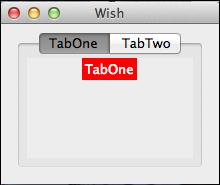
A simple example for notebook widget is shown below −
#!/usr/bin/wish

ttk::notebook .n  -width 100 -height 100
ttk::frame .n.f1;
ttk::frame .n.f2;
.n add .n.f1 -text "TabOne"
.n add .n.f2 -text "TabTwo"
pack [label .n.f1.f2 -background red -foreground white -text "TabOne"]
pack [label .n.f2.f2 -background red -foreground white -text "TabTwo"]
pack .n
When we run the above program, we will get the following output −
tk_mega_widgets.htm

Advertisements