- Spring WS - Home
- Spring WS - Overview
- Spring WS - Environment Setup
- Spring WS - First Application
- Spring WS - Static WSDL
- Spring WS - Writing Server
- Spring WS - Unit Test Server
- Spring WS - Writing Client
- Spring WS - Unit Test Client
Spring WS - Resources
Spring WS - First Application
Let us start writing actual SOAP based web services with Spring-WS Framework. Before you start writing your first example using Spring-WS framework, you have to make sure that you have setup your Spring-WS environment properly as explained in Spring Web Services - Environment Setup tutorial. I also assume that you have a little bit working knowledge with Eclipse IDE.
So let us proceed to write a simple Spring WS Application which will expose a web service method to book a leave in an HR Portal.
Contract-first Approach
As Spring-WS uses Contract-first approach which means we should have our XML Structures ready before writing any JAVA based implementation code. We're defining a LeaveRequest Object which have sub-object as Leave and Employee. Following are the required XML constructs:
Leave.xml
<Leave xmlns="http://tutorialspoint.com/hr/schemas">
   <StartDate>2016-07-03</StartDate>
   <EndDate>2016-07-07</EndDate>
</Leave>
Employee.xml
<Employee xmlns="http://tutorialspoint.com/hr/schemas">
   <Number>404</Number>
   <FirstName>Mahesh</FirstName>
   <LastName>Parashar</LastName>
</Employee>
LeaveRequest.xml
<LeaveRequest xmlns="http://tutorialspoint.com/hr/schemas">
   <Leave>
      <StartDate>2016-07-03</StartDate>
      <EndDate>2016-07-07</EndDate>
   </Leave>
   <Employee>
      <Number>404</Number>
      <FirstName>Mahesh</FirstName>
      <LastName>Parashar</LastName>
   </Employee>
</LeaveRequest>
hr.xsd
<xs:schema xmlns:xs="http://www.w3.org/2001/XMLSchema"
   xmlns:hr="http://tutorialspoint.com/hr/schemas"
   elementFormDefault="qualified"
   targetNamespace="http://tutorialspoint.com/hr/schemas">
   <xs:element name="LeaveRequest">
      <xs:complexType>
         <xs:all>
            <xs:element name="Leave" type="hr:LeaveType"/>
            <xs:element name="Employee" type="hr:EmployeeType"/>
         </xs:all>
      </xs:complexType>
   </xs:element>
   <xs:complexType name="LeaveType">
      <xs:sequence>
         <xs:element name="StartDate" type="xs:date"/>
         <xs:element name="EndDate" type="xs:date"/>
      </xs:sequence>
   </xs:complexType>
   <xs:complexType name="EmployeeType">
      <xs:sequence>
         <xs:element name="Number" type="xs:integer"/>
         <xs:element name="FirstName" type="xs:string"/>
         <xs:element name="LastName" type="xs:string"/>
      </xs:sequence>
   </xs:complexType>
</xs:schema>
Create Project
Let's open command console, go the C:\MVN directory and execute the following mvn command.
C:\MVN>mvn archetype:generate -DarchetypeGroupId=org.springframework.ws -DarchetypeArtifactId=spring-ws-archetype -DgroupId=com.tutorialspoint.hr -DartifactId=leaveService
Maven will start processing and will create the complete java application project structure.
[INFO] Scanning for projects...
[INFO]
[INFO] ------------------------------------------------------------------------
[INFO] Building Maven Stub Project (No POM) 1
[INFO] ------------------------------------------------------------------------
[INFO]
[INFO] Using property: groupId = com.tutorialspoint.hr
[INFO] Using property: artifactId = leaveService
Define value for property 'version':  1.0-SNAPSHOT: :
[INFO] Using property: package = com.tutorialspoint.hr
Confirm properties configuration:
groupId: com.tutorialspoint.hr
artifactId: leaveService
version: 1.0-SNAPSHOT
package: com.tutorialspoint.hr
 Y: :
[INFO] -------------------------------------------------------------------------
---
[INFO] Using following parameters for creating project from Old (1.x) Archetype:
 spring-ws-archetype:2.0.0-M1
[INFO] -------------------------------------------------------------------------
---
[INFO] Parameter: groupId, Value: com.tutorialspoint.hr
[INFO] Parameter: packageName, Value: com.tutorialspoint.hr
[INFO] Parameter: package, Value: com.tutorialspoint.hr
[INFO] Parameter: artifactId, Value: leaveService
[INFO] Parameter: basedir, Value: C:\mvn
[INFO] Parameter: version, Value: 1.0-SNAPSHOT
[INFO] project created from Old (1.x) Archetype in dir: C:\mvn\leaveService
[INFO] ------------------------------------------------------------------------
[INFO] BUILD SUCCESS
[INFO] ------------------------------------------------------------------------
[INFO] Total time: 35.989 s
[INFO] Finished at: 2017-01-21T11:18:31+05:30
[INFO] Final Memory: 17M/178M
[INFO] ------------------------------------------------------------------------
Now go to C:/MVN directory. You'll see a java application project created named leaveService (as specified in artifactId). Update the pom.xml and add HumanResourceService.java, HumanResourceServiceImpl.java in C:\MVN\leaveService\src\main\java\com\tutorialspoint\hr\service folder and LeaveEndpoint.java in C:\MVN\leaveService\src\main\java\com\tutorialspoint\hr\ws folder.
pom.xml
<?xml version="1.0" encoding="UTF-8"?>
   <project xmlns="http://maven.apache.org/POM/4.0.0"
   xmlns:xsi="http://www.w3.org/2001/XMLSchema-instance"
   xsi:schemaLocation="http://maven.apache.org/POM/4.0.0
   http://maven.apache.org/maven-v4_0_0.xsd">
   <modelVersion>4.0.0</modelVersion>
   <groupId>com.tutorialspoint.hr</groupId>
   <artifactId>leaveService</artifactId>
   <packaging>war</packaging>
   <version>1.0-SNAPSHOT</version>
   <name>leaveService Spring-WS Application</name>
   <url>http://www.springframework.org/spring-ws</url>
   <build>
      <finalName>leaveService</finalName>
   </build>
   <dependencies>
      <dependency>
         <groupId>org.springframework.ws</groupId>
         <artifactId>spring-ws-core</artifactId>
         <version>2.4.0.RELEASE</version>
      </dependency>
      <dependency>
         <groupId>jdom</groupId>
         <artifactId>jdom</artifactId>
         <version>1.0</version>
      </dependency>
      <dependency>
         <groupId>jaxen</groupId>
         <artifactId>jaxen</artifactId>
         <version>1.1</version>
      </dependency>
      <dependency>
         <groupId>wsdl4j</groupId>
         <artifactId>wsdl4j</artifactId>
         <version>1.6.2</version>
      </dependency>
   </dependencies>
</project>
HumanResourceService.java
package com.tutorialspoint.hr.service;

import java.util.Date;

public interface HumanResourceService {
   void bookLeave(Date startDate, Date endDate, String name);
}
HumanResourceServiceImpl.java
package com.tutorialspoint.hr.service;

import java.util.Date;

import org.springframework.stereotype.Service;

@Service
public class HumanResourceServiceImpl implements HumanResourceService {
   public void bookLeave(Date startDate, Date endDate, String name) {
      System.out.println("Booking holiday for [" + startDate + "-" + endDate + "] for [" + name + "] ");
   }
}
LeaveEndpoint.java
package com.tutorialspoint.hr.ws;

import java.text.SimpleDateFormat;
import java.util.Date;

import org.springframework.beans.factory.annotation.Autowired;
import org.springframework.ws.server.endpoint.annotation.Endpoint;
import org.springframework.ws.server.endpoint.annotation.PayloadRoot;
import org.springframework.ws.server.endpoint.annotation.RequestPayload;

import com.tutorialspoint.hr.service.HumanResourceService;
import org.jdom.Element;
import org.jdom.JDOMException;
import org.jdom.Namespace;
import org.jdom.xpath.XPath;

@Endpoint
public class LeaveEndpoint {

private static final String NAMESPACE_URI = "http://tutorialspoint.com/hr/schemas";

private XPath startDateExpression;

private XPath endDateExpression;

private XPath nameExpression;

private HumanResourceService humanResourceService;

   @Autowired
   public LeaveEndpoint(HumanResourceService humanResourceService)
      throws JDOMException {
      this.humanResourceService = humanResourceService;

      Namespace namespace = Namespace.getNamespace("hr", NAMESPACE_URI);

      startDateExpression = XPath.newInstance("//hr:StartDate");
      startDateExpression.addNamespace(namespace);

      endDateExpression = XPath.newInstance("//hr:EndDate");
      endDateExpression.addNamespace(namespace);

      nameExpression = XPath.newInstance("concat(//hr:FirstName,' ',//hr:LastName)");
      nameExpression.addNamespace(namespace);
   }

   @PayloadRoot(namespace = NAMESPACE_URI, localPart = "LeaveRequest")
   public void handleLeaveRequest(@RequestPayload Element leaveRequest)
      throws Exception {
      SimpleDateFormat dateFormat = new SimpleDateFormat("yyyy-MM-dd");
      Date startDate = dateFormat.parse(startDateExpression.valueOf(leaveRequest));
      Date endDate = dateFormat.parse(endDateExpression.valueOf(leaveRequest));
      String name = nameExpression.valueOf(leaveRequest);

      humanResourceService.bookLeave(startDate, endDate, name);
   }
}
/WEB-INF/spring-ws-servlet.xml
<beans xmlns="http://www.springframework.org/schema/beans"
   xmlns:xsi="http://www.w3.org/2001/XMLSchema-instance"
   xmlns:context="http://www.springframework.org/schema/context"
   xmlns:sws="http://www.springframework.org/schema/web-services"
   xsi:schemaLocation="http://www.springframework.org/schema/beans
   http://www.springframework.org/schema/beans/spring-beans-3.0.xsd
   http://www.springframework.org/schema/web-services
   http://www.springframework.org/schema/web-services/web-services-2.0.xsd
   http://www.springframework.org/schema/context
   http://www.springframework.org/schema/context/spring-context-3.0.xsd">

   <context:component-scan base-package="com.tutorialspoint.hr"/>
   <bean id="humanResourceService" class="com.tutorialspoint.hr.service.HumanResourceServiceImpl" />
   <sws:annotation-driven/>

   <sws:dynamic-wsdl id="leave"
      portTypeName="HumanResource"
      locationUri="/leaveService/"
      targetNamespace="http://tutorialspoint.com/hr/definitions">
      <sws:xsd location="/WEB-INF/hr.xsd"/>
   </sws:dynamic-wsdl>
</beans>
/WEB-INF/web.xml
<web-app xmlns="http://java.sun.com/xml/ns/j2ee"
   xmlns:xsi="http://www.w3.org/2001/XMLSchema-instance"
   xsi:schemaLocation="http://java.sun.com/xml/ns/j2ee
   http://java.sun.com/xml/ns/j2ee/web-app_2_4.xsd"
   version="2.4">

   <display-name>TutorialsPoint HR Leave Service</display-name>

   <servlet>
      <servlet-name>spring-ws</servlet-name>
      <servlet-class>org.springframework.ws.transport.http.MessageDispatcherServlet</servlet-class>
      <init-param>
         <param-name>transformWsdlLocations</param-name>
         <param-value>true</param-value>
      </init-param>
   </servlet>
   <servlet-mapping>
      <servlet-name>spring-ws</servlet-name>
      <url-pattern>/*</url-pattern>
   </servlet-mapping>
</web-app>
/WEB-INF/hr.xsd
<xs:schema xmlns:xs="http://www.w3.org/2001/XMLSchema"
   xmlns:hr="http://tutorialspoint.com/hr/schemas"
   elementFormDefault="qualified"
   targetNamespace="http://tutorialspoint.com/hr/schemas">
   <xs:element name="LeaveRequest">
      <xs:complexType>
         <xs:all>
            <xs:element name="Leave" type="hr:LeaveType"/>
            <xs:element name="Employee" type="hr:EmployeeType"/>
         </xs:all>
      </xs:complexType>
   </xs:element>
   <xs:complexType name="LeaveType">
      <xs:sequence>
         <xs:element name="StartDate" type="xs:date"/>
         <xs:element name="EndDate" type="xs:date"/>
      </xs:sequence>
   </xs:complexType>
   <xs:complexType name="EmployeeType">
      <xs:sequence>
         <xs:element name="Number" type="xs:integer"/>
         <xs:element name="FirstName" type="xs:string"/>
         <xs:element name="LastName" type="xs:string"/>
      </xs:sequence>
   </xs:complexType>
</xs:schema>
Build Project
Let's open command console, go the C:\MVN\leaveService directory and execute the following mvn command.C:\MVN\leaveService>mvn clean packageMaven will start building the project.
[INFO] Scanning for projects...
[INFO]
[INFO] ------------------------------------------------------------------------
[INFO] Building leaveService Spring-WS Application 1.0-SNAPSHOT
[INFO] ------------------------------------------------------------------------
[INFO]
[INFO] --- maven-clean-plugin:2.5:clean (default-clean) @ leaveService ---
[INFO] Deleting C:\mvn\leaveService\target
[INFO]
[INFO] --- maven-resources-plugin:2.6:resources (default-resources) @ leaveServi
ce ---
[WARNING] Using platform encoding (Cp1252 actually) to copy filtered resources,
i.e. build is platform dependent!
[INFO] Copying 0 resource
[INFO]
[INFO] --- maven-compiler-plugin:3.1:compile (default-compile) @ leaveService --
-
[INFO] Changes detected - recompiling the module!
[WARNING] File encoding has not been set, using platform encoding Cp1252, i.e. b
uild is platform dependent!
[INFO] Compiling 3 source files to C:\mvn\leaveService\target\classes
[INFO]
[INFO] --- maven-resources-plugin:2.6:testResources (default-testResources) @ le
aveService ---
[WARNING] Using platform encoding (Cp1252 actually) to copy filtered resources,
i.e. build is platform dependent!
[INFO] skip non existing resourceDirectory C:\mvn\leaveService\src\test\resource
s
[INFO]
[INFO] --- maven-compiler-plugin:3.1:testCompile (default-testCompile) @ leaveSe
rvice ---
[INFO] No sources to compile
[INFO]
[INFO] --- maven-surefire-plugin:2.12.4:test (default-test) @ leaveService ---
[INFO] No tests to run.
[INFO]
[INFO] --- maven-war-plugin:2.2:war (default-war) @ leaveService ---
[INFO] Packaging webapp
[INFO] Assembling webapp [leaveService] in [C:\mvn\leaveService\target\leaveServ
ice]
[INFO] Processing war project
[INFO] Copying webapp resources [C:\mvn\leaveService\src\main\webapp]
[INFO] Webapp assembled in [7159 msecs]
[INFO] Building war: C:\mvn\leaveService\target\leaveService.war
[INFO] WEB-INF\web.xml already added, skipping
[INFO] ------------------------------------------------------------------------
[INFO] BUILD SUCCESS
[INFO] ------------------------------------------------------------------------
[INFO] Total time: 19.667 s
[INFO] Finished at: 2017-01-21T11:56:43+05:30
[INFO] Final Memory: 18M/173M
[INFO] ------------------------------------------------------------------------
Import Project in Eclipse
Open Eclipse.
Select File > Import > option.
Select Maven Projects Option. Click on Next Button.
Select Project location, where leaveService project was created using Maven.
Click Finish Button.
Run Project
Once you are done with creating source and configuration files, export your application. Right click on your application and use Export > WAR File option and save your leaveService.war file in Tomcat's webapps folder.
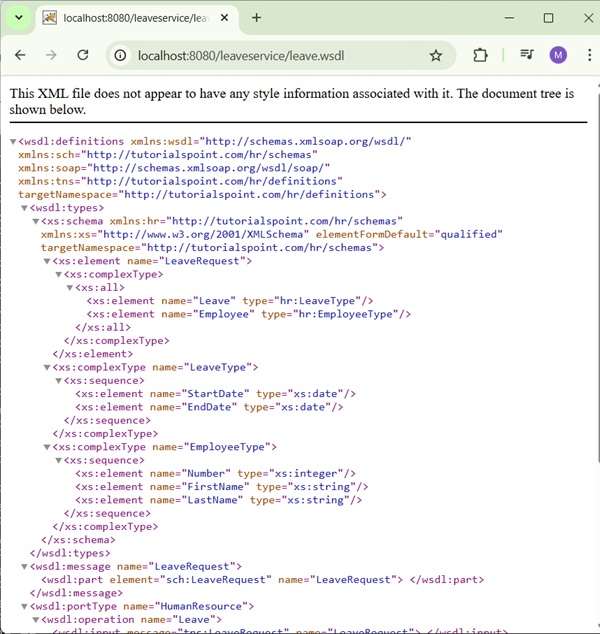
Now start your Tomcat server and make sure you are able to access other web pages from webapps folder using a standard browser. Now try to access the URL http://localhost:8080/leaveService/leave.wsdl and if everything is fine with your Spring Web Application, you should see the following result: