
- Basic Image Operations
- Python Pillow - Working with Images
- Python Pillow - Resizing an Image
- Python Pillow - Flip and Rotate Images
- Python Pillow - Cropping an Image
- Python Pillow - Adding Borders to Images
- Python Pillow - Identifying Image Files
- Python Pillow - Merging Images
- Python Pillow - Cutting and Pasting Images
- Python Pillow - Rolling an Image
- Python Pillow - Writing text on image
- Python Pillow - ImageDraw Module
- Python Pillow - Concatenating two Images
- Python Pillow - Creating Thumbnails
- Python Pillow - Creating a Watermark
- Python Pillow - Image Sequences
- Python Pillow Color Conversions
- Python Pillow - Colors on an Image
- Python Pillow - Creating Images With Colors
- Python Pillow - Converting Color String to RGB Color Values
- Python Pillow - Converting Color String to Grayscale Values
- Python Pillow - Change the Color by Changing the Pixel Values
- Image Manipulation
- Python Pillow - Reducing Noise
- Python Pillow - Changing Image Modes
- Python Pillow - Compositing Images
- Python Pillow - Working with Alpha Channels
- Python Pillow - Applying Perspective Transforms
- Image Filtering
- Python Pillow - Adding Filters to an Image
- Python Pillow - Convolution Filters
- Python Pillow - Blur an Image
- Python Pillow - Edge Detection
- Python Pillow - Embossing Images
- Python Pillow - Enhancing Edges
- Python Pillow - Unsharp Mask Filter
- Image Enhancement and Correction
- Python Pillow - Enhancing Contrast
- Python Pillow - Enhancing Sharpness
- Python Pillow - Enhancing Color
- Python Pillow - Correcting Color Balance
- Python Pillow - Removing Noise
- Advanced Topics
- Python Pillow - Creating Animated GIFs
- Python Pillow - Batch Processing Images
- Python Pillow - Converting Image File Formats
- Python Pillow - Adding Padding to an Image
- Python Pillow - Color Inversion
- Python Pillow - M L with Numpy
- Python Pillow with Tkinter BitmapImage and PhotoImage objects
- Image Module
- Python Pillow - Image Blending
- Python Pillow Useful Resources
- Python Pillow - Quick Guide
- Python Pillow - Function Reference
- Python Pillow - Useful Resources
- Python Pillow - Discussion
Python Pillow - ImageChops.soft_light() Function
The Python image processing library Pillow (PIL) offers a variety of functions within its ImageChops module for performing arithmetical and logical operations on images. Additionally, the library includes functions specifically designed for blending modes, which are techniques for merging two images or layers to generate a distinctive result. One such blending mode is Soft Light.
The soft_light() function in the ImageChops module superimposes two images on top of each other using the Soft Light algorithm.
Syntax
Following is the syntax of the function −
PIL.ImageChops.soft_light(image1, image2)
Parameters
Here are the details of this function parameters −
image1 − The first input image.
image2 − The second input image.
Return Value
The return type of this function is an Image.
Examples
Example 1
Here is an example that demonstrates the working of the ImageChops.soft_light() function for superimposing the two images using the Soft Light blending mode.
from PIL import Image, ImageChops
import numpy as np

# Create two input images using numpy array
array1 = np.array([(154, 64, 3), (255, 0, 0), (255, 255, 0), (255, 255, 255), (164, 0, 3)], dtype=np.uint8)
array2 = np.array([(200, 14, 3), (20, 222, 0), (255, 155, 0), (255, 55, 100), (180, 0, 78)], dtype=np.uint8)

image1 = Image.fromarray(array1)
image2 = Image.fromarray(array2)

# Display the pixel values of the two input images
print("Pixel values of image1 at (0, 0):", image1.getpixel((0, 0)))
print("Pixel values of image2 at (0, 0):", image2.getpixel((0, 0)))

# Superimpose the two images using soft_light algorithm
result = ImageChops.soft_light(image1, image2)

# Display the pixel values of the resulting image at (0, 0)
print("Pixel values of the result at (0, 0) after soft_light:", result.getpixel((0, 0)))
Output
Pixel values of image1 at (0, 0): 154
Pixel values of image2 at (0, 0): 200
Pixel values of the result at (0, 0) after soft_light: 188
Example 2
In this example, the PIL.ImageChops.soft_light() function is applied to the two PNG images to superimpose the images using the Soft Light algorithm.
from PIL import Image, ImageChops

# Open the input images
image1 = Image.open("Images/pillow-logo-w.png")
image2 = Image.open("Images/ColorDots.png")

# Apply the Soft Light algorithm
result_image = ImageChops.soft_light(image1, image2)

# Display the input and resulting images
image1.show()
image2.show()
result_image.show()
Output
Input Image 1

Input Image 2

Output Image

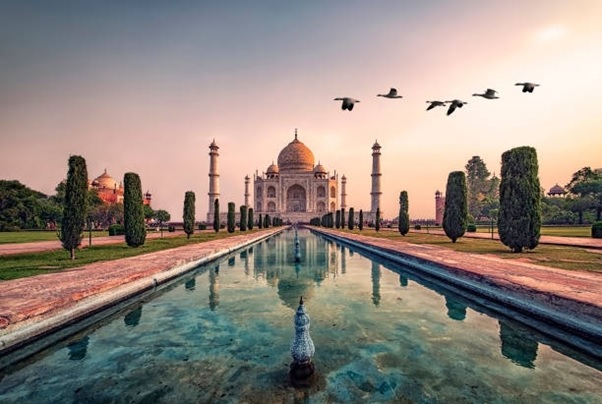
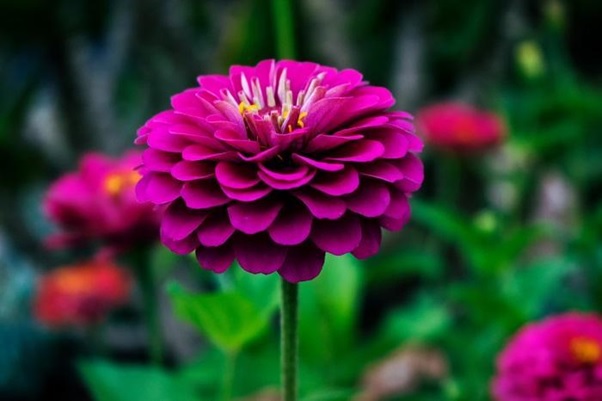
Example 3
Here is an example that demonstrates the use of Soft Light blend mode with two JPEG image files.
from PIL import Image, ImageChops

# Open the input images
image1 = Image.open("Images/Tajmahal_2.jpg")
image2 = Image.open("Images/Flower1.jpg")

# Apply the Soft Light algorithm
result = ImageChops.soft_light(image1, image2)

# Display the input and resulting images
image1.show()
image2.show()
result.show()
Output
Input Image 1
Input Image 2
Output Image