
- Polars - Home
- Polars - Installation
- Polars - Expressions And Contexts
- Polars - Lazy vs Eager API
- Polars - Data Stucture and Data Types
- Polars Useful Resources
- Polars - Useful Resources
- Polars - Discussion
Python Polars - Lazy vs Eager API
Polars supports two ways or mode to process data eager and lazy. Eager mode execute the code immediately, which is similar to pandas. Where as, Lazy mode does not execute code immediately. Instead of it, lazy API execute the code once it collects all operations. It is basically a good way of working with data because processing the data using lazy mode allows Polars to optimize the code. So, in mostly cases lazy mode is preferred.
Why Polars uses Lazy Execution?
Lets understand through a scenario example why polars prefer lazy execution better than eager execution.
Let's suppose in a dataset we want following operations −
- filter the rows
- selecting rows
- compute new column
- calculate aggregation(like min, max, count, )
Then here, if we execute each step one by one, polars have to execute each operation immediately and wait for the result each time which is eager mode.
So, instead of executing each step one by one, Polars first collects all the operations you want to perform and then executes them together.
After collecting all operations, polars also find out which steps of opertaions can be skip and rearranged and how to execute the data so it will give better performance in minimum time.
Working of Lazy API in Polars
Let's see the working of lazy API in polars through the following steps −
- First, we write all operations we want to perform on dataset.
- After that, polars makes an optimized query steps internally.
- The execution of code will happen only, when we invoke .collect() Function
Example 1
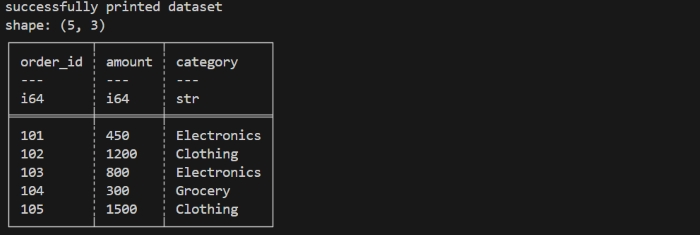
Lets understand lazy API through following program. First we create a dataset of online orders then we perform some operations on that dataset and understand the working of lazy API.
Step 1: creating a dataset
First, we will create a dataset using eager mode.
import polars as pl

orders = pl.DataFrame({
    "order_id": [101, 102, 103, 104, 105],
    "amount": [450, 1200, 800, 300, 1500],
    "category": ["Electronics", "Clothing", "Electronics", "Grocery", "Clothing"]
})
print("successfully printed dataset")
print(orders)
Let us compile and run the above program, this will produce the following result −

Here, In eager mode, each step runs immediately and gives a result immediately. This means Polars keeps executing again and again at every step, even if some part of data is not needed later. If instead of this, we wait until all steps are defined before running them (lazy mode), Polars can optimize the all process and avoid unnecessary work.
Now, suppose we want polars to perform following operations in lazy mode −
- Filter all orders whose amount is greater than 500.
- Add a new column that calculates amount with 18% GST.
- Group the filtered orders based on their category.
- Calculate the average GST included amount for each category.
Step 2: Use lazy mode
Now, we will switch to lazy mode using .lazy() function, so that we can perform operations in lazy mode in polars on above dataset we have created. So, at this point nothing will get execute immediately. We are just converting our dataset in lazyFrame. We will read about lazyFrame in more deatil in the upcoming chapters.
lazy_orders = orders.lazy()
Step 3: Lazy Pipeline
Now, we will create a lazy pipeline which explains the polars what operations we want to perform on our given dataset. But, still it will not get execute, polars will just store the optimized steps to execute the code later.
lazy_mode = (
    lazy_orders
    .filter(pl.col("amount") > 500)                          # filter expensive orders
    .with_columns((pl.col("amount") * 1.18).alias("with_gst"))  # add GST column
    .group_by("category")                                       # group orders by category
    .agg(pl.col("with_gst").mean().alias("avg_gst_amount"))     # compute average
)
Step 4: Execute the Pipeline
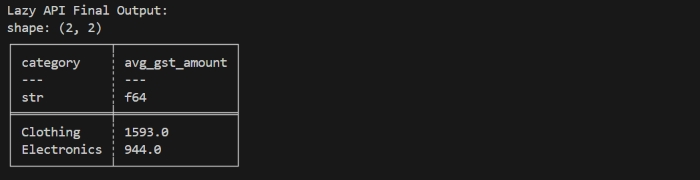
Now, using .collect() function we will execute our above pipeline. At this point, polars will get execute all optimized pipeline code at once.
final_output = lazy_mode.collect()
print(final_output)
Example 2
Now, lets execute all above steps in once to see how lazy API works.
import polars as pl

# create a  DataFrame/dataset
orders = pl.DataFrame({
    "order_id": [101, 102, 103, 104, 105],
    "amount": [450, 1200, 800, 300, 1500],
    "category": ["Electronics", "Clothing", "Electronics", "Grocery", "Clothing"]
})

print("successfully printed dataset")
print(orders)

# Lazy API operations pipeline
lazy_mode = (
    orders.lazy() # convert to lazy mode
    .filter(pl.col("amount") > 500)                          # filter orders
    .with_columns((pl.col("amount") * 1.18).alias("with_gst"))  # add GST column
    .group_by("category")                                       # group orders by category
    .agg(pl.col("with_gst").mean().alias("avg_gst_amount"))     # compute average GST amount
)

final_output = lazy_mode.collect()

print("\nLazy API Final Output:")
print(final_output)
Let us compile and run the above program,this will produce the following result −
Inspecting the Query Execution
When we use polars in lazy mode, the operations and transformations does not run immediately. Polars first make a query plan then optimizes it and then polars execute the operations by invoking .collect() function.
If we want to know the query plan which polars make internally, we can check that, using explain() function.
What is explain() function?
The explain() function returns detailed description of the query plan that Polars will execute in lazy mode.
- It helps to understand how polars will optimize the query.
- It helps to understand which steps of query will get combined or removed.
Example
If we use explain() function in our above code to understand the query plan of polars internally using following command −
print(lazy_mode.explain())
It will display the output as given below in image −

Lazy vs Eager Execution
Below are some differences of lazy and eager exceution and they are as −
| Lazy Execution | Eager Execution |
|---|---|
| Lazy mode Builds a query plan instead of executing immediately. | Eager mode executes computations immediately. |
| Polars optimizes query plan under the hood (predicate pushdown, parallelization, projection pruning). | Eager mode is similar to pandas. |
| Lazy mode is good for large datasets and complex transformations. | Eager mode is best for interactive exploration and small-to-medium datasets. |
Different ways to laod the dataset in polars using python
In the above examples we have created a small dataset for understanding but, polars can ingest data from multiple file formats and memory objects. This makes it flexible for integrating into modern data pipelines.
If you have already dataset in your system but in different formats so you can directly import it in your code editior.
Let's see how you can do that for different sources and formats −
From CSV dataset −
import polars as pl
df = pl.read_csv("path of file.csv")
print(df.head())
From Parquet −
df_parquet = pl.read_parquet("path of file.parquet")
From JSON file −
df_json = pl.read_json("path of file.json")
#For JSON Lines (NDJSON), use the following instead:
df_json = pl.read_ndjson("path of file.json")
What is Streaming in Polars?
There is another feature provided by lazy API in polars which is knowns as streaming. When we work with large datasets, instead of loading entire data at once may not be possible. Polars helps to resolve this problem using streaming.
Streaming allows us to process the data in small parts or chunks. By doing streaminh, polars reads our data in parts and processes the data in chunks. It also solves the memory space problem. It is more useful for or multi-GB CSV or Parquet files. We can enable streaming by invoking .collect(streaming=True).
It works only in Lazy mode and only for operations that support streaming. It reduces memory usage and makes possible big-data processing on normal systems.
Working of Streaming
Let's understand the working of streaming through following steps −
- Firstly, polars does not read the entire file.
- It reads a small portion or chunks, then it apply the given operations.
- After applying operations it discard that portion of data.
- Then, it reads the next portion of data, process it, and merges the results.
- At last, it display the final output.
Limitations of Streaming
Streaming is helpful but not supports every operation. Some operations require full data in memory, so they would not stream.
Following are some limitataions of using streaming and they are as −
- Streaming does not supports some joins operations.
- It does not supports those operations which required entire dataframe at once.
- It does not supports some window functions also.
