
Article Categories
- All Categories
-
 Data Structure
-
 Networking
-
 RDBMS
RDBMS
-
 Operating System
-
 Java
Java
-
 MS Excel
-
 iOS
iOS
-
 HTML
HTML
-
 CSS
CSS
-
 Android
-
 Python
-
 C Programming
-
 C++
C++
-
 C#
C#
-
 MongoDB
-
 MySQL
MySQL
-
 Javascript
-
 PHP
PHP
Selected Reading
Plot the dataset to display Uptrend – Python Pandas
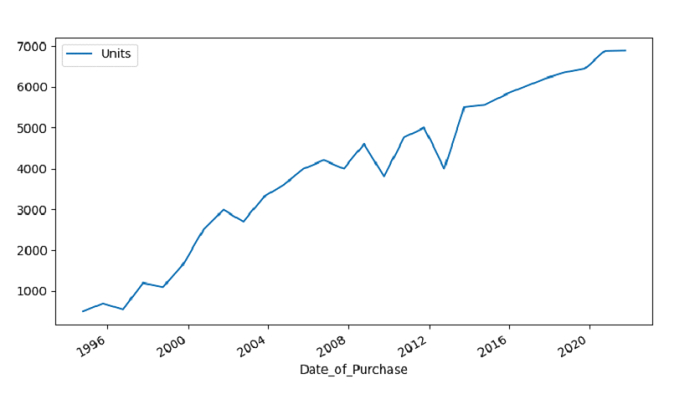
Upward pattern displayed by Time Series Analysis is what we call Uptrend. Let’s say the following is our dataset i.e. SalesRecords.csv
At first, import the required libraries −
import pandas as pd
import matplotlib.pyplot as plt
Load data from a CSV file into a Pandas DataFrame −
dataFrame = pd.read_csv("C:\Users\amit_\Desktop\SalesRecords.csv")
Casting column to datetime object −
dataFrame['Date_of_Purchase'] = pd.to_datetime(dataFrame['Date_of_Purchase'])
Create the plot for uptrend −
dataFrame.plot()
Example
Following is the code −
import pandas as pd
import matplotlib.pyplot as plt

# Load data from a CSV file into a Pandas DataFrame
dataFrame = pd.read_csv("C:\Users\amit_\Desktop\SalesRecords.csv")
print("Reading the CSV file...\n", dataFrame)

# casting column to datetime object
dataFrame['Date_of_Purchase'] = pd.to_datetime(dataFrame['Date_of_Purchase'])

dataFrame = dataFrame.set_index('Date_of_Purchase')

# Creating the plot
dataFrame.plot()
plt.show()
Output
Following is the output −

Updated on: 2021-10-01T11:27:48+05:30
184 Views

Advertisements