- Peewee - Home
- Peewee - Overview
- Peewee - Database Class
- Peewee - Model
- Peewee - Field Class
- Peewee - Insert a New Record
- Peewee - Select Records
- Peewee - Filters
- Peewee - Primary & Composite Keys
- Peewee - Update Existing Records
- Peewee - Delete Records
- Peewee - Create Index
- Peewee - Constraints
- Peewee - Using MySQL
- Peewee - Using PostgreSQL
- Peewee - Defining Database Dynamically
- Peewee - Connection Management
- Peewee - Relationships & Joins
- Peewee - Subqueries
- Peewee - Sorting
- Peewee - Counting & Aggregation
- Peewee - SQL Functions
- Peewee - Retrieving Row Tuples/Dictionaries
- Peewee - User defined Operators
- Peewee - Atomic Transactions
- Peewee - Database Errors
- Peewee - Query Builder
- Peewee - Integration with Web Frameworks
- Peewee - SQLite Extensions
- Peewee - PostgreSQL & MySQL Extensions
- Peewee - Using CockroachDB
Peewee Useful Resources
Peewee - Using PostgreSQL
Peewee supports PostgreSQL database as well. It has PostgresqlDatabase class for that purpose. In this chapter, we shall see how we can connect to Postgres database and create a table in it, with the help of Peewee model.
As in case of MySQL, it is not possible to create database on Postgres server with Peewees functionality. The database has to be created manually using Postgres shell or PgAdmin tool.
First, we need to install Postgres server. For windows OS, we can download https://get.enterprisedb.com/postgresql/postgresql-13.1-1-windows-x64.exe and install.
Check PostGreSQL tutorial for more details.
Installing Postgres Driver
Next, install Python driver for Postgres Psycopg2 package using pip installer.
pip install psycopg2
Creating Postgres Database
Start the postgres server, either from PgAdmin tool or psql shell. We are now in a position to create a database. Run following Python script to create mydatabase on Postgres server.
main.py
import psycopg2

conn = psycopg2.connect(host='localhost', user='postgres', password='postgres')
conn.cursor().execute('CREATE DATABASE mydatabase')
conn.close()
Output
Check that the database is created. In psql shell, it can be verified with \l command −

Creating Table in Database
To declare MyUser model and create a table of same name in above database, run following Python code −
main.py
from peewee import *

db = PostgresqlDatabase('mydatabase', host='localhost', port=5432, user='postgres', password='postgres')
class MyUser (Model):
   name=TextField()
   city=TextField(constraints=[SQL("DEFAULT 'Mumbai'")])
   age=IntegerField()
   class Meta:
      database=db
      db_table='MyUser'

db.connect()
db.create_tables([MyUser])
Output
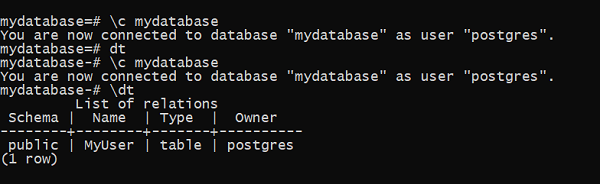
We can verify that table is created. Inside the shell, connect to mydatabase and get list of tables in it.
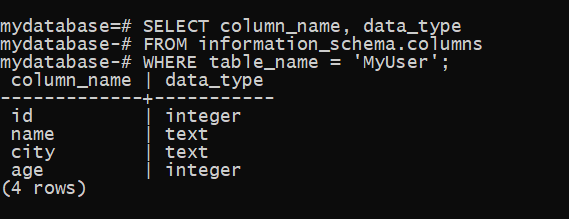
To check structure of newly created MyUser database, run following query in the shell.