
- Peewee - Home
- Peewee - Overview
- Peewee - Database Class
- Peewee - Model
- Peewee - Field Class
- Peewee - Insert a New Record
- Peewee - Select Records
- Peewee - Filters
- Peewee - Primary & Composite Keys
- Peewee - Update Existing Records
- Peewee - Delete Records
- Peewee - Create Index
- Peewee - Constraints
- Peewee - Using MySQL
- Peewee - Using PostgreSQL
- Peewee - Defining Database Dynamically
- Peewee - Connection Management
- Peewee - Relationships & Joins
- Peewee - Subqueries
- Peewee - Sorting
- Peewee - Counting & Aggregation
- Peewee - SQL Functions
- Peewee - Retrieving Row Tuples/Dictionaries
- Peewee - User defined Operators
- Peewee - Atomic Transactions
- Peewee - Database Errors
- Peewee - Query Builder
- Peewee - Integration with Web Frameworks
- Peewee - SQLite Extensions
- Peewee - PostgreSQL & MySQL Extensions
- Peewee - Using CockroachDB
Peewee Useful Resources
Peewee - Relationships and Joins
Peewee supports implementing different type of SQL JOIN queries. Its Model class has a join() method that returns a Join instance.
M1.joint(m2, join_type, on)
The joins table mapped with M1 model to that of m2 model and returns Join class instance. The on parameter is None by default and is expression to use as join predicate.
Join Types
Peewee supports following Join types (Default is INNER).
JOIN.INNER
JOIN.LEFT_OUTER
JOIN.RIGHT_OUTER
JOIN.FULL
JOIN.FULL_OUTER
JOIN.CROSS
Creating Models
To show use of join() method, we first declare models and insert data accordingly −
main.py
from peewee import *

db = SqliteDatabase('mydatabase.db')

class BaseModel(Model):
   class Meta:
      database = db

class Item(BaseModel):
   itemname = TextField()
   price = IntegerField()

class Brand(BaseModel):
   brandname = TextField()
   item = ForeignKeyField(Item, backref='brands')

class Bill(BaseModel):
   item = ForeignKeyField(Item, backref='bills')
   brand = ForeignKeyField(Brand, backref='bills')
   qty = DecimalField()

db.create_tables([Item, Brand, Bill])
db.close()

print("Tables created.")
Output
Tables created.
Tables
Following is the test data −
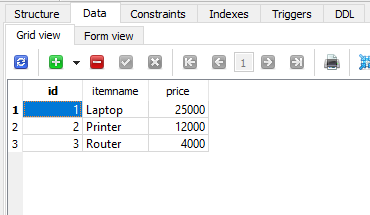
Item Table
The item table is given below −
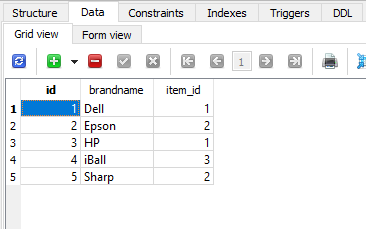
Brand Table
Given below is the brand table −
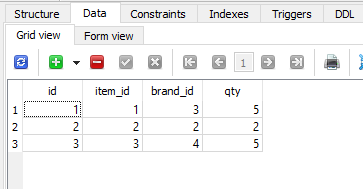
Bill Table
The bill table is as follows −
Following insert sql statements are used.
insert into item(itemname,price) values('Laptop',25000);
insert into item(itemname,price) values('Printer',12000);
insert into item(itemname,price) values('Router',4000);

insert into brand(brandname,item_id) values('Dell', 1);
insert into brand(brandname,item_id) values('Epson', 2);
insert into brand(brandname,item_id) values('HP', 1);
insert into brand(brandname,item_id) values('iBall', 3);
insert into brand(brandname,item_id) values('Sharp', 2);

insert into bill(item_id, brand_id,qty) values(1,3,5);
insert into bill(item_id, brand_id,qty) values(2,2,2);
insert into bill(item_id, brand_id,qty) values(3,4,5);
Example - Simple Join
To perform a simple join operation between Brand and Item tables, execute the following code −
main.py
from peewee import *

db = SqliteDatabase('mydatabase.db')

class BaseModel(Model):
   class Meta:
      database = db

class Item(BaseModel):
   itemname = TextField()
   price = IntegerField()

class Brand(BaseModel):
   brandname = TextField()
   item = ForeignKeyField(Item, backref='brands')

class Bill(BaseModel):
   item = ForeignKeyField(Item, backref='bills')
   brand = ForeignKeyField(Brand, backref='bills')
   qty = DecimalField()

qs=Brand.select().join(Item)
for q in qs:
   print ("Brand ID:{} Item Name: {} Price: {}".format(q.id, q.brandname, q.item.price))
Output
The resultant output will be as follows −
Brand ID:1 Item Name: Dell Price: 25000
Brand ID:2 Item Name: Epson Price: 12000
Brand ID:3 Item Name: HP Price: 25000
Brand ID:4 Item Name: iBall Price: 4000
Brand ID:5 Item Name: Sharp Price: 12000
Example - Joining Multiple Tables
We have a Bill model having two foreign key relationships with item and brand models. To fetch data from all three tables, use following code −
main.py
from peewee import *

db = SqliteDatabase('mydatabase.db')

class BaseModel(Model):
   class Meta:
      database = db

class Item(BaseModel):
   itemname = TextField()
   price = IntegerField()

class Brand(BaseModel):
   brandname = TextField()
   item = ForeignKeyField(Item, backref='brands')

class Bill(BaseModel):
   item = ForeignKeyField(Item, backref='bills')
   brand = ForeignKeyField(Brand, backref='bills')
   qty = DecimalField()

qs=Bill.select().join(Brand).join(Item)
for q in qs:
   print ("BillNo:{} Brand:{} Item:{} price:{} Quantity:{}".format(q.id, q.brand.brandname, q.item.itemname, q.item.price, q.qty))
Output
Following output will be displayed, based on our test data −
BillNo:1 Brand:HP Item:Laptop price:25000 Quantity:5
BillNo:2 Brand:Epson Item:Printer price:12000 Quantity:2
BillNo:3 Brand:iBall Item:Router price:4000 Quantity:5
