
- Neo4j CQL Write Clauses
- Neo4j - Merge Command
- Neo4j - Set Clause
- Neo4j - Delete Clause
- Neo4j - Remove Clause
- Neo4j - Foreach Clause
- Neo4j CQL Read Clause
- Neo4j - Match Clause
- Neo4j - Optional Match Clause
- Neo4j - Where Clause
- Neo4j - Count Function
- Neo4j CQL General Clauses
- Neo4j - Return Clause
- Neo4j - Order By Clause
- Neo4j - Limit Clause
- Neo4j - Skip Clause
- Neo4j - With Clause
- Neo4j - Unwind Clause
- Neo4j CQL Functions
- Neo4j - String Functions
- Neo4j - Aggregation Function
- Neo4j CQL Admin
- Neo4j - Backup & Restore
- Neo4j - Index
- Neo4j - Create Unique Constraint
- Neo4j - Drop Unique
- Neo4j Useful Resources
- Neo4j - Quick Guide
- Neo4j - Useful Resources
- Neo4j - Discussion
Neo4j CQL - UNION ALL
UNION ALL Clause
It combines and returns all rows from two set of results into a single set of results. It returns duplicate rows also from two nodes.
Restriction:
Result column types and names from two set of results have to match that means column names should be same and column's data types should be same.
UNION ALL Clause syntax:
<MATCH Command1>
UNION ALL
<MATCH Command2>
Syntax Description
| S.No. | Syntax Element | Description |
|---|---|---|
| 1. | <MATCH Command1> | It is CQL MATCH command one to be used by UNION clause. |
| 2. | <MATCH Command2> | It is CQL MATCH command two to be used by UNION clause. |
| 3. | UNION ALL | It is a Neo4j CQL keyword for UNION ALL clause. |
Note:-
If both queries does not return same column names and data types, then it throws an error.
In this chapter, we will take a Banking application nodes : CreditCard and DebitCard to explain UNION clause
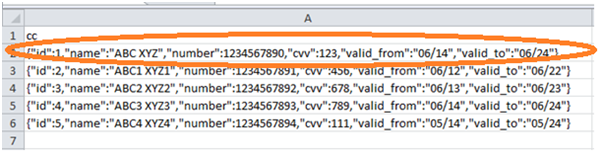
CreditCard Node data
Open Neo4j Data Browser
Type the below command at dollar prompt in Data Browser.
It is Neo4j Data Browser Homepage
MATCH (cc:CreditCard) RETURN cc
Click on "Download CSV" to see the results
DebitCard Node data
Open Neo4j Data Browser
Type the below command at dollar prompt in Data Browser.
It is Neo4j Data Browser Homepage
MATCH (dc:DebitCard) RETURN dc
Click on "Download CSV" to see the results
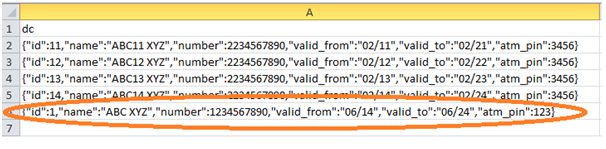
We will use this data to explain the usage of Neo4j CQL UNION with examples
Example1:-
This Example demonstrates what will happen if both queries of UNION clause does have same names or same data types to their columns.
Steps to follow:
Open Neo4j Data Browser
Type the below command at dollar prompt in Data Browser.
It is Neo4j Data Browser Homepage
MATCH (cc:CreditCard)
RETURN cc.id as id,cc.number as number,cc.name as name,
	   cc.valid_from as valid_from,cc.valid_to as valid_to
UNION ALL
MATCH (dc:DebitCard)
RETURN dc.id as id,dc.number as number,dc.name as name,
       dc.valid_from as valid_from,dc.valid_to as valid_to
Click on Execute button and see the success message in the Data Browser.
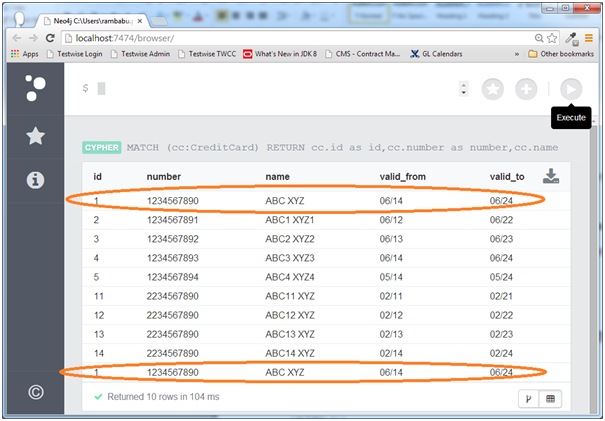
Here we can observe this command returns 10 rows with duplicate rows because UNION ALL clause does not filter them. If we use UNION clause, it returns only 9 rows. Please refer UNION clause chapter to check this.