
- Neo4j CQL Write Clauses
- Neo4j - Merge Command
- Neo4j - Set Clause
- Neo4j - Delete Clause
- Neo4j - Remove Clause
- Neo4j - Foreach Clause
- Neo4j CQL Read Clause
- Neo4j - Match Clause
- Neo4j - Optional Match Clause
- Neo4j - Where Clause
- Neo4j - Count Function
- Neo4j CQL General Clauses
- Neo4j - Return Clause
- Neo4j - Order By Clause
- Neo4j - Limit Clause
- Neo4j - Skip Clause
- Neo4j - With Clause
- Neo4j - Unwind Clause
- Neo4j CQL Functions
- Neo4j - String Functions
- Neo4j - Aggregation Function
- Neo4j CQL Admin
- Neo4j - Backup & Restore
- Neo4j - Index
- Neo4j - Create Unique Constraint
- Neo4j - Drop Unique
- Neo4j Useful Resources
- Neo4j - Quick Guide
- Neo4j - Useful Resources
- Neo4j - Discussion
Neo4J CQL - String Functions
Like SQL, Neo4J CQL has provided a set of String functions to use them in CQL Queries to get required results.
Here we are going to discuss some of the important and frequently used functions.
String Functions List
| S.No. | Function | Description |
|---|---|---|
| 1. | UPPER | It is used to change all letters into upper case letters. |
| 2. | LOWER | It is used to change all letters into lower case letters. |
| 3. | SUBSTRING | It is used to get substring of a given String. |
| 4. | REPLACE | It is used to replace a substring with give substring of a String. |
Now we will discuss each Neo4J CQL String Functions in detail with examples
UPPER
It takes a string as an input and convert into upper case letters. All CQL Functions should use "( )" brackets.
Function syntax
UPPER (<input-string>)
NOTE:-
<input-string> may be a property name of a node or relationship from Neo4J Database.
Example -
This example demonstrates how to use CQL UPPER String function to retrieve Employee node's Ename property details in upper case.
Step 1 - Type the below command at dollar prompt in Data Browser.
MATCH (e:Employee)
RETURN e.id,e.name,e.sal,e.deptno
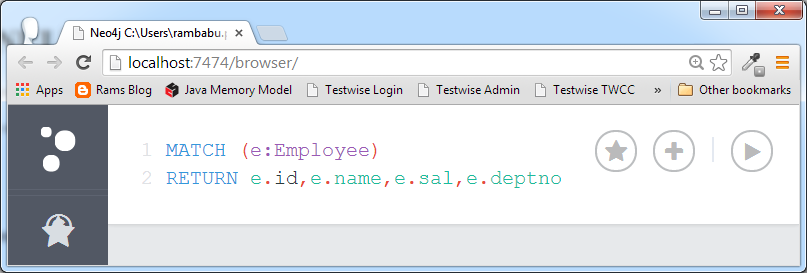
Step 2 - Click on Execute button and observe the results.
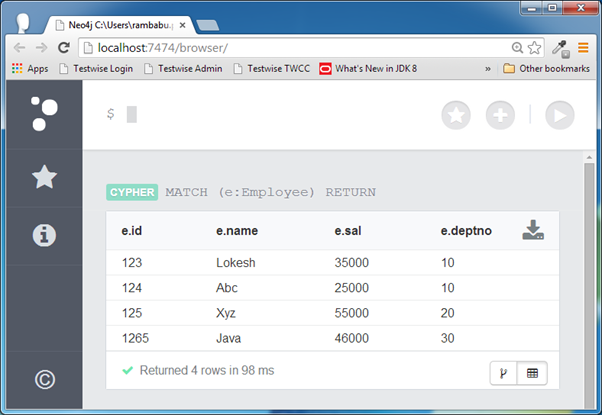
We can observe that this query returns 4 rows.
Step 3 - Type the below command and click on Execute button.
MATCH (e:Employee)
RETURN e.id,UPPER(e.name),e.sal,e.deptno
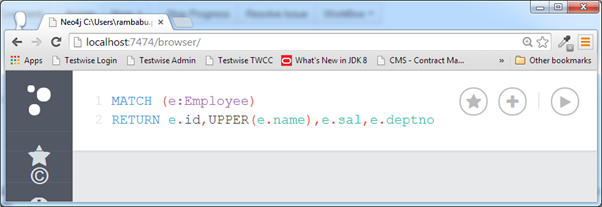
It uses UPPER() String function to print Employee name is upper case letters.
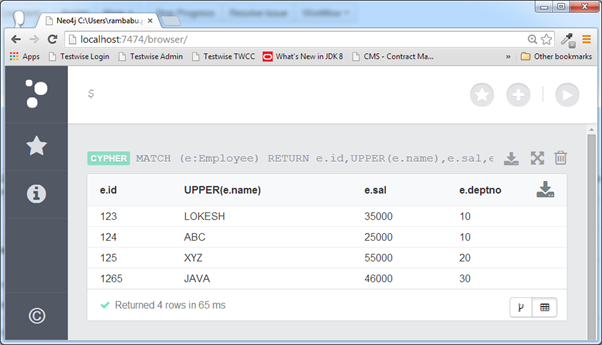
If we observe e.name column, all names are printed in upper case letters.
LOWER
It takes a string as an input and convert into lower case letters. All CQL Functions should use "( )" brackets.
Function syntax
LOWER (<input-string>)
NOTE:-
<input-string> may be a property name of a node or relationship from Neo4J Database.
Example -
This example demonstrates how to use CQL LOWER String function to retrieve Employee node's Ename property details in lower case.
Step 1 - Type the below command at dollar prompt in Data Browser.
MATCH (e:Employee)
RETURN e.id,e.name,e.sal,e.deptno
Step 2 - Click on Execute button and observe the results.
We can observe that this query returns 4 rows.
Step 3 - Type the below command and click on Execute button.
MATCH (e:Employee)
RETURN e.id,LOWER(e.name),e.sal,e.deptno
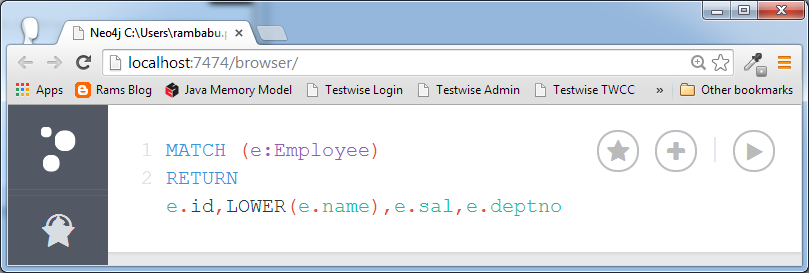
It uses LOWER() String function to print Employee name is lower case letters.
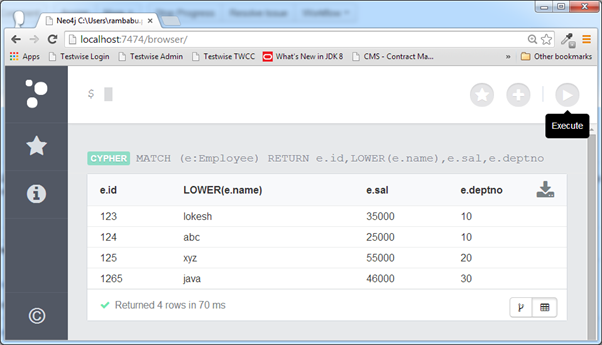
If we observe e.name column, all names are printed in lower case letters.
SUBSTRING
It takes a string as an input and two indexes : one is start of the index and another is end of the index and returns substring from StartInded to EndIndex-1. All CQL Functions should use "( )" brackets.
Function syntax
SUBSTRING(<input-string>,<startIndex> ,<endIndex>)
NOTE:-
In Neo4J CQL, if a string contains n letters, then it's length is n and index starts from 0 and ends at n-1.
<startIndex> is index value to SUBSTRING function.
<endIndex> is optional. If we omit it, then it returns substring of the given string from startIndex to end of the string.
Let us examine this with an example.
Example -
This example demonstrates how to retrieve first two letters of name property of all Employee details.
Step 1 - Type the below command at dollar prompt in Data Browser.
MATCH (e:Employee)
RETURN e.id,e.name,e.sal,e.deptno
Step 2 - Click on Execute button and observe the results.
We can observe that this query returns 4 rows.
Step 3 - Type the below command and click on Execute button.
MATCH (e:Employee)
RETURN e.id,SUBSTRING(e.name,0,2),e.sal,e.deptno
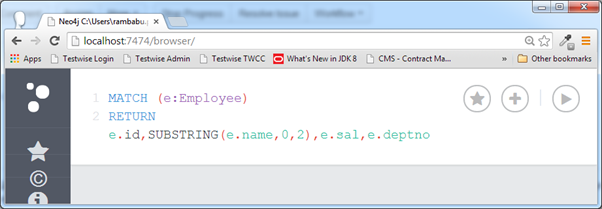
It uses SUBSTRING() String function to print first two letters of Employee name.
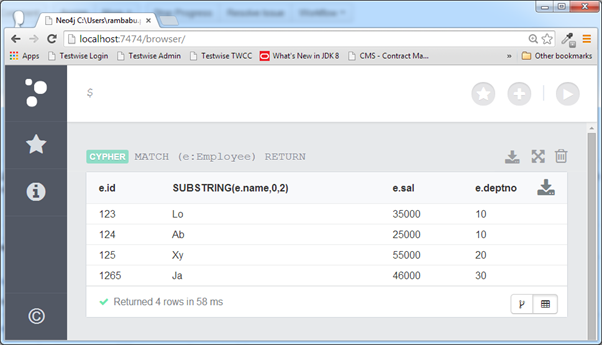
If we observe e.name column, this string function has returned only first two letters of names.