- BPEL - Home
- BPEL - Introduction
- BPEL - Activities
- Partner Link in BPEL Process
- Creating a Partner Link
- BPEL - Adapters
- Process Monitors
- One-Way Messages
- Synchronous Interactions
- Asynchronous Interactions
- Asynchronous Interactions with a Timeout
- Asynchronous Interactions with a Notification Timer
- One Request, Multiple Responses
- One Request, One of Two Possible Responses
- One Request, a Mandatory Response, & an Optional Response
- Partial Processing
- Multiple Application Interactions
- Invoking a Synchronous Web Service
- Invoking an Asynchronous Web Service
- Using Parallel Flow
- Using Conditional Branching
- Using Fault Handling
- Resubmitting a Faulted Process
- Incorporating Java & Java EE Code
- Manipulating XML Data
- Using Correlation Sets & Message Aggregation
- Using Events & Timeouts in BPEL Processes
- Using the Notification Service
- Using Oracle BPEL Process Manager Sensors
- Difference between BPEL 1.1 & BPEL 2.0
Using Oracle BPEL Process Manager Sensors
Composite sensors within a SOA application provides the ability to define trackable fields on messages and enables you to find a specific composite instance by searching for a field or fields within a message. For example, a sensor could be defined for an order number within a message, thus allowing us to find the instance where the order number in question is found.
Composite sensors can be defined within a SOA application in several components −
Service component (exposed service)
Reference component (external reference)
Mediator or BPEL component that have subscribed to a business event (publishing an event cannot have a sensor)
Different Ways to Define Composite Sensor
There are different ways to define a composite sensor −
- By specifying an existing variable as the sensor.
- By an expression with the help of the expression builder.
- By using properties (e.g. message header properties).
Sensors in Enterprise Manager
Defining a sensor allows for a quick search for data within a composite instance in the EM Console.
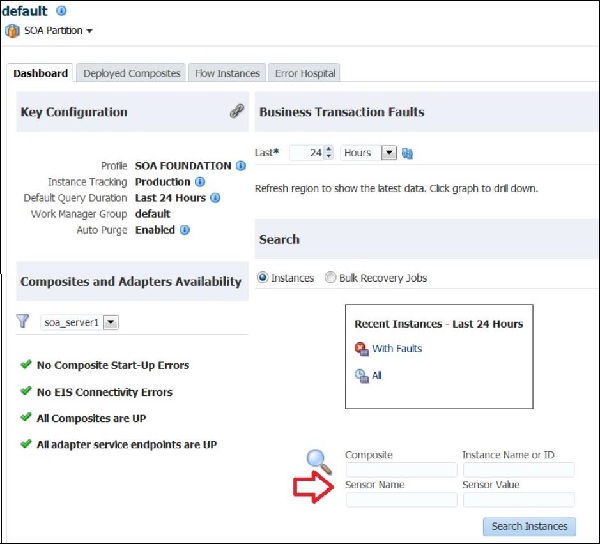
In the EM Console dashboard, a user can search for instances by sensor name and value.
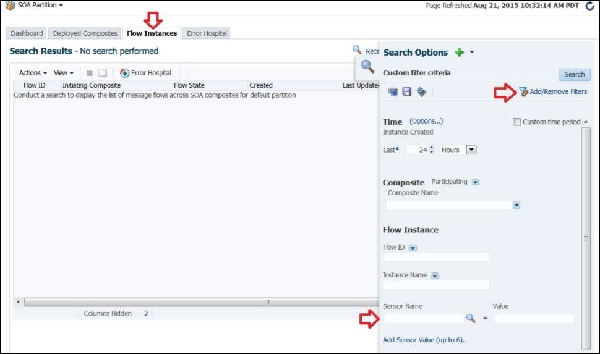
In the Flow Instances tab, you can select sensors from the dropdowns and can use wildcard-like values for the sensor value.