
Article Categories
- All Categories
-
 Data Structure
-
 Networking
-
 RDBMS
RDBMS
-
 Operating System
-
 Java
Java
-
 MS Excel
-
 iOS
iOS
-
 HTML
HTML
-
 CSS
CSS
-
 Android
-
 Python
-
 C Programming
-
 C++
C++
-
 C#
C#
-
 MongoDB
-
 MySQL
MySQL
-
 Javascript
-
 PHP
PHP
-
 Economics & Finance
Selected Reading
Using Text join in SAP HANA Modeling
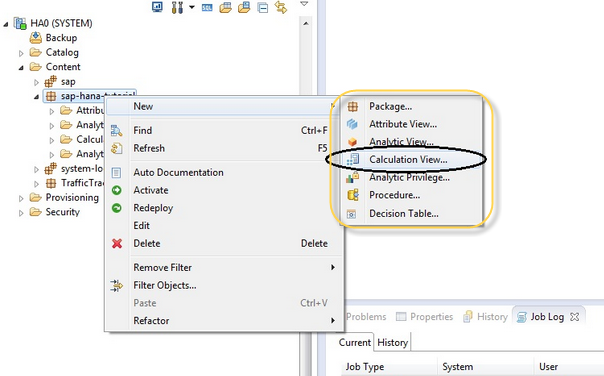
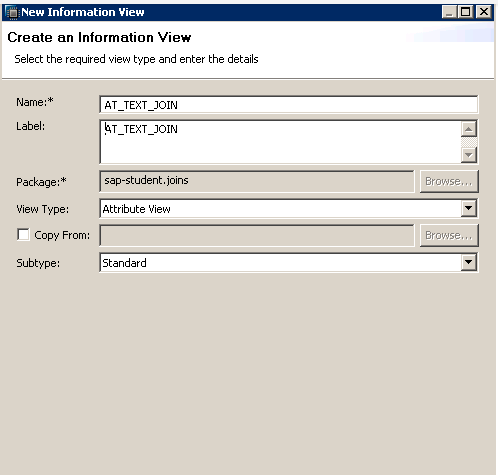
To create an Attribute view, you have to navigate to Content tab → Package → New → Attribute View
You can select any of view type to implement a Text join in HANA.
Add both the tables to Data Foundation and in Join type select Text join as shown below −
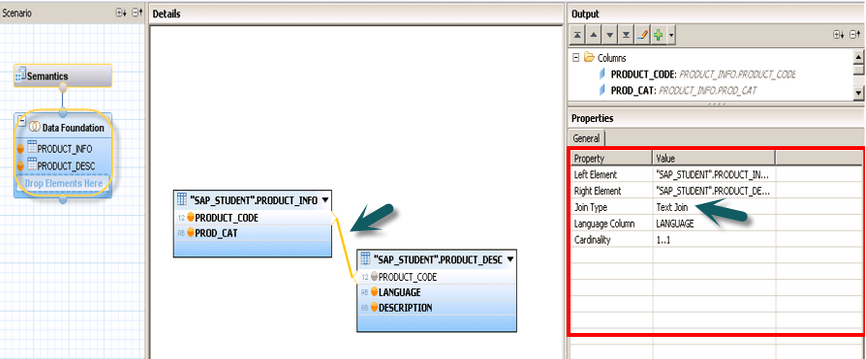
Next is to save and activate Attribute view and text join is used.

Updated on: 2020-02-24T06:05:40+05:30
565 Views

Advertisements