
Article Categories
- All Categories
-
 Data Structure
-
 Networking
-
 RDBMS
RDBMS
-
 Operating System
-
 Java
Java
-
 MS Excel
-
 iOS
iOS
-
 HTML
HTML
-
 CSS
CSS
-
 Android
-
 Python
-
 C Programming
-
 C++
C++
-
 C#
C#
-
 MongoDB
-
 MySQL
MySQL
-
 Javascript
-
 PHP
PHP
-
 Economics & Finance
Understand more about roles in SAP system
On a high level, both the tables are almost same as both of them deal with storing details about profiles which are generated for a role.
Understanding AGR_PROF Table
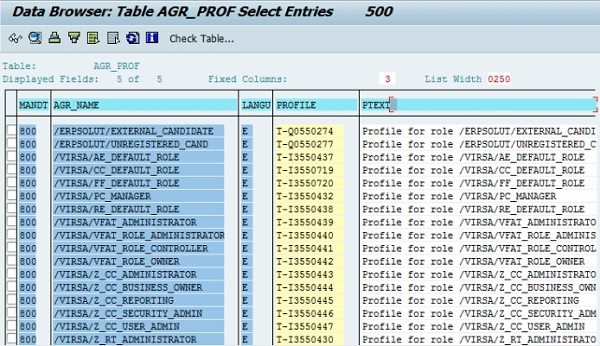
Let's talk about AGR_PROF first. It stores the text of the generated profile which is dependent on language. It stores profile ID as well. So, it results in having only at max one possible combination of a profile and language which is referred to a master profile.
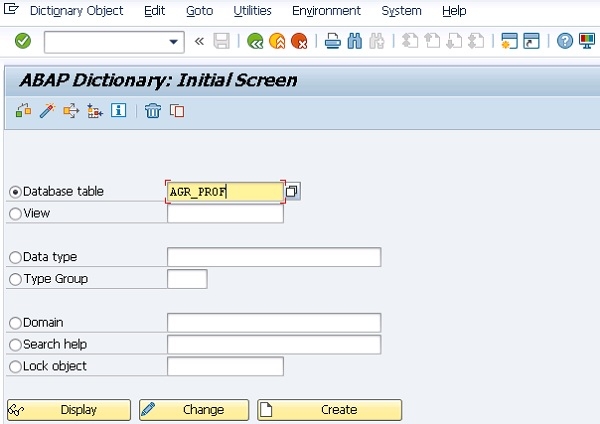
To view further details about this Table "AGR_PROF" and the data within it using the relevant SAP transactions such as SE11, SE80 or SE16. Below shows SE11 T-Code ?
Understanding AGR_1016 Table
Now let's jump onto AGR_1016. It contains different entries for a single role. That means it can have more than one entry for a role. So if we talk about a number of rows in both the tables, it's obvious that the latter will have more entries when compared to the former.

Key Difference
The main difference between these tables is that AGR_PROF maintains one record per role-language combination, while AGR_1016 can store multiple entries for a single role, making it more detailed in terms of authorization objects and field values.
Profile Generation Requirement
SAP_BC_JSF_COMMUNICATION is a role and is not associated with a pre-generated profile. So, if you had not generated the profile, then none of the tables will have an entry for it. This highlights the importance of profile generation in SAP role management.
Conclusion
Both AGR_PROF and AGR_1016 tables are essential for SAP role management, with AGR_PROF storing language-dependent profile texts and AGR_1016 containing detailed authorization entries. Understanding these tables helps in effective role administration and troubleshooting.

459 Views
