
Article Categories
- All Categories
-
 Data Structure
-
 Networking
-
 RDBMS
RDBMS
-
 Operating System
-
 Java
Java
-
 MS Excel
-
 iOS
iOS
-
 HTML
HTML
-
 CSS
CSS
-
 Android
-
 Python
-
 C Programming
-
 C++
C++
-
 C#
C#
-
 MongoDB
-
 MySQL
MySQL
-
 Javascript
-
 PHP
PHP
-
 Economics & Finance
Selected Reading
How to wait until an element no longer exists in Selenium?
We can wait until an element no longer exists in Selenium webdriver. This can be achieved with synchronization in Selenium. We shall add an explicit wait criteria where we shall stop or wait till the element no longer exists.
Timeout exception is thrown once the explicit wait time has elapsed and the expected behavior of the element is still not available on the page. To check if an element no longer exists on the page, we can take the help of the expected condition invisibilityOfElementLocated.
To implement explicit wait conditions, we have to take help of the WebDriverWait and ExpectedCondition class.
Example
Code Implementation.
import org.openqa.selenium.By;
import org.openqa.selenium.WebDriver;
import org.openqa.selenium.WebElement;
import org.openqa.selenium.chrome.ChromeDriver;
import java.util.concurrent.TimeUnit;
import org.openqa.selenium.support.ui.ExpectedConditions;
import org.openqa.selenium.support.ui.WebDriverWait;
public class ElementInvisibleWait{
   public static void main(String[] args) {
      System.setProperty("webdriver.chrome.driver", "C:\Users\ghs6kor\Desktop\Java\chromedriver.exe");
      WebDriver driver = new ChromeDriver();
      driver.get("https://www.tutorialspoint.com/index.htm");
      driver.manage().timeouts().implicitlyWait(3, TimeUnit.SECONDS);
      // identify element and click()
      driver.findElement(By.xpath("//*[text()='Library']")).click();
      // explicit wait of invisibility condition
      WebDriverWait w = new WebDriverWait(driver,5);
      // invisibilityOfElementLocated condition
      w.until(ExpectedConditions.
      invisibilityOfElementLocated(By.xpath("//*[@class='mui-btn']")));
      // get page title of next page
      System.out.println("Page title after click:" + driver.getTitle());
      driver.close()
   }
}
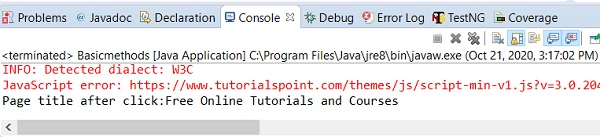
Output

Updated on: 2020-10-26T07:30:40+05:30
8K+ Views

Advertisements