
Article Categories
- All Categories
-
 Data Structure
-
 Networking
-
 RDBMS
RDBMS
-
 Operating System
-
 Java
Java
-
 MS Excel
-
 iOS
iOS
-
 HTML
HTML
-
 CSS
CSS
-
 Android
-
 Python
-
 C Programming
-
 C++
C++
-
 C#
C#
-
 MongoDB
-
 MySQL
MySQL
-
 Javascript
-
 PHP
PHP
-
 Economics & Finance
How to select a drop-down menu option value with Selenium (Python)?
We can select a drop-down menu option value with Selenium webdriver. The Select class in Selenium is used to handle drop-down. In an html document, the drop-down is identified with the
Let us see the html structure of a drop-down.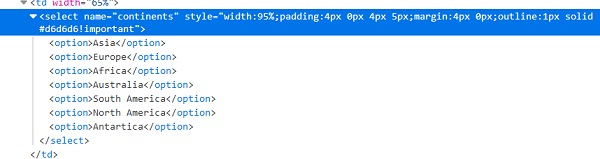
For using the methods of Select class we have to import selenium.webdriver.support.select.Select in our code. Let us discuss the methods available to select an option from drop-down−
-
select_by_visible_text (arg) – The arg which is passed as a parameter to the method is selected if it matches with the text which is visible in the dropdown.
Syntax−
sel = Select (driver.find_element_by_id ("name"))
sel.select_by_visible_text ('Visible Text')
-
select_by_value (arg) – The arg which is passed as a parameter to the method is selected if it matches with the option value in the dropdown.
Syntax−
sel = Select (driver.find_element_by_id ("name"))
sel.select_by_value ('Value')
-
select_by_index (arg) – The arg which is passed as a parameter to the method is selected if it matches with the option index in the dropdown.
The index begins from zero.
Syntax−
sel = Select (driver.find_element_by_id ("name"))
sel.select_by_index (1)
Example
from selenium import webdriver
from selenium.webdriver.support.select import Select
import timedriver = webdriver.Chrome(executable_path="C:\chromedriver.exe")
driver.implicitly_wait(0.5)
driver.get("https://www.tutorialspoint.com/selenium/selenium_automation_practice.htm")
# identify dropdown with Select class
sel = Select(driver.find_element_by_xpath("//select[@name='continents']"))
#select by select_by_visible_text() method
sel.select_by_visible_text("Europe")
time.sleep(0.8)
#select by select_by_index() method
sel.select_by_index(0)
driver.close() 
17K+ Views
