
Article Categories
- All Categories
-
 Data Structure
-
 Networking
-
 RDBMS
RDBMS
-
 Operating System
-
 Java
Java
-
 MS Excel
-
 iOS
iOS
-
 HTML
HTML
-
 CSS
CSS
-
 Android
-
 Python
-
 C Programming
-
 C++
C++
-
 C#
C#
-
 MongoDB
-
 MySQL
MySQL
-
 Javascript
-
 PHP
PHP
-
 Economics & Finance
Selected Reading
How to get text from each cell of an HTML table using Selenium?
We can get text from each cell of an HTML table with Selenium webdriver.A
| . The table headers are identified by | tag. Let us consider a table from which we will get text from each cell.
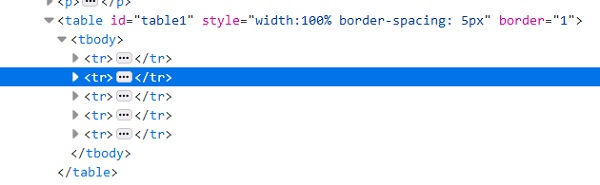
Let us see the html code representation for the above table−
To retrieve the rows count of the table, we will use− List int rws_cnt= rows.size(); To retrieve the columns count of the table, we will use− List int cols_cnt= cols.size(); Exampleimport org.openqa.selenium.By;
import org.openqa.selenium.WebDriver;
import org.openqa.selenium.WebElement;
import org.openqa.selenium.chrome.ChromeDriver;
import java.util.concurrent.TimeUnit;
public class TableCellValue{
public static void main(String[] args) {
System.setProperty("webdriver.chrome.driver","C:\Users\ghs6kor\Desktop\Java\chromedriver.exe");
WebDriver driver = new ChromeDriver();
String u="https://sqengineer.com/practice-sites/practice-tables-selenium/";
driver.get(u);
driver.manage().timeouts().implicitlyWait(5, TimeUnit.SECONDS);
// identify table
WebElement t = driver.findElement(By.xpath("//*[@id='table1']/tbody"));
// count rows with size() method
List<WebElement> rws = t.findElements(By.tagName("tr"));
int rws_cnt = rws.size();
//iterate rows of table
for (int i = 0;i < rws_cnt; i++) {
// count columns with size() method
List<WebElement> cols = rws.get(i).findElements(By.tagName("td"));
int cols_cnt = cols.size();
//iterate cols of table
for (int j = 0;j < cols_cnt; j++) {
// get cell text with getText()
String c = cols.get(j).getText();
System.out.println("The cell value is: " + c);
}
}
driver.quit();
}
}
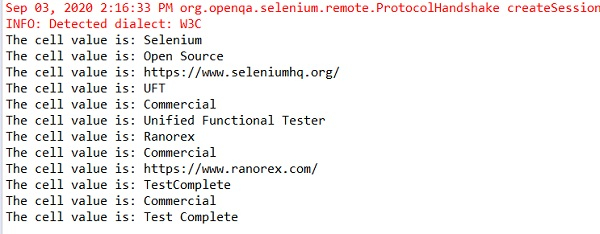
Output
|
|---|

Updated on: 2020-09-18T08:30:23+05:30
6K+ Views

Advertisements