
Article Categories
- All Categories
-
 Data Structure
-
 Networking
-
 RDBMS
RDBMS
-
 Operating System
-
 Java
Java
-
 MS Excel
-
 iOS
iOS
-
 HTML
HTML
-
 CSS
CSS
-
 Android
-
 Python
-
 C Programming
-
 C++
C++
-
 C#
C#
-
 MongoDB
-
 MySQL
MySQL
-
 Javascript
-
 PHP
PHP
-
 Economics & Finance
Selected Reading
How to loop through a menu list on a webpage using Selenium?
We can loop through a menu list on a webpage using Selenium webdriver.
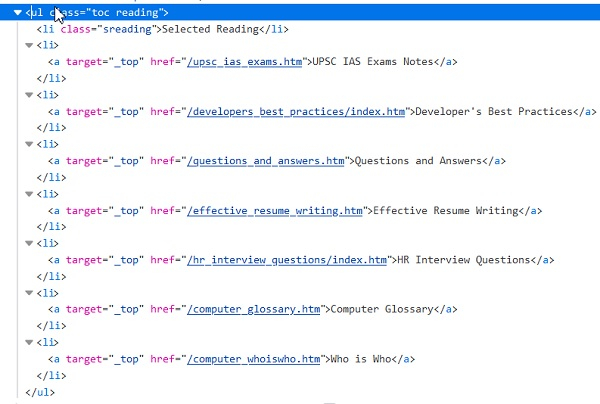
In a webpage, a list is represented by an ul tag and it consists of elements with li tag. Thus the li tag can be said as the child of ul.
First, we have to identify the element with ul tag with any locator, then traverse through its li sub-elements with the help of a loop. Finally, use the method getText to obtain the text on the li elements.
Let us try to identify the menu list on a webpage.
Example
import org.openqa.selenium.By;
import org.openqa.selenium.WebDriver;
import org.openqa.selenium.WebElement;
import org.openqa.selenium.firefox.FirefoxDriver;
import java.util.concurrent.TimeUnit;
import java.util.List;
public class MenuItemLst{
   public static void main(String[] args) {
      System.setProperty("webdriver.gecko.driver",
         "C:\Users\ghs6kor\Desktop\Java\geckodriver.exe");
      WebDriver driver = new FirefoxDriver();
      //implicit wait
      driver.manage().timeouts().implicitlyWait(5, TimeUnit.SECONDS);
      //URL launch
      driver.get("https://www.tutorialspoint.com/about/about_careers.htm");
      // identify elements in menu with findElements
      List<WebElement> p = driver.
      findElements(By.xpath("//ul[@class='toc reading']/li"));
      System.out.println("Menu Items are: ");
      //iterate through list
      for( WebElement i: p){
         System.out.println(i.getText());
         driver.quit();}
      }
   }
}
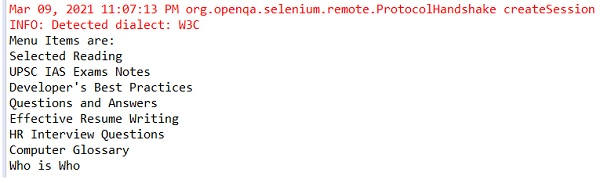
Output

Updated on: 2021-04-06T08:27:44+05:30
8K+ Views

Advertisements