
Article Categories
- All Categories
-
 Data Structure
-
 Networking
-
 RDBMS
RDBMS
-
 Operating System
-
 Java
Java
-
 MS Excel
-
 iOS
iOS
-
 HTML
HTML
-
 CSS
CSS
-
 Android
-
 Python
-
 C Programming
-
 C++
C++
-
 C#
C#
-
 MongoDB
-
 MySQL
MySQL
-
 Javascript
-
 PHP
PHP
-
 Economics & Finance
Selected Reading
How to get selected option using Selenium WebDriver with Java?
We can get a selected option in a dropdown in Selenium webdriver. The method getFirstSelectedOption() returns the selected option in the dropdown. Once the option is fetched we can apply getText() method to fetch the text.
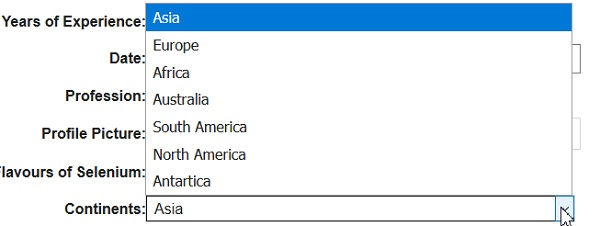
Let us consider the below dropdown Continents get its selected item−
Example
import org.openqa.selenium.By;
import org.openqa.selenium.WebDriver;
import org.openqa.selenium.WebElement;
import org.openqa.selenium.chrome.ChromeDriver;
import java.util.concurrent.TimeUnit;
import org.openqa.selenium.support.ui.Select

public class SelecedItem{
   public static void main(String[] args) {
      System.setProperty("webdriver.chrome.driver","C:\Users\ghs6kor\Desktop\Java\chromedriver.exe");
      WebDriver driver = new ChromeDriver();
      String u =" https://www.tutorialspoint.com/selenium/selenium_automation_practice.htm"driver.get(u);
      driver.manage().timeouts().implicitlyWait(5, TimeUnit.SECONDS);
      // identify element
      WebElement t=driver.findElement(By.xpath("//*[@name='continents']"));
      //Select class for dropdown
      Select select = new Select(t);
      // select an item with text visible
      select.selectByVisibleText("Australia");
      // get selected option with getFirstSelectedOption() with its text
      WebElement o = select.getFirstSelectedOption();
      String selectedoption = o.getText();
      System.out.println("Selected element: " + selectedoption);
      driver.close();
   }
}
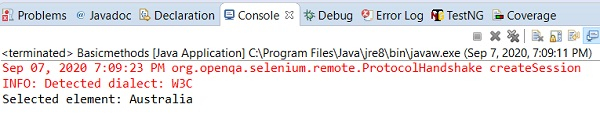
Output

Updated on: 2020-09-18T09:34:21+05:30
17K+ Views

Advertisements