
Article Categories
- All Categories
-
 Data Structure
-
 Networking
-
 RDBMS
RDBMS
-
 Operating System
-
 Java
Java
-
 MS Excel
-
 iOS
iOS
-
 HTML
HTML
-
 CSS
CSS
-
 Android
-
 Python
-
 C Programming
-
 C++
C++
-
 C#
C#
-
 MongoDB
-
 MySQL
MySQL
-
 Javascript
-
 PHP
PHP
-
 Economics & Finance
Selected Reading
How to create Titled Pane using JavaFx?
A title pane just a pane with a title. It holds one or more user interface elements like button, label, etc. you can expand and collapse it.
You can create a titled pane in JavaFX by instantiating the javafx.scene.control.TitledPane class. Once you create it you can add a title to the pane using the setText() method and you can add content to it using the setContent() method.
Example
import javafx.application.Application;
import javafx.scene.Group;
import javafx.scene.Scene;
import javafx.scene.control.Button;
import javafx.scene.control.TitledPane;
import javafx.scene.paint.Color;
import javafx.stage.Stage;
public class TitledPaneExample extends Application {
   @Override
   public void start(Stage stage) {
      //Creating a Button
      Button button = new Button();
      //Setting the title of the button
      button.setText("Click Here");
      //Creating the TitlePane
      TitledPane pane = new TitledPane();
      pane.setLayoutX(200);
      pane.setLayoutY(75);
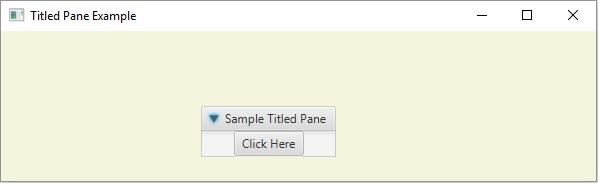
      pane.setText("Sample Titled Pane");
      //Setting contents to the titled pane
      pane.setContent(button);
      //Setting the stage
      Group root = new Group(pane);
      Scene scene = new Scene(root, 595, 150, Color.BEIGE);
      stage.setTitle("Titled Pane Example");
      stage.setScene(scene);
      stage.show();
   }
   public static void main(String args[]){
      launch(args);
   }
}
Output
Example
import javafx.application.Application;
import javafx.scene.Scene;
import javafx.scene.control.TitledPane;
import javafx.scene.control.ToggleButton;
import javafx.scene.control.ToggleGroup;
import javafx.scene.layout.VBox;
import javafx.scene.paint.Color;
import javafx.stage.Stage;
public class TiledPane2 extends Application {
   @Override
   public void start(Stage stage) {
      //Creating toggle buttons
      ToggleButton button1 = new ToggleButton("Java");
      ToggleButton button2 = new ToggleButton("Python");
      ToggleButton button3 = new ToggleButton("C++");
      //Toggle button group
      ToggleGroup group = new ToggleGroup();
      button1.setToggleGroup(group);
      button2.setToggleGroup(group);
      button3.setToggleGroup(group);
      //Adding the toggle button to the pane
      VBox box = new VBox();
      box.getChildren().addAll(button1, button2, button3);
      //Creating the TitlePane
      TitledPane pane = new TitledPane();
      pane.setLayoutX(10);
      pane.setLayoutY(10);
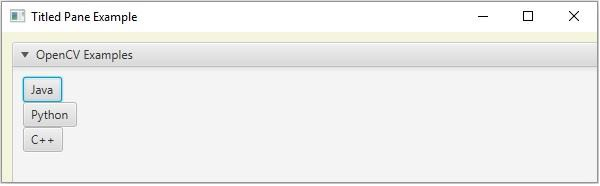
      pane.setText("OpenCV Examples");
      //Adding the toggle button to the pane
      pane.setContent(box);
      //Setting the stage
      Scene scene = new Scene(pane, 595, 150, Color.BEIGE);
      stage.setTitle("Titled Pane Example");
      stage.setScene(scene);
      stage.show();
   }
   public static void main(String args[]){
      launch(args);
   }
}
Output

Updated on: 2020-05-16T07:27:40+05:30
1K+ Views

Advertisements