
Article Categories
- All Categories
-
 Data Structure
-
 Networking
-
 RDBMS
RDBMS
-
 Operating System
-
 Java
Java
-
 MS Excel
-
 iOS
iOS
-
 HTML
HTML
-
 CSS
CSS
-
 Android
-
 Python
-
 C Programming
-
 C++
C++
-
 C#
C#
-
 MongoDB
-
 MySQL
MySQL
-
 Javascript
-
 PHP
PHP
-
 Economics & Finance
Selected Reading
How to create histogram with relative frequency in R?
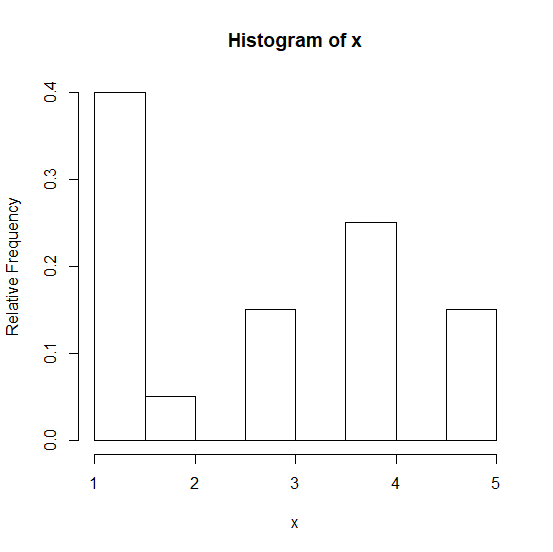
The relative frequency histogram can be created for the column of an R data frame or a vector that contains discrete data. For this purpose, we can use PlotRelativeFrequency function of HistogramTools package along with hist function to generate histogram. For example, if we have a vector x for which we want to create a histogram with relative frequencies then it can be done as PlotRelativeFrequency(hist(x)).
Example
Consider the below vector −
x<-sample(1:5,20,replace=TRUE)
x
Output
[1] 2 1 1 4 3 5 5 4 1 3 5 1 4 1 3 4 4 1 1 1
Loading HistogramTools package and creating histogram of x with relative frequency −
Example
library("HistogramTools")
PlotRelativeFrequency(hist(x))
Output
Example
y<-sample(1:10,100,replace=TRUE)
y
Output
[1] 7 6 8 9 5 1 2 9 6 7 2 1 3 3 6 7 7 4 9 5 10 5 10 6 6
[26] 4 10 9 5 1 9 7 9 9 2 7 8 8 10 10 8 5 9 8 3 6 9 8 9 10
[51] 6 6 6 4 8 8 6 10 2 7 6 5 1 8 7 9 2 6 2 9 2 5 8 3 2
[76] 3 2 4 5 9 5 5 9 4 2 6 3 10 3 2 7 9 4 8 10 6 5 8 8 2
Example
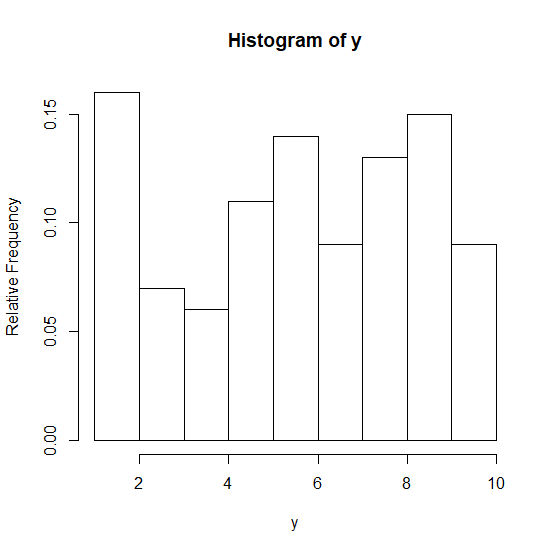
PlotRelativeFrequency(hist(y))
Output

Updated on: 2026-03-11T22:50:52+05:30
2K+ Views

Advertisements