
Article Categories
- All Categories
-
 Data Structure
-
 Networking
-
 RDBMS
RDBMS
-
 Operating System
-
 Java
Java
-
 MS Excel
-
 iOS
iOS
-
 HTML
HTML
-
 CSS
CSS
-
 Android
-
 Python
-
 C Programming
-
 C++
C++
-
 C#
C#
-
 MongoDB
-
 MySQL
MySQL
-
 Javascript
-
 PHP
PHP
-
 Economics & Finance
Selected Reading
How to create a text area in JavaFX?
A text area is a multi-line editor where you can enter text. Unlike previous versions, in the latest versions of JavaFX, a TextArea does not allow single lines in it. You can create a text area by instantiating the javafx.scene.control.TextArea class.
Example
The following Example demonstrates the creation of a TextArea.
import javafx.application.Application;
import javafx.geometry.Insets;
import javafx.scene.Group;
import javafx.scene.Scene;
import javafx.scene.control.Label;
import javafx.scene.control.TextArea;
import javafx.scene.layout.HBox;
import javafx.scene.paint.Color;
import javafx.scene.text.Font;
import javafx.scene.text.FontPosture;
import javafx.scene.text.FontWeight;
import javafx.stage.Stage;
public class TextAreaExample extends Application {
   public void start(Stage stage) {
      //Setting the label
      Label label = new Label("Address");
      Font font = Font.font("verdana", FontWeight.BOLD, FontPosture.REGULAR, 12);
      label.setFont(font);
      //Creating a pagination
      TextArea area = new TextArea();
      //Setting number of pages
      area.setText("Enter your address here");
      area.setPrefColumnCount(15);
      area.setPrefHeight(120);
      area.setPrefWidth(300);
      //Creating a hbox to hold the pagination
      HBox hbox = new HBox();
      hbox.setSpacing(20);
      hbox.setPadding(new Insets(20, 50, 50, 60));
      hbox.getChildren().addAll(label, area);
      //Setting the stage
      Group root = new Group(hbox);
      Scene scene = new Scene(root, 595, 200, Color.BEIGE);
      stage.setTitle("Text Area");
      stage.setScene(scene);
      stage.show();
   }
   public static void main(String args[]){
      launch(args);
   }
}
Output
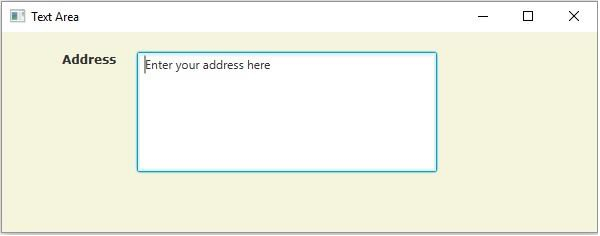

Updated on: 2020-05-19T07:25:59+05:30
4K+ Views

Advertisements