
Article Categories
- All Categories
-
 Data Structure
-
 Networking
-
 RDBMS
RDBMS
-
 Operating System
-
 Java
Java
-
 MS Excel
-
 iOS
iOS
-
 HTML
HTML
-
 CSS
CSS
-
 Android
-
 Python
-
 C Programming
-
 C++
C++
-
 C#
C#
-
 MongoDB
-
 MySQL
MySQL
-
 Javascript
-
 PHP
PHP
-
 Economics & Finance
Selected Reading
How do you make Selenium 2.0 wait for the page to load?
We can make Selenium wait for the page to load. We can use the synchronization concept in Selenium to wait for page loading. The implicit wait is a type of synchronization applied to elements to wait for a specified amount of time.
Syntax
driver.manage().timeouts().implicitlyWait();
We can also call the JavaScript method document.readyState and wait till it yields the value complete. Selenium executes JavaScript command with the help of the executeScript method.
Syntax
JavascriptExecutor j = (JavascriptExecutor)driver;
j.executeScript("return document.readyState").toString().equals("complete");
Post this step, we should check if the URL is similar to the one we are looking for.
Example
Code Implementation with implicit wait.
import org.openqa.selenium.By;
import org.openqa.selenium.WebDriver;
import org.openqa.selenium.WebElement;
import org.openqa.selenium.chrome.ChromeDriver;
import java.util.concurrent.TimeUnit;
public class PageloadImplWt{
   public static void main(String[] args) {
      System.setProperty("webdriver.chrome.driver",
      "C:\Users\ghs6kor\Desktop\Java\chromedriver.exe");
      WebDriver driver = new ChromeDriver();
      // wait for page load
      driver.manage().timeouts().implicitlyWait(12, TimeUnit.SECONDS);
      driver.get("https://www.tutorialspoint.com/index.htm");
      // identify element
      WebElement n=driver.findElement(By.id("gsc−i−id1"));
      n.sendKeys("Selenium");
      driver.quit();
   }
}
Example
Code Implementation with Javascript Executor.
import org.openqa.selenium.By;
import org.openqa.selenium.WebDriver;
import org.openqa.selenium.WebElement;
import org.openqa.selenium.chrome.ChromeDriver;
import java.util.concurrent.TimeUnit;
import org.openqa.selenium.JavascriptExecutor;
public class PagaLoadWtJS{
   public static void main(String[] args) {
      System.setProperty("webdriver.chrome.driver",
      "C:\Users\ghs6kor\Desktop\Java\chromedriver.exe");
      WebDriver driver = new ChromeDriver();
      //launch URL
      driver.get("https://www.tutorialspoint.com/index.htm");
      // Javascript executor
      JavascriptExecutor js = (JavascriptExecutor) driver;
      js.executeScript("return document.readyState")
      .toString().equals("complete");
      // obtain current URL
      String str = driver.getCurrentUrl();
      // checking condition if the URL is loaded
      if (str.equals(u)) {
         System.out.println("Page Loaded");
         System.out.println("Current Url: " + str);
      }
      else {
         System.out.println("Page did not load");
      }
      driver.quit();
   }
}
Output
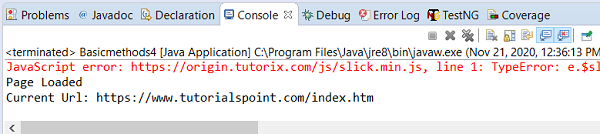

Updated on: 2021-02-01T12:25:54+05:30
707 Views

Advertisements