
Article Categories
- All Categories
-
 Data Structure
-
 Networking
-
 RDBMS
RDBMS
-
 Operating System
-
 Java
Java
-
 MS Excel
-
 iOS
iOS
-
 HTML
HTML
-
 CSS
CSS
-
 Android
-
 Python
-
 C Programming
-
 C++
C++
-
 C#
C#
-
 MongoDB
-
 MySQL
MySQL
-
 Javascript
-
 PHP
PHP
-
 Economics & Finance
Selected Reading
How can Selenium select each div separately that have the same class?
We can select each div separately that have the same class with the help of the Selenium webdriver. Often in the html code, we find more than one div element having a class attribute with the same value.
Let us see the html code of elements with div tag having the same value set for the class attribute (as highlighted in the image). The value of the class attribute is - colsm-5 col-xs-8 store-details sp-detail paddingR0.
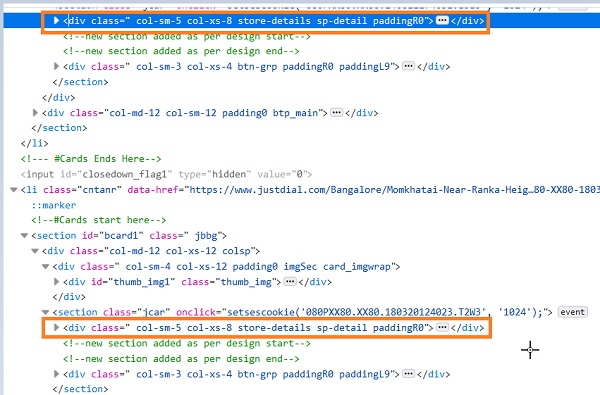
To identify each of these div elements separately, we shall use the method findElements and pass the value of the class attribute as a parameter to this method. The findElements method returns a list of matching elements. We have to iterate through this list and identify each div separately.
Syntax
List<WebElement> l =
driver.findElements(By.className("store-details"));
Example
import org.openqa.selenium.By;
import org.openqa.selenium.WebDriver;
import org.openqa.selenium.WebElement;
import org.openqa.selenium.chrome.ChromeDriver;
import java.util.concurrent.TimeUnit;
import java.util.List;
public class DivSameCls{
   public static void main(String[] args) {
      System.setProperty("webdriver.chrome.driver",
         "C:\Users\ghs6kor\Desktop\Java\chromedriver.exe");
      WebDriver driver = new ChromeDriver();
      //implicit wait
      driver.manage().timeouts().implicitlyWait(5, TimeUnit.SECONDS);
      //URL launch
      driver.get("https://www.justdial.com/Bangalore/Bakeries");
      // identify div elements with same class
      List<WebElement> l = driver.findElements(By.className("store-details"));
      // list iteration
      System.out.println("Elements are: ");
      for(int j = 0; j< l.size(); j++) {
         //identify separate div
         String v = l.get(j).getText();
         System.out.println("Elements are: ");
         System.out.println(v);
      }
      //browser close
      driver.close();
   }
}
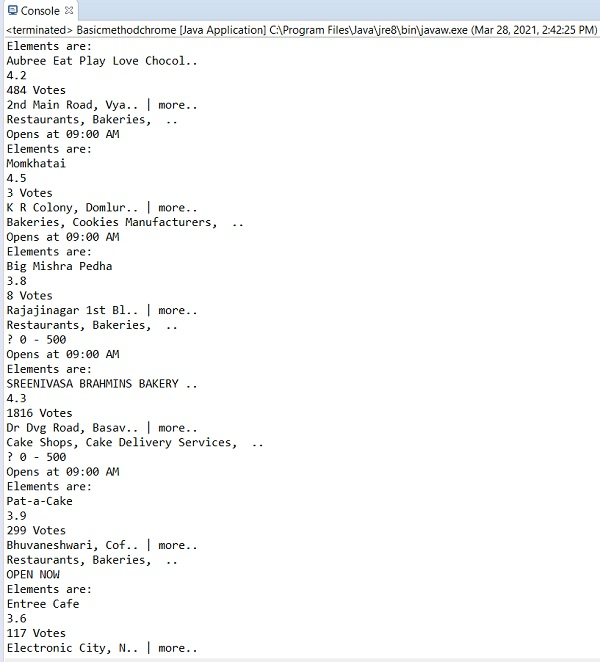
Output

Updated on: 2021-04-08T07:35:37+05:30
5K+ Views

Advertisements