
Article Categories
- All Categories
-
 Data Structure
-
 Networking
-
 RDBMS
RDBMS
-
 Operating System
-
 Java
Java
-
 MS Excel
-
 iOS
iOS
-
 HTML
HTML
-
 CSS
CSS
-
 Android
-
 Python
-
 C Programming
-
 C++
C++
-
 C#
C#
-
 MongoDB
-
 MySQL
MySQL
-
 Javascript
-
 PHP
PHP
-
 Economics & Finance
Dividing Images Into Equal Parts Using OpenCV Python
The Python OpenCV library enables us to utilize a variety of image-processing tools, like image classification, face/object detection, tracking, and more.
In this article, we will use Python list slicing or NumPy array slicing techniques to divide an image into equal parts, since OpenCV-Python uses NumPy arrays to store image data and pixel values.
Input Output Scenarios
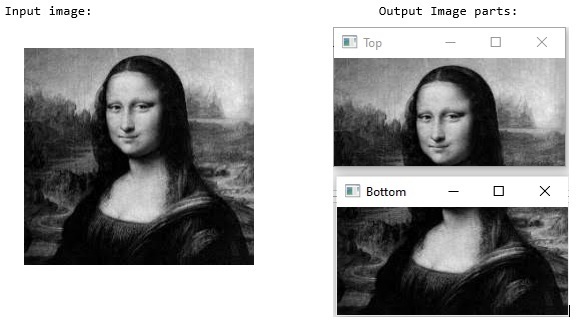
Assuming we have an input image, in the output we will see the equally divided parts of the given image.
Approach
We will follow the below steps to divide the images into equal parts ?
Load the image using
cv2.imread()Extract the image dimensions and store them in variables
Divide the image array using Python slicing techniques
Save or display the segregated parts
Method 1: Horizontal Division into Two Parts
In this example, we will horizontally divide an input image into 2 equal parts ?
import cv2
import numpy as np

# Create a sample image for demonstration
image = np.random.randint(0, 255, (400, 600, 3), dtype=np.uint8)

height, width, channels = image.shape
half_height = height // 2

top_section = image[:half_height, :]
bottom_section = image[half_height:, :]

print(f"Original image shape: {image.shape}")
print(f"Top section shape: {top_section.shape}")
print(f"Bottom section shape: {bottom_section.shape}")
Original image shape: (400, 600, 3)
Top section shape: (200, 600, 3)
Bottom section shape: (200, 600, 3)
Input Image

Output Images

Method 2: Using a Function to Divide into Grid
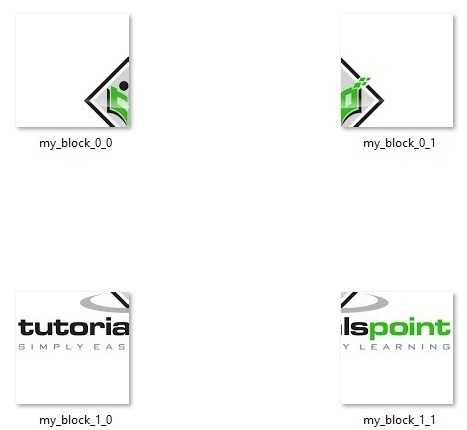
In this example, we will divide an input image into 4 equal parts using a reusable function ?
import cv2
import numpy as np

def divide_img_blocks(img, n_blocks=(2, 2)):
    horizontal = np.array_split(img, n_blocks[0])
    splitted_img = [np.array_split(block, n_blocks[1], axis=1) for block in horizontal]
    return np.asarray(splitted_img, dtype=np.ndarray).reshape(n_blocks)

# Create a sample 400x400 image
sample_img = np.random.randint(0, 255, (400, 400, 3), dtype=np.uint8)

# Divide into 2x2 grid
result = divide_img_blocks(sample_img)

print(f"Original image shape: {sample_img.shape}")
print(f"Number of blocks: {result.shape}")

for i in range(result.shape[0]):
    for j in range(result.shape[1]):
        print(f"Block [{i}][{j}] shape: {result[i,j].shape}")
Original image shape: (400, 400, 3)
Number of blocks: (2, 2)
Block [0][0] shape: (200, 200, 3)
Block [0][1] shape: (200, 200, 3)
Block [1][0] shape: (200, 200, 3)
Block [1][1] shape: (200, 200, 3)
Input Image

Output Images
Method 3: Manual Grid Division
This approach manually calculates coordinates to divide an image into a 3×3 grid ?
import cv2
import numpy as np

# Create a sample image
img = np.random.randint(0, 255, (372, 669, 3), dtype=np.uint8)

height, width, channels = img.shape

# Number of pieces Horizontally
W_SIZE = 3
# Number of pieces Vertically
H_SIZE = 3

print("Coordinates for each block:")

for ih in range(H_SIZE):
    for iw in range(W_SIZE):
        x = int(width / W_SIZE * iw)
        y = int(height / H_SIZE * ih)
        h = int(height / H_SIZE)
        w = int(width / W_SIZE)

        print(f"Block [{ih}][{iw}]: x={x}, y={y}, height={h}, width={w}")

        # Extract the block
        block = img[y:y+h, x:x+w]
        print(f"  Block shape: {block.shape}")
Coordinates for each block:
Block [0][0]: x=0, y=0, height=124, width=223
  Block shape: (124, 223, 3)
Block [0][1]: x=223, y=0, height=124, width=223
  Block shape: (124, 223, 3)
Block [0][2]: x=446, y=0, height=124, width=223
  Block shape: (124, 223, 3)
Block [1][0]: x=0, y=124, height=124, width=223
  Block shape: (124, 223, 3)
Block [1][1]: x=223, y=124, height=124, width=223
  Block shape: (124, 223, 3)
Block [1][2]: x=446, y=124, height=124, width=223
  Block shape: (124, 223, 3)
Block [2][0]: x=0, y=248, height=124, width=223
  Block shape: (124, 223, 3)
Block [2][1]: x=223, y=248, height=124, width=223
  Block shape: (124, 223, 3)
Block [2][2]: x=446, y=248, height=124, width=223
  Block shape: (124, 223, 3)
Input Image

Output Images

Comparison of Methods
| Method | Best For | Flexibility | Code Complexity |
|---|---|---|---|
| Simple Slicing | Basic 2-part division | Low | Simple |
| Function with array_split() | Any grid size | High | Medium |
| Manual Coordinate Calculation | Custom control | High | Complex |
The first example divides the image into 3 horizontal pieces, then for each piece it crops another 3 sections, creating a total of 9 parts. Change the W_SIZE and H_SIZE values to adjust how many equal parts you need.
Conclusion
OpenCV with NumPy array slicing provides flexible methods to divide images into equal parts. Use simple slicing for basic divisions, np.array_split() for grid-based divisions, or manual coordinate calculation for custom control.

8K+ Views
