
Article Categories
- All Categories
-
 Data Structure
-
 Networking
-
 RDBMS
RDBMS
-
 Operating System
-
 Java
Java
-
 MS Excel
-
 iOS
iOS
-
 HTML
HTML
-
 CSS
CSS
-
 Android
-
 Python
-
 C Programming
-
 C++
C++
-
 C#
C#
-
 MongoDB
-
 MySQL
MySQL
-
 Javascript
-
 PHP
PHP
-
 Economics & Finance
While using SAP .NET connector, I am an getting error: Could not load file or assembly 'sapnco' or one of its dependencies.
When working with the SAP .NET connector, you may encounter the error "Could not load file or assembly 'sapnco' or one of its dependencies." This typically occurs due to platform architecture mismatches or incorrect IIS configuration. You can try any of the below fixes ?
Solution 1: Enable 64-bit IIS Express
This solution addresses architecture compatibility issues by enabling 64-bit support in IIS Express ?
- Go to Run ? Regedit
- Navigate to "HKEY_CURRENT_USER\Software\Microsoft\VisualStudio\1X.0\WebProjects"
- Change Use64BitIISExpress from 0 ? 1
- Restart Visual Studio and IIS Express

Solution 2: Configure IIS Application Pool
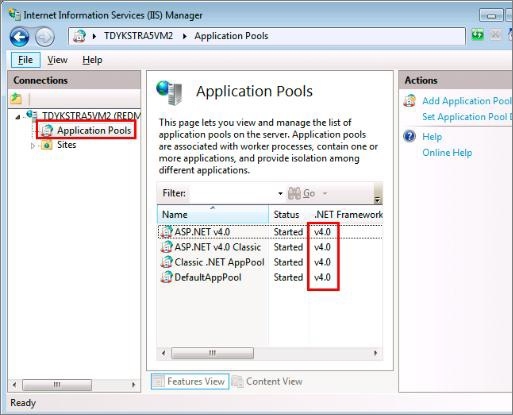
Another solution is to configure the IIS service and set the application pool to .NET Framework 4.0. This can help resolve sapnco DLL compatibility issues ?
- Go to IIS Manager ? Application Pools
- Select your application pool
- Set the .NET Framework version to 4.0
- Ensure the correct platform architecture is selected
Solution 3: Set Platform Target
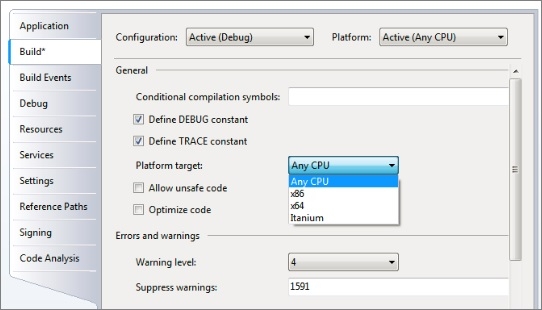
You can also fix this by changing the platform target in your project settings ?
- Navigate to Project ? Properties
- Go to the Build tab
- Set Platform target from "Any CPU" to "x86"
- Rebuild your project
Conclusion
The sapnco assembly loading error is typically resolved by ensuring proper platform architecture alignment between your application, IIS configuration, and the SAP .NET connector libraries. Try these solutions in order until the issue is resolved.

2K+ Views
